

- Posts: 29
- Thank you received: 1
Styling the little cart on shopping pages
14 years 10 months ago #30966
by sue.b
Styling the little cart on shopping pages was created by sue.b
Please let me preface this by saying I love your product!
I would like to style the little cart that appears on all of the shopping pages. If I could make the font a little smaller and the line-height a little less, I think it would look better on my pages. I'm including a screenshot. Using firebug, I see that I'm referring to the td class "hikashop_cart_module_product_name_value hikashop_cart_value" perhaps? But I haven't seen this listed in the css file.
Thanks for any help you might have.
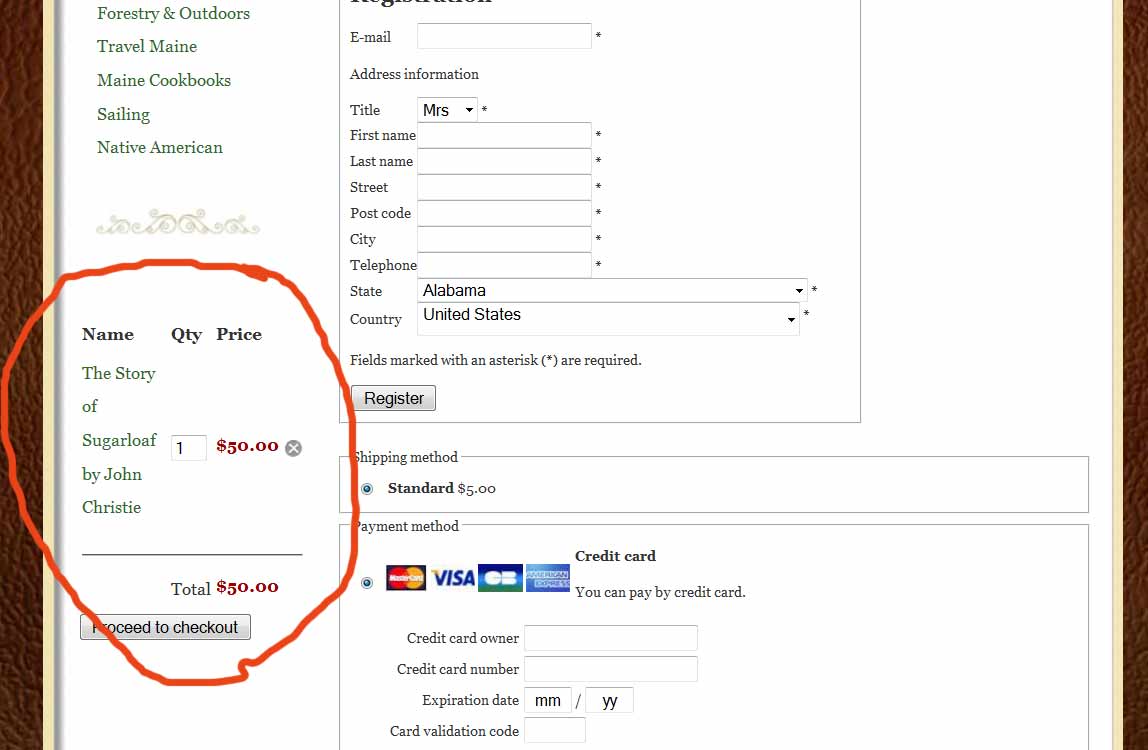
I would like to style the little cart that appears on all of the shopping pages. If I could make the font a little smaller and the line-height a little less, I think it would look better on my pages. I'm including a screenshot. Using firebug, I see that I'm referring to the td class "hikashop_cart_module_product_name_value hikashop_cart_value" perhaps? But I haven't seen this listed in the css file.
Thanks for any help you might have.
Please Log in or Create an account to join the conversation.

14 years 10 months ago #30985
by nicolas
Replied by nicolas on topic Re: Styling the little cart on shopping pages
Yes, you need to add it in the CSS file. So, add something like that:
.hikashop_cart_module_product_name_value {font-size: 0.7em !important; line-height: 1em !important;}
.hikashop_cart_module_product_name_value {font-size: 0.7em !important; line-height: 1em !important;}
Please Log in or Create an account to join the conversation.
14 years 10 months ago #30993
by sue.b
Replied by sue.b on topic Re: Styling the little cart on shopping pages
Thank you.
A related question, not on styling, but on settings:
I'm having a little trouble with my settings for the cart. I can put an item in the cart, and go to the checkout to see it, but if I don't do anything with it and click "Continue Shopping", I go back to my category page but the shopping cart message says it is "empty" on that page. When I go back to the checkout page the item is still there, though. (Which is good!) What setting should I use to continue to show item(s) in my mini shopping cart after I have only viewed the checkout page?
A related question, not on styling, but on settings:
I'm having a little trouble with my settings for the cart. I can put an item in the cart, and go to the checkout to see it, but if I don't do anything with it and click "Continue Shopping", I go back to my category page but the shopping cart message says it is "empty" on that page. When I go back to the checkout page the item is still there, though. (Which is good!) What setting should I use to continue to show item(s) in my mini shopping cart after I have only viewed the checkout page?
Please Log in or Create an account to join the conversation.
14 years 10 months ago #31021
by nicolas
Replied by nicolas on topic Re: Styling the little cart on shopping pages
That can happen because of the joomla cache. Make sure that it is disabled in the joomla configuration and that the joomla system cache plugin is disabled.
Please Log in or Create an account to join the conversation.
Time to create page: 0.163 seconds