

- Posts: 49
- Thank you received: 0
Not asking for Password
14 years 10 months ago #31214
by byesuzuki
Not asking for Password was created by byesuzuki
When the user gets prompted to sign up, it doesn't ask them to enter a password anywhere. So how can a user make an order, get created and then log in to see their order history. They don't know what their password is. How can I get a password box put in on the registration form?
See image below.
Thanks
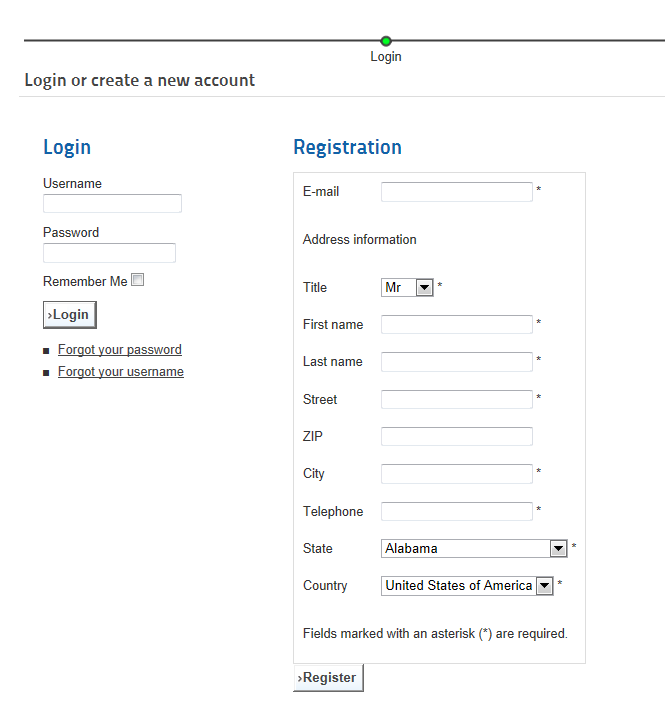
See image below.
Thanks
Please Log in or Create an account to join the conversation.

14 years 10 months ago #31249
by nicolas
Replied by nicolas on topic Re: Not asking for Password
You should change the option "registration" to "registration" in the Checkout tab of the configuration and that will display a password and a username field so that the user can enter them and later on use them to access his orders.
Please Log in or Create an account to join the conversation.
14 years 10 months ago #31634
by byesuzuki
Replied by byesuzuki on topic Re: Not asking for Password
I had that before but it gives me
"Your account has been created and an activation link has been sent to the e-mail address you entered. Note that you must activate the account by clicking on the activation link when you get the e-mail before you can login.
Upon clicking on the activation link, your account will be activated and you will be able to continue your order"
I don't want them to have to click on a link to activate, I just want them to purchase right away.
Is this possible?
"Your account has been created and an activation link has been sent to the e-mail address you entered. Note that you must activate the account by clicking on the activation link when you get the e-mail before you can login.
Upon clicking on the activation link, your account will be activated and you will be able to continue your order"
I don't want them to have to click on a link to activate, I just want them to purchase right away.
Is this possible?
Please Log in or Create an account to join the conversation.
14 years 10 months ago #31655
by nicolas
Replied by nicolas on topic Re: Not asking for Password
Sure. You should deactivate the account confirmation in your joomla settings, in the joomla configuration on 1.5 and in the options of the user manager on 1.6 and 1.7
Please Log in or Create an account to join the conversation.
14 years 10 months ago #31683
by byesuzuki
Replied by byesuzuki on topic Re: Not asking for Password
Awesome, that worked great.
Thanks so much, you rock!
Thanks so much, you rock!
Please Log in or Create an account to join the conversation.
Time to create page: 0.254 seconds