

- Posts: 10
- Thank you received: 0
Remove quantity display
14 years 11 months ago #31981
by ursule15
Remove quantity display was created by ursule15
Hello,
For some digital products, there is usually no need of quantity info.
Is there a way to have a product without any quantity ?
So no quantity displayed anywhere.
I understand I can have a limit of maw quantity to 1. That's OK.
But it is just not very user friendly. Because it should not be any quantity field at all.
Moreover, if max quantity per order is 1, message if we try to add 1 (using quantity button) is something like : out of stock, something like that.
Basically, I would like to have a checkbox on product object to indicate this is a digital good, no quantity to manage.
If there is no easy way to do that, I will use the max quantity per order, and will add a feature request for great Hikashop !
Many thanks.
For some digital products, there is usually no need of quantity info.
Is there a way to have a product without any quantity ?
So no quantity displayed anywhere.
I understand I can have a limit of maw quantity to 1. That's OK.
But it is just not very user friendly. Because it should not be any quantity field at all.
Moreover, if max quantity per order is 1, message if we try to add 1 (using quantity button) is something like : out of stock, something like that.
Basically, I would like to have a checkbox on product object to indicate this is a digital good, no quantity to manage.
If there is no easy way to do that, I will use the max quantity per order, and will add a feature request for great Hikashop !
Many thanks.
Please Log in or Create an account to join the conversation.

14 years 11 months ago #31996
by nicolas
Replied by nicolas on topic Re: Remove quantity display
Hi,
If you want to remove the quantity box on your product pages, you can change the option "Display the quantity field on the product page" to "No display" in the Display tab of the configuration.
For the quantity box on the checkout, you would have to add some simple CSS in the front end CSS of HikaShop to hide it, like that:
.hikashop_product_quantity_field, .hikashop_cart_product_quantity_refresh{ display:none;}
If you want to remove the quantity box on your product pages, you can change the option "Display the quantity field on the product page" to "No display" in the Display tab of the configuration.
For the quantity box on the checkout, you would have to add some simple CSS in the front end CSS of HikaShop to hide it, like that:
.hikashop_product_quantity_field, .hikashop_cart_product_quantity_refresh{ display:none;}
The following user(s) said Thank You: PeterP
Please Log in or Create an account to join the conversation.
14 years 11 months ago #32008
by ursule15
Replied by ursule15 on topic Re: Remove quantity display
But the option you are speaking about in a global one (or I miss something).
I would like to have the same per product.
I would like to have the same per product.
Please Log in or Create an account to join the conversation.
14 years 11 months ago #32034
by nicolas
Replied by nicolas on topic Re: Remove quantity display
There is no such option on a per product basis.
Please Log in or Create an account to join the conversation.
Less
More
- Posts: 78
- Thank you received: 1
14 years 7 months ago - 14 years 7 months ago #46196
by adeptdesigns
Replied by adeptdesigns on topic Re: Remove quantity display
I added the .css as recommended, it removed the field, but not the column. How can I remove the entire quantity column? (see photo)
Or better yet, how can I change, "quantity" to "Remove from cart" so that the 'X' is still present??
Thanks!!
Or better yet, how can I change, "quantity" to "Remove from cart" so that the 'X' is still present??
Thanks!!
Last edit: 14 years 7 months ago by adeptdesigns.
Please Log in or Create an account to join the conversation.
14 years 7 months ago #46310
by nicolas
Replied by nicolas on topic Re: Remove quantity display
In both cases, you will have to edit the file "cart" of the view "checkout" via the menu Display->Views in order to adapt it to what you want.
Please Log in or Create an account to join the conversation.

12 years 5 months ago - 12 years 5 months ago #157253
by PeterP
I want to be visible (static 1), but I want to remove(hide) refresh button and instead input text box make label or make this box disable.
I want customer see they have 1 item in cart and leave option to remove, but not add more quantity.
I using Business version.
Replied by PeterP on topic Re: Remove quantity display
Can you be more specify exactly where and how I can disable Quantity .nicolas wrote: In both cases, you will have to edit the file "cart" of the view "checkout" via the menu Display->Views in order to adapt it to what you want.
I want to be visible (static 1), but I want to remove(hide) refresh button and instead input text box make label or make this box disable.
I want customer see they have 1 item in cart and leave option to remove, but not add more quantity.
I using Business version.
Last edit: 12 years 5 months ago by PeterP.
Please Log in or Create an account to join the conversation.

12 years 5 months ago #157356
by Xavier
Replied by Xavier on topic Re: Remove quantity display
Hi,
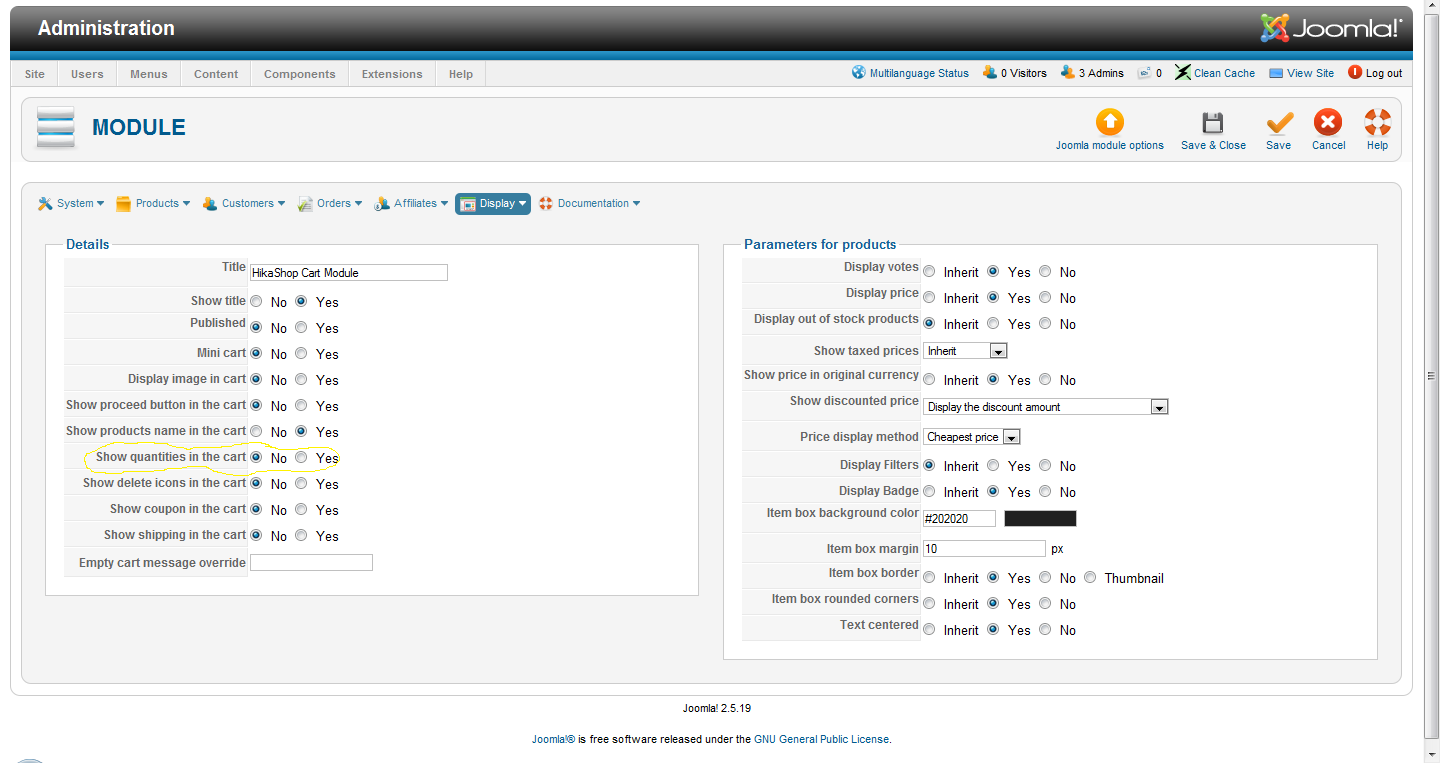
For your needs, editing the HikaShop cart module can do the job. You can enable/disable the quantity field, etc.
You can edit it via the menu Display > Content modules.
For your needs, editing the HikaShop cart module can do the job. You can enable/disable the quantity field, etc.
You can edit it via the menu Display > Content modules.
The following user(s) said Thank You: PeterP
Please Log in or Create an account to join the conversation.
12 years 5 months ago - 12 years 5 months ago #157369
by PeterP

Replied by PeterP on topic Re: Remove quantity display
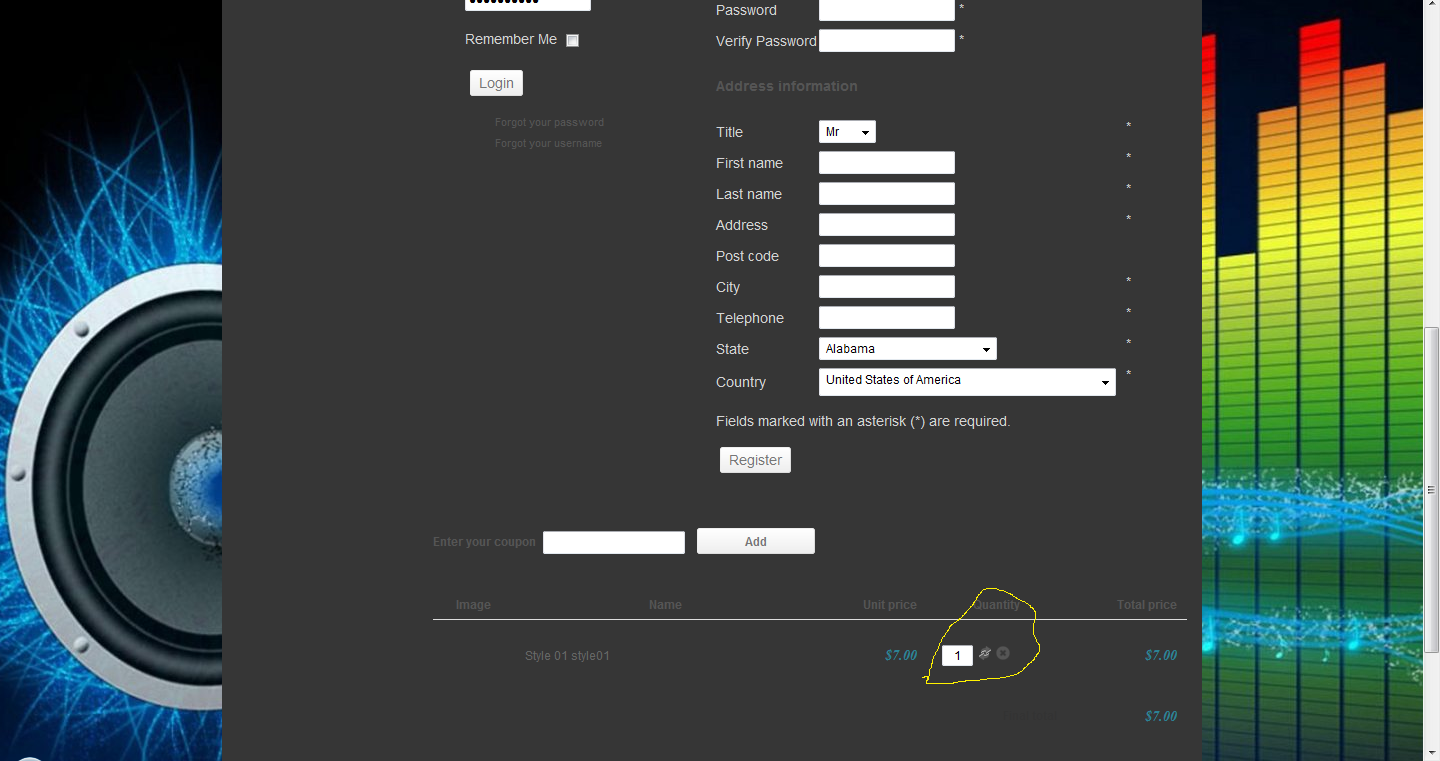
I did it, but still show in cart.Xavier wrote: Hi,
For your needs, editing the HikaShop cart module can do the job. You can enable/disable the quantity field, etc.
You can edit it via the menu Display > Content modules.
Last edit: 12 years 5 months ago by PeterP.
Please Log in or Create an account to join the conversation.
12 years 5 months ago #157461
by PeterP
Replied by PeterP on topic Re: Remove quantity display
I did use css fix : .hikashop_product_quantity_field, .hikashop_cart_product_quantity_refresh{ display:none;}
from previous post and now is working.
Now I need hide refresh icon or better replace for icon showing Nr 1.
from previous post and now is working.
Now I need hide refresh icon or better replace for icon showing Nr 1.
Please Log in or Create an account to join the conversation.
12 years 5 months ago #157462
by PeterP
Replied by PeterP on topic Re: Remove quantity display
I create icon: nr1_green.png with same dimension 14x14.
Now I can't find where I should change code from... /media/com_hikashop/images/refresh.png to ...../media/com_hikashop/images/nr1_green.png.
Is not in CSS.
Please give me a clue.
Thanks.
Now I can't find where I should change code from... /media/com_hikashop/images/refresh.png to ...../media/com_hikashop/images/nr1_green.png.
Is not in CSS.
Please give me a clue.
Thanks.
Please Log in or Create an account to join the conversation.
12 years 5 months ago #157467
by PeterP
Replied by PeterP on topic Re: Remove quantity display
I quess I find it.
I edit via Display/views ---> checkout, cart
in line: 482 i change: <img src="<?php echo HIKASHOP_IMAGES . 'refresh.png';?>"
for <img src="<?php echo HIKASHOP_IMAGES . 'nr1_green.png';?>"
Now is looks how I want to.
I hope I didn't mess anything.
BTW thank you for software which can be fully customize!!
I edit via Display/views ---> checkout, cart
in line: 482 i change: <img src="<?php echo HIKASHOP_IMAGES . 'refresh.png';?>"
for <img src="<?php echo HIKASHOP_IMAGES . 'nr1_green.png';?>"
Now is looks how I want to.
I hope I didn't mess anything.
BTW thank you for software which can be fully customize!!
Please Log in or Create an account to join the conversation.
9 years 9 months ago #261195
by huwhuw
Replied by huwhuw on topic Remove quantity display
Hi you can hide individual quantity boxes on the product page with css
e.g.
div#hikashop_product_family_fee_single_student_page.hikashop_product_page .hikashop_product_quantity_field {display:none!important;}
Then you have to hide the + and - icons too
e.g.
div#hikashop_product_family_fee_single_student_page.hikashop_product_page .hikashop_product_quantity_field {display:none!important;}
Then you have to hide the + and - icons too
Please Log in or Create an account to join the conversation.
9 years 5 months ago #271760
by nicolas
Replied by nicolas on topic Remove quantity display
Hi,
For anyone reading this thread, these are not relevant anymore.
You can now do that by changing the setting "Quantity input method" in the HikaShop configuration.
For anyone reading this thread, these are not relevant anymore.
You can now do that by changing the setting "Quantity input method" in the HikaShop configuration.
Please Log in or Create an account to join the conversation.
8 years 8 months ago #288803
by arnask
Replied by arnask on topic Remove quantity display
how to hide quantity field in checkout cart?
i tired to edit cart file on display-views checkout view with no success
i tired to edit cart file on display-views checkout view with no success
Please Log in or Create an account to join the conversation.

8 years 8 months ago #288806
by Jerome
Jerome - Obsidev.com
HikaMarket & HikaSerial developer / HikaShop core dev team.
Replied by Jerome on topic Remove quantity display
Hello,
You should use the "cart status" instead of the "cart".
The default checkout cart need to let the customer remove the products and see/change their quantity.
The "cart status" is a "read only" version of the cart, so without quantity fields.
Regards,
You should use the "cart status" instead of the "cart".
The default checkout cart need to let the customer remove the products and see/change their quantity.
The "cart status" is a "read only" version of the cart, so without quantity fields.
Regards,
Jerome - Obsidev.com
HikaMarket & HikaSerial developer / HikaShop core dev team.
Please Log in or Create an account to join the conversation.
Time to create page: 0.104 seconds