
- Posts: 12
- Thank you received: 0
[solved] stuck, checkout page goes no where
- ryan0rogers
-
 Topic Author
- Offline
Less
More
14 years 9 months ago - 14 years 9 months ago #32109
by ryan0rogers
[solved] stuck, checkout page goes no where was created by ryan0rogers
Somewhat a noob at this. Fairly experienced in Joomla.
1.Checkout page goes no where, It used to go straight to the check out page, now it just stops.
I think it has something to do with the shipping address and billing address.
Ive been looking through forums as well and still couldnt figure it out.
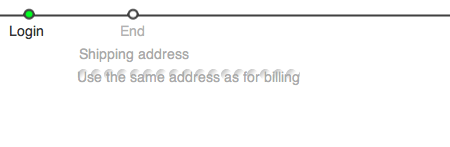
2. and cant figure out how to change the layout of shipping address ( 40 circles behind it
www.takeupyourcrossonline.com
admin
frank2011
Thank you in advance,
can someone please help client waiting!
This attachment is hidden for guests.
1.Checkout page goes no where, It used to go straight to the check out page, now it just stops.
I think it has something to do with the shipping address and billing address.
Ive been looking through forums as well and still couldnt figure it out.
2. and cant figure out how to change the layout of shipping address ( 40 circles behind it
www.takeupyourcrossonline.com
admin
frank2011
Thank you in advance,
can someone please help client waiting!
This attachment is hidden for guests.
Please log in or register to see it.
Last edit: 14 years 9 months ago by nicolas.
Please Log in or Create an account to join the conversation.

14 years 9 months ago #32143
by nicolas
Replied by nicolas on topic Re: stuck, checkout page goes no where
Hi,
You deactivated the login of your checkout and you also turned off the registration in joomla. But you still have the "login" and "address" views in your HikaShop checkout workflow.
So the system still wants you to register or login but these options have be disabled so you can't. Thus, it doesn't not allow you to continue the checkout.
You shoudl change these options to solve the problem.
I couldn't see the address view since I couldn't login so I can't help on your second point.
You deactivated the login of your checkout and you also turned off the registration in joomla. But you still have the "login" and "address" views in your HikaShop checkout workflow.
So the system still wants you to register or login but these options have be disabled so you can't. Thus, it doesn't not allow you to continue the checkout.
You shoudl change these options to solve the problem.
I couldn't see the address view since I couldn't login so I can't help on your second point.
Please Log in or Create an account to join the conversation.
- ryan0rogers
-
Topic Author
- Offline
Less
More
- Posts: 12
- Thank you received: 0
14 years 9 months ago #33070
by ryan0rogers
Replied by ryan0rogers on topic Re: stuck, checkout page goes no where
OK, received your message and it was helpful. My cart seems close to finished but i think im a hickup or 2 past this thing working.
right now after you select the 1st shirt, called "blessed" select billing address
then shipping method then you click
next, then nothing happens, literally
it just keeps relaying the same page???
can someone login to see what is wrong, im basically to the point where im going to have to give the customer his money back cuz i cant get
this checkout working after a month.
the login username is: admin
the password is: frank2011
right now after you select the 1st shirt, called "blessed" select billing address
then shipping method then you click
next, then nothing happens, literally
it just keeps relaying the same page???
can someone login to see what is wrong, im basically to the point where im going to have to give the customer his money back cuz i cant get
this checkout working after a month.
the login username is: admin
the password is: frank2011
Please Log in or Create an account to join the conversation.
14 years 9 months ago #33089
by nicolas
Replied by nicolas on topic Re: stuck, checkout page goes no where
That's because in your paypal plugin, you selected a shipping method restriction. Please remove it and it will work.
To unselect them, you need to press the ctrl key and click on the selected currencies or shipping methods.
To unselect them, you need to press the ctrl key and click on the selected currencies or shipping methods.
Please Log in or Create an account to join the conversation.
- ryan0rogers
-
Topic Author
- Offline
Less
More
- Posts: 12
- Thank you received: 0
14 years 9 months ago #33166
by ryan0rogers
Replied by ryan0rogers on topic Re: stuck, checkout page goes no where
thank you very much nicolas, thou art very wise! I have 1 more question i will post.
Please Log in or Create an account to join the conversation.
- ryan0rogers
-
Topic Author
- Offline
Less
More
- Posts: 12
- Thank you received: 0
14 years 9 months ago #33168
by ryan0rogers
Replied by ryan0rogers on topic Re: stuck, checkout page goes no where
How do I remove the dots behind the words Shipping Address and make it just a simple "select button" like the billing address next to it?
heres a photo of what im talking about attached

heres a photo of what im talking about attached
Please Log in or Create an account to join the conversation.
14 years 9 months ago #33197
by nicolas
Replied by nicolas on topic Re: stuck, checkout page goes no where
That comes from your template. There should be an option in your template to deactivate the style processing of checkboxes which apparently doesn't work properly here.
If you don't know where to find it, you should ask your template provider.
If you don't know where to find it, you should ask your template provider.
Please Log in or Create an account to join the conversation.
- ryan0rogers
-
Topic Author
- Offline
Less
More
- Posts: 12
- Thank you received: 0
14 years 9 months ago #33210
by ryan0rogers
Replied by ryan0rogers on topic Re: stuck, checkout page goes no where
how do i mark this thread as solved?
thanks, every question i had was answered guys
thanks, every question i had was answered guys
Please Log in or Create an account to join the conversation.
Time to create page: 0.236 seconds