

- Posts: 7
- Thank you received: 0
change + and - for add quantity to card
14 years 10 months ago #32212
by lexiboy
change + and - for add quantity to card was created by lexiboy
I want to change the layout of the plus and minus button that are used to change the quantity of product to add to the card. I want to either remove the underline from the + and -, or change them into graphics.
In what file can I find the code? Can I create a template for this of my own?
I found that the code is generated from functions called in quantity.php, but got stuck from there.
In what file can I find the code? Can I create a template for this of my own?
I found that the code is generated from functions called in quantity.php, but got stuck from there.
Please Log in or Create an account to join the conversation.

14 years 10 months ago #32252
by nicolas
Replied by nicolas on topic Re: change + and - for add quantity to card
You can do all that with CSS. No need to edit any code. You can look with firebug at the CSS we use on our demo website where we changed the style of the + and - links:
.hikashop_product_quantity_main .hikashop_product_stock td a {
color: #14CBEC;
font-weight: bold;
background: url(../images/add_white_dot.png) no-repeat center;
padding-left: 15px;
padding-right: 15px;
padding-top: 3px;
padding-bottom: 3px;
margin-top: 3px;
}
.hikashop_product_quantity_main .hikashop_product_stock td a {
color: #14CBEC;
font-weight: bold;
background: url(../images/add_white_dot.png) no-repeat center;
padding-left: 15px;
padding-right: 15px;
padding-top: 3px;
padding-bottom: 3px;
margin-top: 3px;
}
Please Log in or Create an account to join the conversation.

Less
More
- Posts: 38
- Thank you received: 0
14 years 2 months ago #59235
by QuantumView
Replied by QuantumView on topic Re: change + and - for add quantity to card
Hi,
Can you tell me how to remove the underline from under the + and - buttons?
Thank you,
Chris
Can you tell me how to remove the underline from under the + and - buttons?
Thank you,
Chris
Please Log in or Create an account to join the conversation.
14 years 2 months ago - 14 years 2 months ago #59288
by nicolas
Replied by nicolas on topic Re: change + and - for add quantity to card
You can add that CSS:
.hikashop_product_quantity_main .hikashop_product_stock td a, .hikashop_product_quantity_main .hikashop_product_stock td a:hover,.hikashop_product_quantity_main .hikashop_product_stock td a:visited{
text-decoration: none; }
.hikashop_product_quantity_main .hikashop_product_stock td a, .hikashop_product_quantity_main .hikashop_product_stock td a:hover,.hikashop_product_quantity_main .hikashop_product_stock td a:visited{
text-decoration: none; }
Last edit: 14 years 2 months ago by nicolas.
The following user(s) said Thank You: luizarios
Please Log in or Create an account to join the conversation.
Less
More
- Posts: 38
- Thank you received: 0
14 years 2 months ago #59346
by QuantumView
Thank you very much, it worked. Although I did have to change the first ; to a :
Replied by QuantumView on topic Re: change + and - for add quantity to card
nicolas wrote: You can add that CSS:
.hikashop_product_quantity_main .hikashop_product_stock td a, .hikashop_product_quantity_main .hikashop_product_stock td a;hover,.hikashop_product_quantity_main .hikashop_product_stock td a:visited{
text-decoration: none; }
Thank you very much, it worked. Although I did have to change the first ; to a :
Please Log in or Create an account to join the conversation.
14 years 2 months ago #60071
by luizarios
It worked for me and I did NOT have to change the ; to a, just copied and pasted Nicola's code and worked fine.
The only problem I see thou is that there is no space between the plus and minus
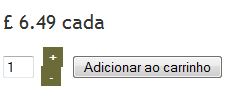
I tried to add a margin-bottom but it didn't work. I also tried to apply the margin-bottom to .hikashop_product_quantity_main .hikashop_product_stock .hikashop_product_quantity_field_change_plus td a{ but it didn't work
Replied by luizarios on topic Re: change + and - for add quantity to card
QuantumView wrote:
nicolas wrote: You can add that CSS:
.hikashop_product_quantity_main .hikashop_product_stock td a, .hikashop_product_quantity_main .hikashop_product_stock td a;hover,.hikashop_product_quantity_main .hikashop_product_stock td a:visited{
text-decoration: none; }
Thank you very much, it worked. Although I did have to change the first ; to a :
It worked for me and I did NOT have to change the ; to a, just copied and pasted Nicola's code and worked fine.
The only problem I see thou is that there is no space between the plus and minus
I tried to add a margin-bottom but it didn't work. I also tried to apply the margin-bottom to .hikashop_product_quantity_main .hikashop_product_stock .hikashop_product_quantity_field_change_plus td a{ but it didn't work
Please Log in or Create an account to join the conversation.
14 years 2 months ago #60131
by nicolas
Replied by nicolas on topic Re: change + and - for add quantity to card
Try with that:
.hikashop_product_quantity_main .hikashop_product_stock td a, .hikashop_product_quantity_main .hikashop_product_stock td a:hover,.hikashop_product_quantity_main .hikashop_product_stock td a:visited{
padding: 5px; }
.hikashop_product_quantity_main .hikashop_product_stock td a, .hikashop_product_quantity_main .hikashop_product_stock td a:hover,.hikashop_product_quantity_main .hikashop_product_stock td a:visited{
padding: 5px; }
Please Log in or Create an account to join the conversation.
14 years 2 months ago #60136
by mtangelcv
Replied by mtangelcv on topic Re: change + and - for add quantity to card
Where in code does one change the minus to an mdash (emdash)? It's so small on the screen.
Please Log in or Create an account to join the conversation.
14 years 2 months ago #60222
by nicolas
Replied by nicolas on topic Re: change + and - for add quantity to card
You can change the line:
<a id="hikashop_product_quantity_field_change_minus_'.$i.'" class="hikashop_product_quantity_field_change_minus hikashop_product_quantity_field_change" href="#" onclick="return hikashopQuantityChange(\'hikashop_product_quantity_field_'.$i.'\',0,'.$max_quantity.','.$min_quantity.');">-</a>
to:
<a id="hikashop_product_quantity_field_change_minus_'.$i.'" class="hikashop_product_quantity_field_change_minus hikashop_product_quantity_field_change" href="#" onclick="return hikashopQuantityChange(\'hikashop_product_quantity_field_'.$i.'\',0,'.$max_quantity.','.$min_quantity.');">—</a>
in the file administrator/components/com_hikashop/helper/cart.php
<a id="hikashop_product_quantity_field_change_minus_'.$i.'" class="hikashop_product_quantity_field_change_minus hikashop_product_quantity_field_change" href="#" onclick="return hikashopQuantityChange(\'hikashop_product_quantity_field_'.$i.'\',0,'.$max_quantity.','.$min_quantity.');">-</a>
to:
<a id="hikashop_product_quantity_field_change_minus_'.$i.'" class="hikashop_product_quantity_field_change_minus hikashop_product_quantity_field_change" href="#" onclick="return hikashopQuantityChange(\'hikashop_product_quantity_field_'.$i.'\',0,'.$max_quantity.','.$min_quantity.');">—</a>
in the file administrator/components/com_hikashop/helper/cart.php
Please Log in or Create an account to join the conversation.
14 years 2 months ago #60520
by mtangelcv
Replied by mtangelcv on topic Re: change + and - for add quantity to card
That worked well but now I'm forgetting where to turn down the style... where does one remove the block of color in style sheet? What am I looking for (besides my brain peanut gallery)...
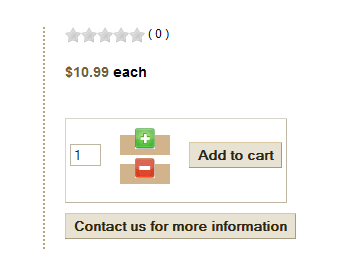
Please Log in or Create an account to join the conversation.
14 years 2 months ago #60597
by nicolas
Replied by nicolas on topic Re: change + and - for add quantity to card
Can you give a link to that page ?
Please Log in or Create an account to join the conversation.
Time to create page: 0.348 seconds