
- Posts: 7
- Thank you received: 0
Short description at the product listings
- uniteddare
-
 Topic Author
- Offline
Less
More
14 years 10 months ago #32677
by uniteddare
Short description at the product listings was created by uniteddare
Ive seen this
www.hikashop.com/en/support/forum/4-how-...cts-in-listings.html
old theme but it is not solving the problem for me.
At the product listings page there is some room between product image and price so I would like to know whether it is possible to fill this space with a brief description of the goods?
Thanks
At the product listings page there is some room between product image and price so I would like to know whether it is possible to fill this space with a brief description of the goods?
Thanks
Please Log in or Create an account to join the conversation.

14 years 10 months ago #32707
by nicolas
Replied by nicolas on topic Re: Short description at the product listings
Sure it's possible. You should add a read more link in your products description. Then, in the file "listing_img_title" or "listing_img" (it depends on the layout you're using) of the view "product" that you can edit via the menu Display->Views, you could add that line of code to display the beginning of the product description until the read more link:
<?php echo preg_replace('#<hr *id="system-readmore" */>.*#is','',$this->row->product_description); ?>
<?php echo preg_replace('#<hr *id="system-readmore" */>.*#is','',$this->row->product_description); ?>
Please Log in or Create an account to join the conversation.
- uniteddare
-
Topic Author
- Offline
Less
More
- Posts: 7
- Thank you received: 0
14 years 10 months ago #33378
by uniteddare
Replied by uniteddare on topic Re: Short description at the product listings
Okay, and how that read more link should look like? I mean code.
Please Log in or Create an account to join the conversation.
14 years 10 months ago #33419
by nicolas
Replied by nicolas on topic Re: Short description at the product listings
You can do like that:
www.hikashop.com/en/support/forum/4-how-...ml?limit=20&start=20
www.hikashop.com/en/support/forum/4-how-...ml?limit=20&start=20
Please Log in or Create an account to join the conversation.
- uniteddare
-
Topic Author
- Offline
Less
More
- Posts: 7
- Thank you received: 0
14 years 10 months ago #33517
by uniteddare
Replied by uniteddare on topic Re: Short description at the product listings
Ive made changes like it shown at that topic - but nothing happened.
This code <?php echo preg_replace('#<hr *id="system-readmore" */>.*#is','',$this->row->product_description); ?> was also added to pointed here files and still nothing.
Can you make some advice?
This code <?php echo preg_replace('#<hr *id="system-readmore" */>.*#is','',$this->row->product_description); ?> was also added to pointed here files and still nothing.
Can you make some advice?
Please Log in or Create an account to join the conversation.
14 years 10 months ago #33559
by nicolas
Replied by nicolas on topic Re: Short description at the product listings
The code :
<?php echo preg_replace('#<hr *id="system-readmore" */>.*#is','',$this->row->product_description); ?>
is for displaying the description.
If you want to display a read more link, you should add the code :
echo '<a href="'.$link.'">Read more</a>';
Also, make sure that you're editing the correct file (for the template you're using, not for another template).
<?php echo preg_replace('#<hr *id="system-readmore" */>.*#is','',$this->row->product_description); ?>
is for displaying the description.
If you want to display a read more link, you should add the code :
echo '<a href="'.$link.'">Read more</a>';
Also, make sure that you're editing the correct file (for the template you're using, not for another template).
Please Log in or Create an account to join the conversation.
12 years 11 months ago #131456
by arnask
Replied by arnask on topic Re: Short description at the product listings
is there any new method for adding short description between image and price? without editing some files?
Please Log in or Create an account to join the conversation.
12 years 11 months ago #131476
by nicolas
Replied by nicolas on topic Re: Short description at the product listings
No it's still the same.
Please Log in or Create an account to join the conversation.
12 years 11 months ago #131480
by arnask
Replied by arnask on topic Re: Short description at the product listings
is that something that will be lost after update? is i will change this file?
Please Log in or Create an account to join the conversation.
12 years 11 months ago #131687
by nicolas
Replied by nicolas on topic Re: Short description at the product listings
No. If you do the change via the menu Display>Views as we explain, the changes are saved as view overrides in your template so you don't loose them when you update HikaShop.
The following user(s) said Thank You: arnask
Please Log in or Create an account to join the conversation.
11 years 11 months ago - 11 years 11 months ago #178519
by Apeter
Replied by Apeter on topic Short description at the product listings
Thnk you bro for All your Support
I will Love you to Break this down for me
I want to Add Read more & Short Description to my Product Listing page
So i have Opened a File in my Tem Name is : listing_img_title
And this the code i got frm you
Now i got Confused on were to put those lines of script
Could love if you help solve
This the whole Line of code in the File
Thanks will love if you can solve
Thanks for quick response in Advance
I will Love you to Break this down for me
I want to Add Read more & Short Description to my Product Listing page
So i have Opened a File in my Tem Name is : listing_img_title
And this the code i got frm you
Code:
<?php echo preg_replace('#<hr *id="system-readmore" */>.*#is','',$this->row->product_description); ?>
<?php echo '<a href="'.$link.'">Read more</a>'; ?>
Now i got Confused on were to put those lines of script
Could love if you help solve
This the whole Line of code in the File
Code:
<?php
/**
* @package HikaShop for Joomla!
* @version 2.3.0
* @author hikashop.com
* @copyright (C) 2010-2014 HIKARI SOFTWARE. All rights reserved.
* @license GNU/GPLv3 http://www.gnu.org/licenses/gpl-3.0.html
*/
defined('_JEXEC') or die('Restricted access');
?><?php
$link = hikashop_completeLink('product&task=show&cid='.$this->row->product_id.'&name='.$this->row->alias.$this->itemid.$this->category_pathway);
if(!empty($this->row->extraData->top)) { echo implode("\r\n",$this->row->extraData->top); }
?>
<!-- PRODUCT IMG -->
<div style="height:<?php echo $this->image->main_thumbnail_y;?>px;text-align:center;clear:both;" class="hikashop_product_image">
<div style="position:relative;text-align:center;clear:both;width:<?php echo $this->image->main_thumbnail_x;?>px;margin: auto;" class="hikashop_product_image_subdiv">
<?php if($this->params->get('link_to_product_page',1)){ ?>
<a href="<?php echo $link;?>" title="<?php echo $this->escape($this->row->product_name); ?>">
<?php }
$image_options = array('default' => true,'forcesize'=>$this->config->get('image_force_size',true),'scale'=>$this->config->get('image_scale_mode','inside'));
$img = $this->image->getThumbnail(@$this->row->file_path, array('width' => $this->image->main_thumbnail_x, 'height' => $this->image->main_thumbnail_y), $image_options);
if($img->success) {
echo '<img class="hikashop_product_listing_image" title="'.$this->escape(@$this->row->file_description).'" alt="'.$this->escape(@$this->row->file_name).'" src="'.$img->url.'"/>';
}
$main_thumb_x = $this->image->main_thumbnail_x;
$main_thumb_y = $this->image->main_thumbnail_y;
$horizontal = '0';
$vertical = '0';
if($this->params->get('display_badges',1)){
$this->classbadge->placeBadges($this->image, $this->row->badges, $vertical, $horizontal);
}
$this->image->main_thumbnail_x = $main_thumb_x;
$this->image->main_thumbnail_y = $main_thumb_y;
if($this->params->get('link_to_product_page',1)){ ?>
</a>
<?php } ?>
</div>
</div>
<!-- EO PRODUCT IMG -->
<!-- PRODUCT PRICE -->
<?php
if($this->params->get('show_price','-1')=='-1'){
$config =& hikashop_config();
$this->params->set('show_price',$config->get('show_price'));
}
if($this->params->get('show_price')){
$this->setLayout('listing_price');
echo $this->loadTemplate();
}
?>
<!-- EO PRODUCT PRICE -->
<!-- PRODUCT VOTE -->
<?php
if($this->params->get('show_vote_product')){
$this->setLayout('listing_vote');
echo $this->loadTemplate();
}
?>
<!-- EO PRODUCT VOTE -->
<!-- ADD TO CART BUTTON AREA -->
<?php
if($this->params->get('add_to_cart') || $this->params->get('add_to_wishlist')){
?><form action="<?php echo hikashop_completeLink('product&task=updatecart'); ?>" method="post" name="hikashop_product_form_<?php echo $this->row->product_id.'_'.$this->params->get('main_div_name'); ?>"><?php
$this->ajax='';
if(!$this->config->get('ajax_add_to_cart',0)){
$this->ajax = 'return hikashopModifyQuantity(\''.$this->row->product_id.'\',field,1,\'hikashop_product_form_'.$this->row->product_id.'_'.$this->params->get('main_div_name').'\',\'cart\');';
}
$this->setLayout('quantity');
echo $this->loadTemplate();
if(!empty($this->ajax) && $this->config->get('redirect_url_after_add_cart','stay_if_cart')=='ask_user'){ ?>
<input type="hidden" name="popup" value="1"/>
<?php } ?>
<input type="hidden" name="product_id" value="<?php echo $this->row->product_id; ?>" />
<input type="hidden" name="add" value="1"/>
<input type="hidden" name="ctrl" value="product"/>
<input type="hidden" name="task" value="updatecart"/>
<input type="hidden" name="return_url" value="<?php echo urlencode(base64_encode(urldecode($this->redirect_url)));?>"/>
</form><?php
}
?>
<!-- EO ADD TO CART BUTTON AREA -->
<!-- COMPARISON AREA -->
<?php
if(JRequest::getVar('hikashop_front_end_main',0) && JRequest::getVar('task')=='listing' && $this->params->get('show_compare')) { ?>
<br/><?php
if( $this->params->get('show_compare') == 1 ) {
$js = 'setToCompareList('.$this->row->product_id.',\''.$this->escape($this->row->product_name).'\',this); return false;';
echo $this->cart->displayButton(JText::_('ADD_TO_COMPARE_LIST'),'compare',$this->params,$link,$js,'',0,1,'hikashop_compare_button');
} else { ?>
<input type="checkbox" class="hikashop_compare_checkbox" id="hikashop_listing_chk_<?php echo $this->row->product_id;?>" onchange="setToCompareList(<?php echo $this->row->product_id;?>,'<?php echo $this->escape($this->row->product_name); ?>',this);"><label for="hikashop_listing_chk_<?php echo $this->row->product_id;?>"><?php echo JText::_('ADD_TO_COMPARE_LIST'); ?></label>
<?php }
} ?>
<!-- EO COMPARISON AREA -->
<?php if(!empty($this->row->extraData->bottom)) { echo implode("\r\n",$this->row->extraData->bottom); } ?>
Thanks will love if you can solve
Thanks for quick response in Advance
Last edit: 11 years 11 months ago by Jerome. Reason: [code] is nice ! - please use it :)
Please Log in or Create an account to join the conversation.

11 years 11 months ago #178568
by Jerome
Jerome - Obsidev.com
HikaMarket & HikaSerial developer / HikaShop core dev team.
Replied by Jerome on topic Short description at the product listings
Hi,
The importation question is : where you do you want to display the product description exactly ?
Before the price ? Before the vote ? Before the add to cart ? at the bottom ?
For example, if you want to display it at the bottom, you just have to paste the code that Nicolas gave you ; at the bottom of the code you pasted ; in order to have something like that:
Regards,
The importation question is : where you do you want to display the product description exactly ?
Before the price ? Before the vote ? Before the add to cart ? at the bottom ?
For example, if you want to display it at the bottom, you just have to paste the code that Nicolas gave you ; at the bottom of the code you pasted ; in order to have something like that:
Code:
<!-- EO COMPARISON AREA -->
<?php if(!empty($this->row->extraData->bottom)) { echo implode("\r\n",$this->row->extraData->bottom); } ?>
<?php echo preg_replace('#<hr *id="system-readmore" */>.*#is','',$this->row->product_description); ?>
Regards,
Jerome - Obsidev.com
HikaMarket & HikaSerial developer / HikaShop core dev team.
Please Log in or Create an account to join the conversation.
Less
More
- Posts: 31
- Thank you received: 0
9 years 3 months ago #273622
by marketingfocal
Replied by marketingfocal on topic Short description at the product listings
Hi Jerome,
We need tu show a custom field in product listing but only show the first two lines and "...". Is it possible? Regards, Leo.
We need tu show a custom field in product listing but only show the first two lines and "...". Is it possible? Regards, Leo.
Please Log in or Create an account to join the conversation.

9 years 3 months ago - 9 years 3 months ago #273628
by Philip
Replied by Philip on topic Short description at the product listings
Hello,
I think you use an Item Custom field and create an override view, you need to have html & php knowledge, follow these steps :
- First, go to Components => HikaShop => Configuration
- Then in Display dropdown select Custom fields
- Click on New
- Reproduce this settings :
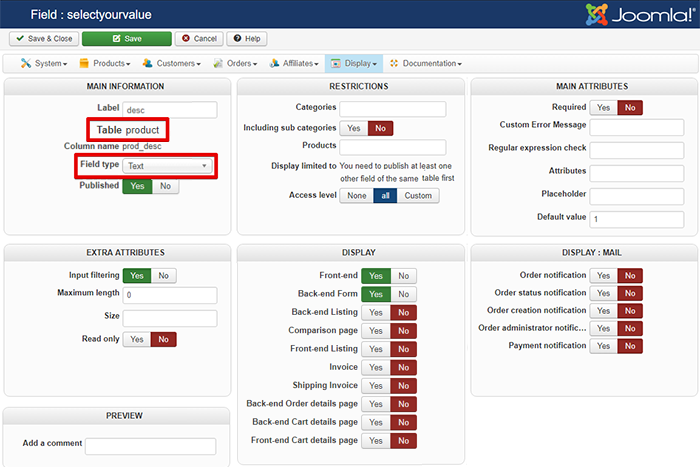
And add your custom code in order to have your custom field display on your listing view :
- Define which listing type you use among listing, div or tabular
- Go in your Main HikaShop Configuration part (like previous)
- On Display dropdown this time select Views
- Use 3 filter dropdown with Product/YourTemplate/Front end
- Select your required among listing_div, listing_list or listing_table
- Add where required this code to display your custom field :
Just be sure to be in the block that start with :
, around line 125 and before this command :
.
And to see how to proceed, see this tutorial .
After this you will have to full your custom field directly in your product backend configuration.
Hope this will help you to achieved what you wants.
Regards
I think you use an Item Custom field and create an override view, you need to have html & php knowledge, follow these steps :
- First, go to Components => HikaShop => Configuration
- Then in Display dropdown select Custom fields
- Click on New
- Reproduce this settings :
And add your custom code in order to have your custom field display on your listing view :
- Define which listing type you use among listing, div or tabular
- Go in your Main HikaShop Configuration part (like previous)
- On Display dropdown this time select Views
- Use 3 filter dropdown with Product/YourTemplate/Front end
- Select your required among listing_div, listing_list or listing_table
- Add where required this code to display your custom field :
Code:
echo($this->row->prod_desc);
Code:
<div class="hikashop_subcontainer <?php echo $this->borderClass; ?>">
Code:
unset($this->row);
And to see how to proceed, see this tutorial .
After this you will have to full your custom field directly in your product backend configuration.
Hope this will help you to achieved what you wants.
Regards
Last edit: 9 years 3 months ago by Philip.
Please Log in or Create an account to join the conversation.
Less
More
- Posts: 31
- Thank you received: 0
9 years 3 months ago #273713
by marketingfocal
Replied by marketingfocal on topic Short description at the product listings
Thanks Philips! I can show the text. But, some of them are very big and only I need to show only two lines. Where I can set this? Regards, Leo.
Please Log in or Create an account to join the conversation.
9 years 3 months ago #273766
by nicolas
Replied by nicolas on topic Short description at the product listings
Hi,
There is no setting for that.
You need to use custom code to strip the value of the custom field to 2 lines like you want.
The simplest would be to do something like that:
<?php echo preg_replace('#<hr *id="system-readmore" */>.*#is','',$this->row->prod_desc); ?>
and add a read more tag in your custom field editor where you want the cut to be done.
Please understand that custom coding like that is outside of the user support we provide. We've already gave you all the necessary information to know how to do it if you're a developer. If you're not a developer, we have partners you can contact for such custom development job:
www.hikashop.com/home/our-partners.html
There is no setting for that.
You need to use custom code to strip the value of the custom field to 2 lines like you want.
The simplest would be to do something like that:
<?php echo preg_replace('#<hr *id="system-readmore" */>.*#is','',$this->row->prod_desc); ?>
and add a read more tag in your custom field editor where you want the cut to be done.
Please understand that custom coding like that is outside of the user support we provide. We've already gave you all the necessary information to know how to do it if you're a developer. If you're not a developer, we have partners you can contact for such custom development job:
www.hikashop.com/home/our-partners.html
Please Log in or Create an account to join the conversation.
Time to create page: 0.430 seconds