
- Posts: 21
- Thank you received: 0
Mass upload of video files
- jazzmeister
-
 Topic Author
- Offline
Less
More
14 years 9 months ago #33141
by jazzmeister
Mass upload of video files was created by jazzmeister
Hi,
I need to be able to mass upload files in one hit, instead of going through each product individually and adding them. I have some large video files, and it would be far too time consuming to do these individually.
I know they need to be linked to each product, but can anyone think of a way that this can be done?
Thanks
I need to be able to mass upload files in one hit, instead of going through each product individually and adding them. I have some large video files, and it would be far too time consuming to do these individually.
I know they need to be linked to each product, but can anyone think of a way that this can be done?
Thanks
Please Log in or Create an account to join the conversation.

14 years 9 months ago #33165
by nicolas
Replied by nicolas on topic Re: Mass upload of video files
You could upload them via FTP, then put their URLs in an option of the product like the manufacturer URL or a custom product field.
Please Log in or Create an account to join the conversation.
- jazzmeister
-
Topic Author
- Offline
Less
More
- Posts: 21
- Thank you received: 0
14 years 9 months ago #33218
by jazzmeister
Replied by jazzmeister on topic Re: Mass upload of video files
Would I still be able to have these files available as download links in the generated email that the customer receives once they have paid for their order, using your described method? This is important as my site sells videos.
Thanks
Thanks
Please Log in or Create an account to join the conversation.
14 years 9 months ago #33233
by nicolas
Replied by nicolas on topic Re: Mass upload of video files
Then in that case, you should upload your files in the folder media/com_hikashop/upload/safe
Then, you could link your files with your products by importing a small CSV file like that:
product_code,files
my_prod1,myfile1.avi
my_prod2,myfile2.avi
...etc...
Then, you could link your files with your products by importing a small CSV file like that:
product_code,files
my_prod1,myfile1.avi
my_prod2,myfile2.avi
...etc...
Please Log in or Create an account to join the conversation.
- jazzmeister
-
Topic Author
- Offline
Less
More
- Posts: 21
- Thank you received: 0
14 years 9 months ago #33317
by jazzmeister
Replied by jazzmeister on topic Re: Mass upload of video files
Thanks again,
this works great for products with no variants, the files link up fine. However what I really need to do is to have products with a characteristic with 2 or 3 variants. I need the files (which are videos) to be available in the variants.
I read the help docs and created a csv with:
product_code | product_parent_id | select_res| files
NULL | product1 | Standard | image002.jpg
NULL | product1 | HD | image003.jpg
NULL | product1 | SmartPhone| image004.jpg
(NULL = left completely blank, nothing entered)
This creates the variants fine, but does not insert any files. (the files are in the folder as directed before)
What am I doing wrong?
Thanks
this works great for products with no variants, the files link up fine. However what I really need to do is to have products with a characteristic with 2 or 3 variants. I need the files (which are videos) to be available in the variants.
I read the help docs and created a csv with:
product_code | product_parent_id | select_res| files
NULL | product1 | Standard | image002.jpg
NULL | product1 | HD | image003.jpg
NULL | product1 | SmartPhone| image004.jpg
(NULL = left completely blank, nothing entered)
This creates the variants fine, but does not insert any files. (the files are in the folder as directed before)
What am I doing wrong?
Thanks
Please Log in or Create an account to join the conversation.
14 years 9 months ago #33332
by nicolas
Replied by nicolas on topic Re: Mass upload of video files
Once you created a product with characteristics, you can click on the "manage variants" button to access the variants listing of that product. There, you can edit each variant to get the product_code of each variant and use it in your CSV file as I explained in my previous post.
Please Log in or Create an account to join the conversation.
- jazzmeister
-
Topic Author
- Offline
Less
More
- Posts: 21
- Thank you received: 0
14 years 9 months ago #33384
by jazzmeister
Replied by jazzmeister on topic Re: Mass upload of video files
I have done this, but the files are not inserted.
So to be clear, is this is what you mean? (product_code refering to the variant product_code???)
product_code | files
product1_1 | image002.jpg
product1_2 | image003.jpg
product1_3 | image004.jpg
As said this does not insert any files...
So to be clear, is this is what you mean? (product_code refering to the variant product_code???)
product_code | files
product1_1 | image002.jpg
product1_2 | image003.jpg
product1_3 | image004.jpg
As said this does not insert any files...
Please Log in or Create an account to join the conversation.
14 years 9 months ago #33441
by nicolas
Replied by nicolas on topic Re: Mass upload of video files
Yes, that's what I mean.
And do you have the files media/com_hikashop/upload/safe/image0002.jpg media/com_hikashop/upload/safe/image0003.jpg media/com_hikashop/upload/safe/image0004.jpg ?
You don't see anything in the Files area of your variants ?
That method should definitely work so if you don't have the files after the import, it means that you didn't something properly but it's hard to say what without a clear view of your your variants, etc
And do you have the files media/com_hikashop/upload/safe/image0002.jpg media/com_hikashop/upload/safe/image0003.jpg media/com_hikashop/upload/safe/image0004.jpg ?
You don't see anything in the Files area of your variants ?
That method should definitely work so if you don't have the files after the import, it means that you didn't something properly but it's hard to say what without a clear view of your your variants, etc
Please Log in or Create an account to join the conversation.
- jazzmeister
-
Topic Author
- Offline
Less
More
- Posts: 21
- Thank you received: 0
14 years 9 months ago #33467
by jazzmeister
Replied by jazzmeister on topic Re: Mass upload of video files
Hi, yes the images are in the correct folder.
This is the error message I get when importing:
The product is of the type but it already exists in the database and is of the type variant. In order to avoid any problem the product insertion process has been skipped. Please correct its type before trying to reimport it.
The product is of the type but it already exists in the database and is of the type variant. In order to avoid any problem the product insertion process has been skipped. Please correct its type before trying to reimport it.
The product is of the type but it already exists in the database and is of the type variant. In order to avoid any problem the product insertion process has been skipped. Please correct its type before trying to reimport it.
3 products found : 0 new products imported, 0 invalid product code, 3 already existing products
Please see attached image and files with screenshots of variants etc
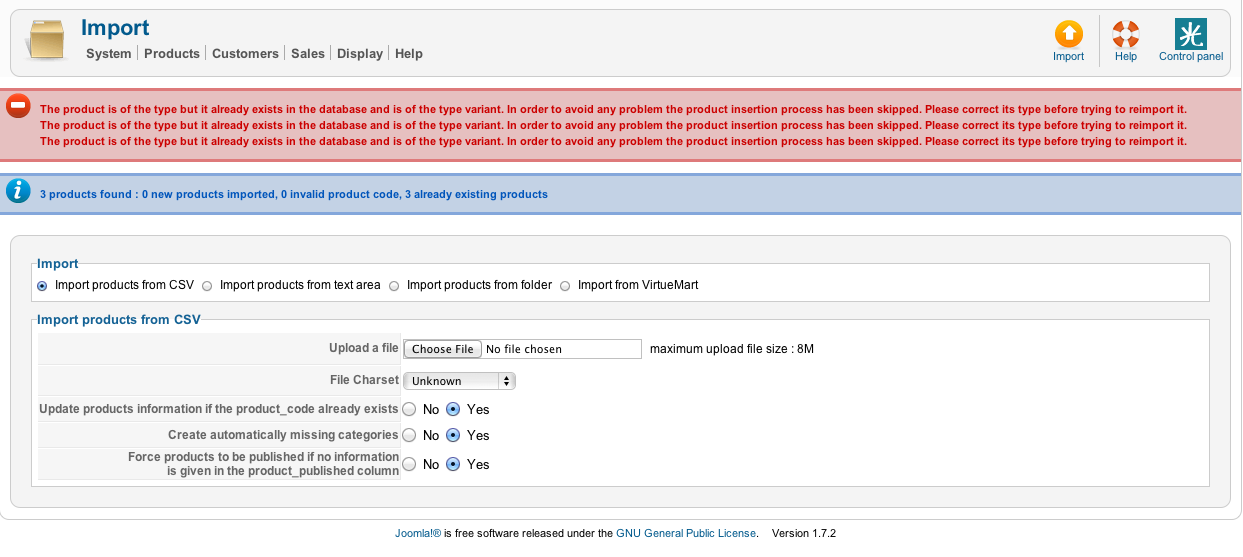
This attachment is hidden for guests.
This is the error message I get when importing:
The product is of the type but it already exists in the database and is of the type variant. In order to avoid any problem the product insertion process has been skipped. Please correct its type before trying to reimport it.
The product is of the type but it already exists in the database and is of the type variant. In order to avoid any problem the product insertion process has been skipped. Please correct its type before trying to reimport it.
The product is of the type but it already exists in the database and is of the type variant. In order to avoid any problem the product insertion process has been skipped. Please correct its type before trying to reimport it.
3 products found : 0 new products imported, 0 invalid product code, 3 already existing products
Please see attached image and files with screenshots of variants etc
This attachment is hidden for guests.
Please log in or register to see it.
Please Log in or Create an account to join the conversation.
14 years 9 months ago #33493
by nicolas
Replied by nicolas on topic Re: Mass upload of video files
Ah yes, as it's for variants, you should add the product_type column like that:
product_code,files,product_type
my_prod1,myfile1.avi,variant
my_prod2,myfile2.avi,variant
product_code,files,product_type
my_prod1,myfile1.avi,variant
my_prod2,myfile2.avi,variant
Please Log in or Create an account to join the conversation.
- jazzmeister
-
Topic Author
- Offline
Less
More
- Posts: 21
- Thank you received: 0
14 years 9 months ago #33501
by jazzmeister
Replied by jazzmeister on topic Re: Mass upload of video files
Fantastic that did the job perfectly!
Many thanks for all your help.
Many thanks for all your help.
Please Log in or Create an account to join the conversation.
Time to create page: 0.209 seconds