
- Posts: 32
- Thank you received: 0
Popup Box "Continue Shopping" button styling
- waveforcemedia
-
 Topic Author
- Offline
Less
More
14 years 9 months ago #33752
by waveforcemedia
Popup Box "Continue Shopping" button styling was created by waveforcemedia
Hey Nicolas,
I attached an image, having an issue editing other buttons in the cart. Looks like the class "a.hikashop_cart_button" seems to affect all buttons in the afterburner template.
I did make a change to the div id to test:
#hikashop_add_to_cart_continue_div {float:left; width:200px; background:#000 !important;}
Can you give me any insight to make it so I can have them to not display the correct styling?
Thanks.
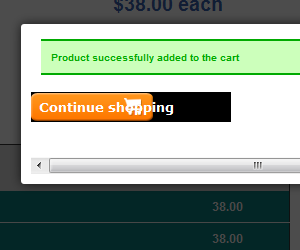
I attached an image, having an issue editing other buttons in the cart. Looks like the class "a.hikashop_cart_button" seems to affect all buttons in the afterburner template.
I did make a change to the div id to test:
#hikashop_add_to_cart_continue_div {float:left; width:200px; background:#000 !important;}
Can you give me any insight to make it so I can have them to not display the correct styling?
Thanks.
Please Log in or Create an account to join the conversation.

14 years 9 months ago #33762
by nicolas
Replied by nicolas on topic Re: Popup Box "Continue Shopping" button styling
Hi,
You would have to add some CSS to override the style of your template for these buttons.
I would need a link to that page in order to see the CSS of your website with Firebug to give you a more precise answer.
You would have to add some CSS to override the style of your template for these buttons.
I would need a link to that page in order to see the CSS of your website with Firebug to give you a more precise answer.
Please Log in or Create an account to join the conversation.
- waveforcemedia
-
Topic Author
- Offline
Less
More
- Posts: 32
- Thank you received: 0
14 years 9 months ago #33771
by waveforcemedia
Replied by waveforcemedia on topic Re: Popup Box "Continue Shopping" button styling
Unfortunately, it is currently on localhost.
I do run firebug but it seems as if it's pointing to the class I specified, "a.hikashop_cart_button".
Also, if you know how I can type the override I may be able to figure it out on my template. Am I placing the !important in the right spot?
I am using the Rockettheme Afterburner template on 1.7.
I do run firebug but it seems as if it's pointing to the class I specified, "a.hikashop_cart_button".
Also, if you know how I can type the override I may be able to figure it out on my template. Am I placing the !important in the right spot?
I am using the Rockettheme Afterburner template on 1.7.
Please Log in or Create an account to join the conversation.
14 years 9 months ago #33775
by nicolas
Replied by nicolas on topic Re: Popup Box "Continue Shopping" button styling
That CSS is correct. But I can't say if that's what you need for your template... It depends on your template I don't have it.
Please Log in or Create an account to join the conversation.
- waveforcemedia
-
Topic Author
- Offline
Less
More
- Posts: 32
- Thank you received: 0
14 years 9 months ago - 14 years 9 months ago #33776
by waveforcemedia
Replied by waveforcemedia on topic Re: Popup Box "Continue Shopping" button styling
Hi Nicolas,
I just uploaded the site:
www.chiro.semsmi.com
Shopping Cart Links:
www.chiro.semsmi.com/index.php/shop-onli...he-chiropractic-belt
www.chiro.semsmi.com/index.php/shop-online/black-belt
I actually have several issues and was wondering if you could help. I tried to edit css before asking but can't get it as I am assuming there is some override I should probably use.
1. ability to use different styling for cart buttons (mentioned above)
2. adjust the +/- quantity to line up correctly with the input box / "add to cart"
3. change the buttons in the checkout page.
Thank you!
I just uploaded the site:
www.chiro.semsmi.com
Shopping Cart Links:
www.chiro.semsmi.com/index.php/shop-onli...he-chiropractic-belt
www.chiro.semsmi.com/index.php/shop-online/black-belt
I actually have several issues and was wondering if you could help. I tried to edit css before asking but can't get it as I am assuming there is some override I should probably use.
1. ability to use different styling for cart buttons (mentioned above)
2. adjust the +/- quantity to line up correctly with the input box / "add to cart"
3. change the buttons in the checkout page.
Thank you!
Last edit: 14 years 9 months ago by waveforcemedia.
Please Log in or Create an account to join the conversation.
14 years 9 months ago #33777
by nicolas
Replied by nicolas on topic Re: Popup Box "Continue Shopping" button styling
1.
If you don't want the same button style for other buttons, you shouldn't use a.hikashop_cart_button:hover and a.hikashop_cart_button but you should use instead .hikashop_product_page a.hikashop_cart_button:hover and .hikashop_product_page a.hikashop_cart_button
2. That's be cause of thee line
vertical-align: baseline;
in that CSS:
html, body, div, span, applet, object, iframe, h1, h2, h3, h4, h5, h6, blockquote, pre, a, abbr, acronym, address, big, cite, code, del, dfn, font, img, ins, kbd, q, s, samp, small, strike, sub, sup, tt, var, center, dl, dt, dd, ul, li, fieldset, form, label, legend, table, caption, tbody, tfoot, thead, tr, th, td {
background: transparent;
border: 0;
font-family: inherit;
font-size: 100%;
font-style: inherit;
font-weight: inherit;
margin: 0;
padding: 0;
outline: 0;
vertical-align: baseline;
border-image: initial;
}
of your template: www.chiro.semsmi.com/templates/rt_afterburner_j16/css/light.css
3.
You need to add some CSS like that:
.hikashop_checkout_page a.hikashop_cart_button{
background-color: #FFFFFF !important;
}
If you don't want the same button style for other buttons, you shouldn't use a.hikashop_cart_button:hover and a.hikashop_cart_button but you should use instead .hikashop_product_page a.hikashop_cart_button:hover and .hikashop_product_page a.hikashop_cart_button
2. That's be cause of thee line
vertical-align: baseline;
in that CSS:
html, body, div, span, applet, object, iframe, h1, h2, h3, h4, h5, h6, blockquote, pre, a, abbr, acronym, address, big, cite, code, del, dfn, font, img, ins, kbd, q, s, samp, small, strike, sub, sup, tt, var, center, dl, dt, dd, ul, li, fieldset, form, label, legend, table, caption, tbody, tfoot, thead, tr, th, td {
background: transparent;
border: 0;
font-family: inherit;
font-size: 100%;
font-style: inherit;
font-weight: inherit;
margin: 0;
padding: 0;
outline: 0;
vertical-align: baseline;
border-image: initial;
}
of your template: www.chiro.semsmi.com/templates/rt_afterburner_j16/css/light.css
3.
You need to add some CSS like that:
.hikashop_checkout_page a.hikashop_cart_button{
background-color: #FFFFFF !important;
}
Please Log in or Create an account to join the conversation.
- waveforcemedia
-
Topic Author
- Offline
Less
More
- Posts: 32
- Thank you received: 0
14 years 9 months ago #33779
by waveforcemedia
Replied by waveforcemedia on topic Re: Popup Box "Continue Shopping" button styling
Hey Nicolas!
It worked! Thanks for the help. I had a feeling it was also using that class. I just wasn't sure if I needed to use it and didn't know which class to apply the changes to.
It worked! Thanks for the help. I had a feeling it was also using that class. I just wasn't sure if I needed to use it and didn't know which class to apply the changes to.
Please Log in or Create an account to join the conversation.
Time to create page: 0.188 seconds