
- Posts: 4
- Thank you received: 0
hikashop_product_options_table
- quickchilli
-
 Topic Author
- Offline
Less
More
14 years 9 months ago #34196
by quickchilli
hikashop_product_options_table was created by quickchilli
Can you help me find where to edit the look of the product option table.
Your demo lines up nicely but I cant find where to edit this.
hikashop_product_options_table
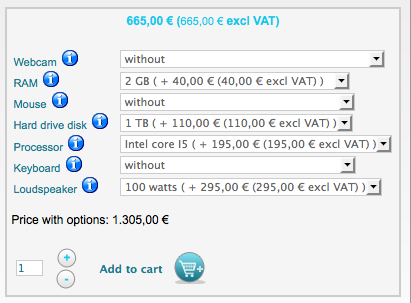
Your demo lines up nicely but I cant find where to edit this.
hikashop_product_options_table
Please Log in or Create an account to join the conversation.

14 years 9 months ago #34235
by nicolas
Replied by nicolas on topic Re: hikashop_product_options_table
The styling of the options table can be done by adding CSS to the front end CSS of HikaShop via the Display tab of the configuration.
On the demo website, it's that CSS which is used:
.hikashop_product_right_part{
background-color:#F5F5F5;
border:1px solid #ccc;
padding:5px;
}
.hikashop_product_options_table select{
border:1px solid #ccc;
margin-left:10px;
color:#666;}
.hikashop_option_name{
color:#167e93;
font-size:11px;}
.hikashop_option_name img{
margin-left:5px;}
#hikashop_product_left_part{
width:300px;
}
#hikashop_product_pice_with_options_main{
color:#14caec;
font-weight:bold;
border-top:1px solid #ccc;
border-bottom:1px solid #ccc;
text-align:center;
background-color:#fff;
padding:5px;
}
.hikashop_product_stock table{
margin-top:20px;}
On the demo website, it's that CSS which is used:
.hikashop_product_right_part{
background-color:#F5F5F5;
border:1px solid #ccc;
padding:5px;
}
.hikashop_product_options_table select{
border:1px solid #ccc;
margin-left:10px;
color:#666;}
.hikashop_option_name{
color:#167e93;
font-size:11px;}
.hikashop_option_name img{
margin-left:5px;}
#hikashop_product_left_part{
width:300px;
}
#hikashop_product_pice_with_options_main{
color:#14caec;
font-weight:bold;
border-top:1px solid #ccc;
border-bottom:1px solid #ccc;
text-align:center;
background-color:#fff;
padding:5px;
}
.hikashop_product_stock table{
margin-top:20px;}
Please Log in or Create an account to join the conversation.
Time to create page: 0.133 seconds