

- Posts: 4
- Thank you received: 0
Adres in checkout without login/registration
14 years 9 months ago - 14 years 9 months ago #34294
by noelj
Adres in checkout without login/registration was created by noelj
Hello, I'm making an online webshop and I want the purchase process to be as easy at possible.
For that reason I removed the login/registration requirement.
But my problem with this is that you can't enter an shipping adres in the checkout when you remove the login function (it says the checkout workflow is invalid when I add adres to it)
For now I use the order custom fields to enter a adres, but then I have to manually copy it to the shipping adres and invoice adres in the back-end for it to show up on invoices.
I would very much appreciate some help with this.
For that reason I removed the login/registration requirement.
But my problem with this is that you can't enter an shipping adres in the checkout when you remove the login function (it says the checkout workflow is invalid when I add adres to it)
For now I use the order custom fields to enter a adres, but then I have to manually copy it to the shipping adres and invoice adres in the back-end for it to show up on invoices.
I would very much appreciate some help with this.
Last edit: 14 years 9 months ago by noelj.
Please Log in or Create an account to join the conversation.

14 years 9 months ago #34351
by nicolas
Replied by nicolas on topic Re: Adres in checkout without login/registration
Hi,
If you want to have a checkout without registration but with address, you will have to have both "login" and "address" views in the checkout workflow. Then, in the Checkout tab of the configuration, you can change the option "registration" to "no registration" in order to remove the creation of a user account. Also, you can turn off the "login" option there to remove the login area of the checkout.
That way, you will still have the address form but no user account would be created.
That "Registration" option is only available in our commercial editions.
If you want to have a checkout without registration but with address, you will have to have both "login" and "address" views in the checkout workflow. Then, in the Checkout tab of the configuration, you can change the option "registration" to "no registration" in order to remove the creation of a user account. Also, you can turn off the "login" option there to remove the login area of the checkout.
That way, you will still have the address form but no user account would be created.
That "Registration" option is only available in our commercial editions.
The following user(s) said Thank You: KandicePieterse
Please Log in or Create an account to join the conversation.
14 years 9 months ago #34382
by noelj
Replied by noelj on topic Re: Adres in checkout without login/registration
Thanks Nicolas,
I tried this out and it worked perfectly for me (I have the business edition of Hikashop).
I tried this out and it worked perfectly for me (I have the business edition of Hikashop).
Please Log in or Create an account to join the conversation.
14 years 9 months ago #35596
by doudijk
Replied by doudijk on topic Re: Adres in checkout without login/registration
I am trying to do the same but with the free version. Is this possible? The Registration section cannot be changed.
We are a volunteer organization trying to provide an easy way for seniors to order clothing for an upcoming event and are looking for a simple way to order online.
Basically ad items to cart, enter address, print order to be mailed or faxed.
Any advise would be much appreciated.
Thank you Dennis
We are a volunteer organization trying to provide an easy way for seniors to order clothing for an upcoming event and are looking for a simple way to order online.
Basically ad items to cart, enter address, print order to be mailed or faxed.
Any advise would be much appreciated.
Thank you Dennis
Please Log in or Create an account to join the conversation.
14 years 9 months ago #35638
by nicolas
Replied by nicolas on topic Re: Adres in checkout without login/registration
Well, you can't use that "Registration" option in the free edition so that's not an option.
An alternative I can see would be to remove the "address" and "login" views from your checkout workflow option of the configuration and instead use the address entered by the user in PayPal (you can configure that with the address related options of the configuration of the PayPal plugin).
So you wouldn't know the address information in HikaShop and the user wouldn't be notified by your website but he would receive a payment confirmation email by PayPal and you would be able to get his address in PayPal.
An alternative I can see would be to remove the "address" and "login" views from your checkout workflow option of the configuration and instead use the address entered by the user in PayPal (you can configure that with the address related options of the configuration of the PayPal plugin).
So you wouldn't know the address information in HikaShop and the user wouldn't be notified by your website but he would receive a payment confirmation email by PayPal and you would be able to get his address in PayPal.
Please Log in or Create an account to join the conversation.
Less
More
- Posts: 16
- Thank you received: 0
14 years 4 months ago #51421
by tastymouse
Replied by tastymouse on topic Re: Adres in checkout without login/registration
I'm trying to do this in the demo shop, but it doesn't work. The registration won't go away.
Please Log in or Create an account to join the conversation.
14 years 4 months ago #51511
by nicolas
Replied by nicolas on topic Re: Adres in checkout without login/registration
That is not correct.
The registration form will still be there so that the user can easily enter his address, but the username/password fields will be removed and no user account will be created when you fill the form.
The registration form will still be there so that the user can easily enter his address, but the username/password fields will be removed and no user account will be created when you fill the form.
Please Log in or Create an account to join the conversation.
Less
More
- Posts: 16
- Thank you received: 0
14 years 4 months ago #51640
by tastymouse
Replied by tastymouse on topic Re: Adres in checkout without login/registration
Okay. But it's still called registration form, so I'll have to change that in the language file?
Please Log in or Create an account to join the conversation.
14 years 4 months ago #51645
by nicolas
Replied by nicolas on topic Re: Adres in checkout without login/registration
Yes, you can override the translations for that:
www.hikashop.com/en/download/languages.html#modify
www.hikashop.com/en/download/languages.html#modify
Please Log in or Create an account to join the conversation.
Less
More
- Posts: 9
- Thank you received: 0
14 years 2 months ago #61443
by KandicePieterse
Replied by KandicePieterse on topic Re: Adres in checkout without login/registration
Ok I've followed these steps and it's worked perfectly, however, my client really doesn't want it to indicate that their customers are registering to a website. How do I change the wording for "Login or create a new account" and then the submission link, which currently says "Register"
My second question is how do I include a section for a shipping address as the nature of my client's business is to send gifts, therefore the shipping address is 99% of the time different from billing.
My second question is how do I include a section for a shipping address as the nature of my client's business is to send gifts, therefore the shipping address is 99% of the time different from billing.
Please Log in or Create an account to join the conversation.
Less
More
- Posts: 9
- Thank you received: 0
14 years 2 months ago #61444
by KandicePieterse
Replied by KandicePieterse on topic Re: Adres in checkout without login/registration
Except you've already addressed my first point, sorry I should have read through this thread more thoroughly. Any chance you could help on my address question?
Please Log in or Create an account to join the conversation.
14 years 2 months ago #61607
by nicolas
Replied by nicolas on topic Re: Adres in checkout without login/registration
The shipping address selection interface will be displayed automatically if the option "force shipping regardless of weight" of the configuration is activated or if at least one of the products in the cart has a weight.
Please Log in or Create an account to join the conversation.
13 years 6 months ago #97595
by dyvymtvar
I have done that and translate the language file to adjust text to my desires and now I have a "non registered" user (without name or username) but with e-mail in my backend.

The problem comes if I try to make a new buy using the same e-mail. In that case the address is not show so the user can not complete the checkout.

If I click on next buttom I am returned to the cart and I have a loop.
Replied by dyvymtvar on topic Re: Adres in checkout without login/registration
nicolas wrote: Hi,
If you want to have a checkout without registration but with address, you will have to have both "login" and "address" views in the checkout workflow. Then, in the Checkout tab of the configuration, you can change the option "registration" to "no registration" in order to remove the creation of a user account. Also, you can turn off the "login" option there to remove the login area of the checkout.
That way, you will still have the address form but no user account would be created.
That "Registration" option is only available in our commercial editions.
I have done that and translate the language file to adjust text to my desires and now I have a "non registered" user (without name or username) but with e-mail in my backend.
The problem comes if I try to make a new buy using the same e-mail. In that case the address is not show so the user can not complete the checkout.
If I click on next buttom I am returned to the cart and I have a loop.
Please Log in or Create an account to join the conversation.

Less
More
- Posts: 12953
- Thank you received: 1778
13 years 6 months ago #97685
by Mohamed Thelji
Replied by Mohamed Thelji on topic Adres in checkout without login/registration
Hi,
Can you show me how did you configured your checkout workflow ("Hikashop->System->Configuration->'Checkout'")through some
screenshots ?
Thanks .
.
Can you show me how did you configured your checkout workflow ("Hikashop->System->Configuration->'Checkout'")through some
screenshots ?
Thanks
. Please Log in or Create an account to join the conversation.
13 years 6 months ago #97697
by dyvymtvar
Replied by dyvymtvar on topic Adres in checkout without login/registration
Of course I can.
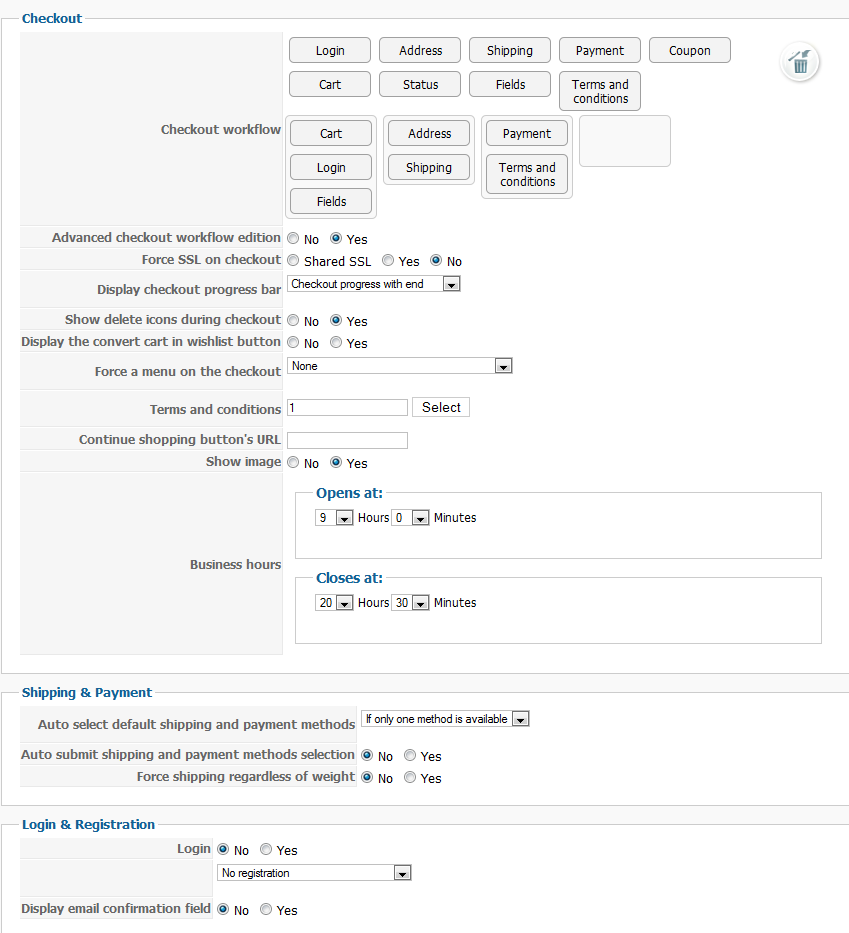
Please Log in or Create an account to join the conversation.
13 years 6 months ago #97944
by nicolas
Replied by nicolas on topic Adres in checkout without login/registration
That sounds like a bug of a previous version of HikaShop. Are you using the latest version ?
Normally, on the login view, you have to enter each time all the address information and that is then used on the address view.
On your screenshot, the address view is empty, which means that the user didn't yet enter any information on the login view.
Normally, on the login view, you have to enter each time all the address information and that is then used on the address view.
On your screenshot, the address view is empty, which means that the user didn't yet enter any information on the login view.
Please Log in or Create an account to join the conversation.
13 years 6 months ago #97951
by dyvymtvar
I have done that and translate the language file to adjust text to my desires and now I have a "non registered" user (without name or username) but with e-mail in my backend.

The problem comes if I try to make a new buy using the same e-mail. In that case the address is not show so the user can not complete the checkout.

If I click on next buttom I am returned to the cart and I have a loop.
I am using the latest version of hikashop.
The can user makes a purchase without any problem, he enter his address in login view and later tha same information is showed in address view. The problem comes when the same user want to make another purchase.
In the login view he has to re-enter his e-mail and then in the address view I have the loop.
You can try it if you want in: www.motosjuancortes.com/en/shop/producto/1226-prueba
Replied by dyvymtvar on topic Adres in checkout without login/registration
Warning: Spoiler!
nicolas wrote:
Hi,
If you want to have a checkout without registration but with address, you will have to have both "login" and "address" views in the checkout workflow. Then, in the Checkout tab of the configuration, you can change the option "registration" to "no registration" in order to remove the creation of a user account. Also, you can turn off the "login" option there to remove the login area of the checkout.
That way, you will still have the address form but no user account would be created.
That "Registration" option is only available in our commercial editions.
I have done that and translate the language file to adjust text to my desires and now I have a "non registered" user (without name or username) but with e-mail in my backend.
The problem comes if I try to make a new buy using the same e-mail. In that case the address is not show so the user can not complete the checkout.
If I click on next buttom I am returned to the cart and I have a loop.
I am using the latest version of hikashop.
The can user makes a purchase without any problem, he enter his address in login view and later tha same information is showed in address view. The problem comes when the same user want to make another purchase.
In the login view he has to re-enter his e-mail and then in the address view I have the loop.
You can try it if you want in: www.motosjuancortes.com/en/shop/producto/1226-prueba
Please Log in or Create an account to join the conversation.
13 years 6 months ago #97953
by nicolas
Replied by nicolas on topic Adres in checkout without login/registration
It sounds like a bug of the latest version that we already fixed.
Please download again the latest version on our website and install it again on yours and that should fix that.
Please download again the latest version on our website and install it again on yours and that should fix that.
Please Log in or Create an account to join the conversation.
13 years 6 months ago #97954
by dyvymtvar
Replied by dyvymtvar on topic Adres in checkout without login/registration
If I upgrade I lose my modified files?
Please Log in or Create an account to join the conversation.
13 years 6 months ago #97956
by nicolas
Replied by nicolas on topic Adres in checkout without login/registration
If you modified HikaShop core files directly via FTP yes. If you modified them via the menu Display->Views, no.
Please Log in or Create an account to join the conversation.
Time to create page: 0.532 seconds