

- Posts: 2
- Thank you received: 0
Add sub-sub zone under sub zone,zone database
14 years 9 months ago #34411
by benking58
Add sub-sub zone under sub zone,zone database was created by benking58
Dear sir,
In your demo, I can see hikashop zone data base( attached). But I can not find it after I installed my downloaded version.
Question 1: Where can I find zone data base and have it display for selection?
Question 2: How can I add sub-sub zone under sub zone? For example: I want to add San Francisco, San Jose... under California>United States. How can I do it?
Thanks for your help.
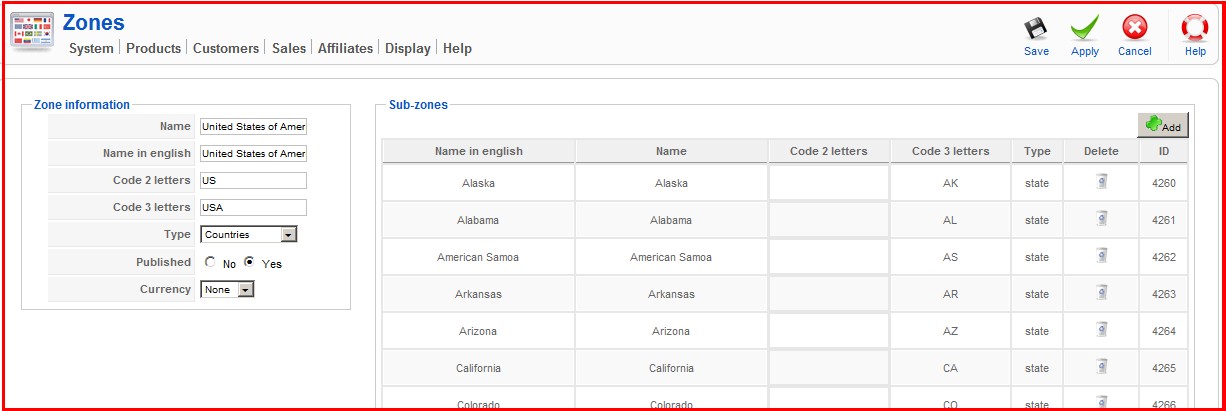
In your demo, I can see hikashop zone data base( attached). But I can not find it after I installed my downloaded version.
Question 1: Where can I find zone data base and have it display for selection?
Question 2: How can I add sub-sub zone under sub zone? For example: I want to add San Francisco, San Jose... under California>United States. How can I do it?
Thanks for your help.
Please Log in or Create an account to join the conversation.

14 years 9 months ago #34470
by nicolas
Replied by nicolas on topic Re: Add sub-sub zone under sub zone,zone database
Hi,
1.
The zones can be edited via the menu System->Zones in HikaShop. It works on our demo website and on all other websites.
If you don't see the menus, it might be because you're using a specific back end template. In that case, you should go in your configuration and change the option "Menu position" in the Display tab and once you save, the menu system should appear.
2. You need to open your California zone on the zones listing. There, you will have a similar screen with a subzones listing where you will be able to add the cities of california.
However, to use the cities that you would create there in the address form on the front end, it won't be easy.
Especially if you want to display different cities for different states. Is that waht you wanted to do ?
1.
The zones can be edited via the menu System->Zones in HikaShop. It works on our demo website and on all other websites.
If you don't see the menus, it might be because you're using a specific back end template. In that case, you should go in your configuration and change the option "Menu position" in the Display tab and once you save, the menu system should appear.
2. You need to open your California zone on the zones listing. There, you will have a similar screen with a subzones listing where you will be able to add the cities of california.
However, to use the cities that you would create there in the address form on the front end, it won't be easy.
Especially if you want to display different cities for different states. Is that waht you wanted to do ?
Please Log in or Create an account to join the conversation.
14 years 9 months ago #34502
by benking58
Replied by benking58 on topic Re: Add sub-sub zone under sub zone,zone database
when you said "go in your "configuration" and change the option "Menu position" in the Display tab" Do you mean "Global Configuration" on Joomla backend? or something else? I did not see "Menu position" "Global Configuration"
Thanks for your help!
Thanks for your help!
Please Log in or Create an account to join the conversation.
14 years 8 months ago #34539
by nicolas
Replied by nicolas on topic Re: Add sub-sub zone under sub zone,zone database
No, I mean the configuration of HikaShop that you can access via the menu Components>HikaShop>Configuration.
Please Log in or Create an account to join the conversation.
Time to create page: 0.158 seconds