

- Posts: 19
- Thank you received: 0
translating filter button label
14 years 9 months ago #35812
by vilost
translating filter button label was created by vilost
I am trying to give a custom name to the label on the filter button on the frontend of the filter module. No matter what I change in the language file the label remains "filter" for English and "filtre" for french.
Please Log in or Create an account to join the conversation.

14 years 9 months ago #35846
by nicolas
Replied by nicolas on topic Re: translating filter button label
Hi,
You should add your modification in the override area when you edit your translation file via the interface of the configuration like that:
FILTER="My custom text"
You should add your modification in the override area when you edit your translation file via the interface of the configuration like that:
FILTER="My custom text"
Please Log in or Create an account to join the conversation.
14 years 9 months ago #35880
by vilost
Replied by vilost on topic Re: translating filter button label
Hi, I have tried that and cleared the cache, but the text remains the same.
Please Log in or Create an account to join the conversation.
14 years 9 months ago #35882
by nicolas
Replied by nicolas on topic Re: translating filter button label
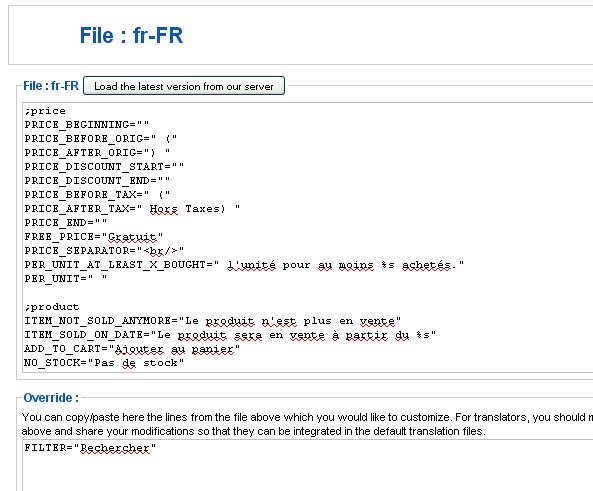
Could you do a screenshot of your modification ?
Please Log in or Create an account to join the conversation.
14 years 9 months ago #35887
by vilost
Replied by vilost on topic Re: translating filter button label
here is it
Please Log in or Create an account to join the conversation.
14 years 9 months ago #35945
by nicolas
Replied by nicolas on topic Re: translating filter button label
That's correct indeed.
Then, it must be joomla translation files overriding that override in some way.
In that case, you should edit the file "filter" for your front end template via the menu Display->Views and directly change the text :
JText::_('FILTER')
by:
'Rechercher'
and that will do what you want.
Then, it must be joomla translation files overriding that override in some way.
In that case, you should edit the file "filter" for your front end template via the menu Display->Views and directly change the text :
JText::_('FILTER')
by:
'Rechercher'
and that will do what you want.
Please Log in or Create an account to join the conversation.
14 years 9 months ago #36041
by vilost
Replied by vilost on topic Re: translating filter button label
That worked. But it is not the best solution for me since I have a multilanguage site and it is not possible to translate the word by this solution. I will keep looking if I can find where the override is coming from. In case you also find it let me know. Thanks for all the help
Please Log in or Create an account to join the conversation.
14 years 9 months ago #36079
by nicolas
Replied by nicolas on topic Re: translating filter button label
Then, you could replace JText::_('FILTER') by this:
JText::_('MY_FILTER')
and in your override file, you could do like that:
MY_FILTER="Rechercher"
That way, the Joomla override when mess with yours.
JText::_('MY_FILTER')
and in your override file, you could do like that:
MY_FILTER="Rechercher"
That way, the Joomla override when mess with yours.
Please Log in or Create an account to join the conversation.
14 years 9 months ago #36128
by vilost
Replied by vilost on topic Re: translating filter button label
That worked perfectly. Thanks.
Please Log in or Create an account to join the conversation.
Time to create page: 0.120 seconds