

- Posts: 39
- Thank you received: 0
Trouble with Taxes
14 years 8 months ago #35921
by CLDesign
Trouble with Taxes was created by CLDesign
Hi,
I'm having trouble implementing the taxes on my site. They're still not showing, and I've already been through all of the FAQ regarding taxes. Is there supposed to be something under "Default Tax Category"? All of my products are set to this, but when I open it, it looks empty. Am I supposed to set this up? Please help!
Thanks!
I'm having trouble implementing the taxes on my site. They're still not showing, and I've already been through all of the FAQ regarding taxes. Is there supposed to be something under "Default Tax Category"? All of my products are set to this, but when I open it, it looks empty. Am I supposed to set this up? Please help!
Thanks!
Please Log in or Create an account to join the conversation.

14 years 8 months ago #35962
by nicolas
Replied by nicolas on topic Re: Trouble with Taxes
Hi,
Did you create tax rule in the menu System->Taxation ?
Did you set your main tax zone in the configuration ?
Please post some screenshots of how you configured your taxes if you want us to be able to help you more precisely.
Did you create tax rule in the menu System->Taxation ?
Did you set your main tax zone in the configuration ?
Please post some screenshots of how you configured your taxes if you want us to be able to help you more precisely.
Please Log in or Create an account to join the conversation.
14 years 8 months ago #36021
by CLDesign
Replied by CLDesign on topic Re: Trouble with Taxes
Hi,
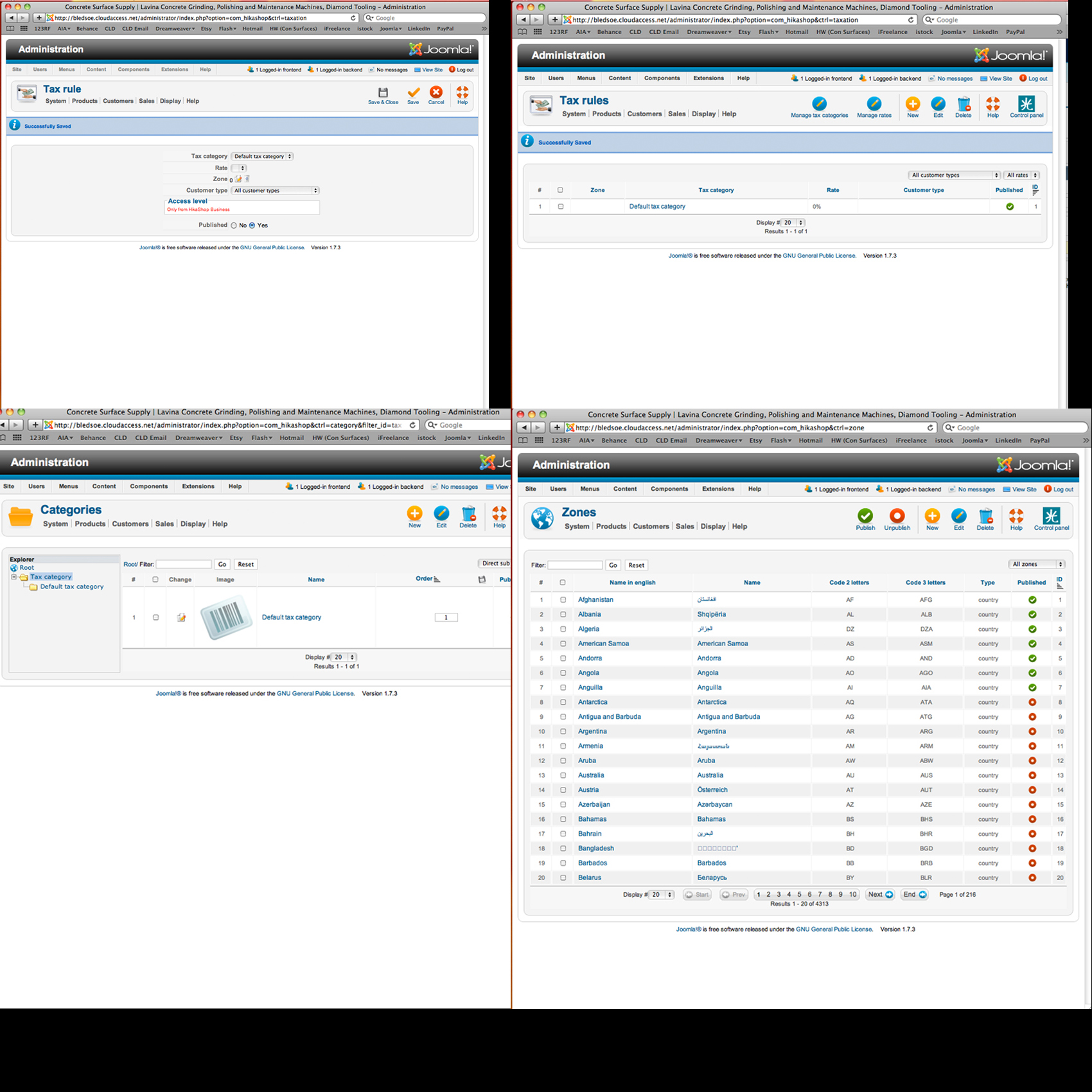
I selected the default tax category under tax rules, and published this, but nothing happened. Am I supposed to create the default tax category? What I need to do is charge tax on sales within 2 states only - Missouri and Kansas - and not charge taxes anywhere else. I hope this is possible...
Also, in the 4th screen shot, you can see that some of my zones are published, and others are not. I'm not really certain if it's necessary that all of them are, but the United States IS published, so I don't think that' the problem.
Please help! Here are a few screen shots:
I selected the default tax category under tax rules, and published this, but nothing happened. Am I supposed to create the default tax category? What I need to do is charge tax on sales within 2 states only - Missouri and Kansas - and not charge taxes anywhere else. I hope this is possible...
Also, in the 4th screen shot, you can see that some of my zones are published, and others are not. I'm not really certain if it's necessary that all of them are, but the United States IS published, so I don't think that' the problem.
Please help!
Here are a few screen shots: Please Log in or Create an account to join the conversation.
14 years 8 months ago #36022
by CLDesign
Replied by CLDesign on topic Re: Trouble with Taxes
Sorry...I tried to send a zip file, but it didn't work...here 4 screenshots in one image...
Please Log in or Create an account to join the conversation.
14 years 8 months ago #36061
by nicolas
Replied by nicolas on topic Re: Trouble with Taxes
You need to create a tax rate via the "manage tax rates" button of the menu System->Taxation.
Then, edit your tax rule (or delete it and create a new one) and use that tax rate AND also specify the zone where that tax rate should apply (Kansas for example).
Then, in the configuration of HikaShop make sure that you select this zone in the "main tax zone"
option.
Then, edit your tax rule (or delete it and create a new one) and use that tax rate AND also specify the zone where that tax rate should apply (Kansas for example).
Then, in the configuration of HikaShop make sure that you select this zone in the "main tax zone"
option.
Please Log in or Create an account to join the conversation.
14 years 8 months ago #36125
by CLDesign
Replied by CLDesign on topic Re: Trouble with Taxes
Thanks! I need to do some more testing, but I think I have this fixed now!!!
Please Log in or Create an account to join the conversation.
Time to create page: 0.170 seconds