

- Posts: 10
- Thank you received: 0
How to create lines for product display ?
14 years 9 months ago #36986
by lucky93
How to create lines for product display ? was created by lucky93
Hi,
May I know how to create lines for product display like your demo site ?
Please see attached screenshot
image missing http://www.hikashop.com/media/kunena/attachments/legacy/images/Product_display.png
May I know how to create lines for product display like your demo site ?
Please see attached screenshot
image missing http://www.hikashop.com/media/kunena/attachments/legacy/images/Product_display.png
Please Log in or Create an account to join the conversation.

14 years 9 months ago #37072
by Jerome
Jerome - Obsidev.com
HikaMarket & HikaSerial developer / HikaShop core dev team.
Replied by Jerome on topic Re: How to create lines for product display ?
Hi,
You have to ddd some CSS rules.
Regards,
You have to ddd some CSS rules.
Code:
.hikashop_product_main_image_thumb {
background-color: white;
border: 1px solid #CCC;
padding-right: 30px;
}
.hikashop_product_right_part {
background-color: whiteSmoke;
border: 1px solid #CCC;
padding: 10px;
margin-bottom: 20px;
}
.hikashop_product_description_main p {
background-color: white;
border: 1px solid #CCC;
margin-bottom: 10px;
margin-right: 20px;
padding: 10px;
}
Regards,
Jerome - Obsidev.com
HikaMarket & HikaSerial developer / HikaShop core dev team.
Please Log in or Create an account to join the conversation.
14 years 9 months ago #37199
by lucky93
Replied by lucky93 on topic Re: How to create lines for product display ?
Thank you for help.
For product description I add following :
.hikashop_product_description_main p {
background-color: #E6E6E6;
border: 1px solid #CCC;
margin-bottom: 10px;
margin-right: 20px;
padding: 10px;
But, why I don't get space between line & text like last screenshot ?
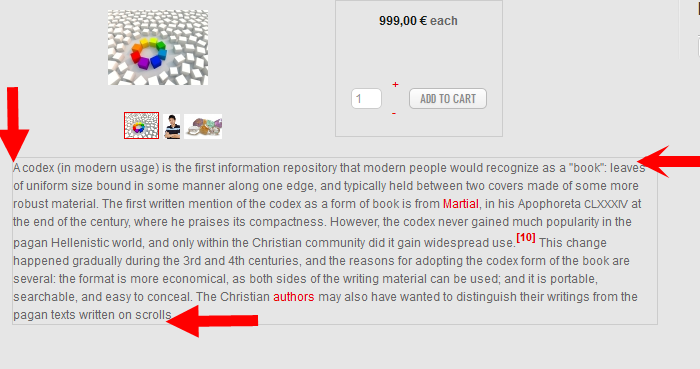
For product description I add following :
.hikashop_product_description_main p {
background-color: #E6E6E6;
border: 1px solid #CCC;
margin-bottom: 10px;
margin-right: 20px;
padding: 10px;
But, why I don't get space between line & text like last screenshot ?
Please Log in or Create an account to join the conversation.
14 years 9 months ago #37202
by Jerome
Jerome - Obsidev.com
HikaMarket & HikaSerial developer / HikaShop core dev team.
Replied by Jerome on topic Re: How to create lines for product display ?
It may have some other CSS rules which are in "conflict".
Try to set " padding: 10px !important; ", it could help.
Regards,
Try to set " padding: 10px !important; ", it could help.
Regards,
Jerome - Obsidev.com
HikaMarket & HikaSerial developer / HikaShop core dev team.
Please Log in or Create an account to join the conversation.
14 years 9 months ago #37206
by lucky93
Replied by lucky93 on topic Re: How to create lines for product display ?
It's working, thanks 
Please Log in or Create an account to join the conversation.
Time to create page: 0.136 seconds