
[SOLVED]different custom field in address template
- alain.roger
-
 Topic Author
- Offline
Less
More
14 years 9 months ago - 14 years 9 months ago #37195
by alain.roger
What does not kill you, makes you stronger.
[SOLVED]different custom field in address template was created by alain.roger
Hi,
i would like to allow user to choose if address is company address or personal/individual.
i was thinking to have a radiobutton and based on that template should consists of different custom fields.
e.g. if user choose company address, template should display VAT address, trading number, company name, but if user select person/individual address in this case template should display what it does by default.
i read some post about it but I didn't find any post with such solution... so is it possible or not ?
if yes, what is the best way to do that ?
thx.
i would like to allow user to choose if address is company address or personal/individual.
i was thinking to have a radiobutton and based on that template should consists of different custom fields.
e.g. if user choose company address, template should display VAT address, trading number, company name, but if user select person/individual address in this case template should display what it does by default.
i read some post about it but I didn't find any post with such solution... so is it possible or not ?
if yes, what is the best way to do that ?
thx.
What does not kill you, makes you stronger.
Last edit: 14 years 9 months ago by alain.roger.
Please Log in or Create an account to join the conversation.

14 years 9 months ago #37279
by nicolas
Replied by nicolas on topic Re: different custom fields in address template
You can do that by editing your custom fields via the menu Display->Custom fields and using the option "Display limited to"
Please Log in or Create an account to join the conversation.
- alain.roger
-
Topic Author
- Offline
14 years 9 months ago #37292
by alain.roger
What does not kill you, makes you stronger.
Replied by alain.roger on topic Re: different custom fields in address template
Thank Nicolas.
I have to say that it's a wonderful setting...however in my case, it doesn't work as i was expecting.
i set as first field a radiobutton or combobox to make user select if he represents a PERSON or a COMPANY.
based on his answer i would like to make appear VAT number, trading chamber number and company name, if user select COMPANY.
however, everything is displayed even if user select "PERSON".
(see attachement)
so what di I do wrong ?
thx.
I have to say that it's a wonderful setting...however in my case, it doesn't work as i was expecting.
i set as first field a radiobutton or combobox to make user select if he represents a PERSON or a COMPANY.
based on his answer i would like to make appear VAT number, trading chamber number and company name, if user select COMPANY.
however, everything is displayed even if user select "PERSON".
(see attachement)
so what di I do wrong ?
thx.
What does not kill you, makes you stronger.
Please Log in or Create an account to join the conversation.
- alain.roger
-
Topic Author
- Offline
14 years 9 months ago - 14 years 9 months ago #37293
by alain.roger
What does not kill you, makes you stronger.
Replied by alain.roger on topic Re: different custom fields in address template
Moreover, some countries have some "personal issues" to purchase services/good from some specific countries.
It could be good to have a specific value for country + state like "select your country" and to make this neutral value not valid in case of user forgot to change it.
It could be good to have a specific value for country + state like "select your country" and to make this neutral value not valid in case of user forgot to change it.
What does not kill you, makes you stronger.
Last edit: 14 years 9 months ago by alain.roger.
Please Log in or Create an account to join the conversation.
- alain.roger
-
Topic Author
- Offline
14 years 9 months ago #37350
by alain.roger
What does not kill you, makes you stronger.
Replied by alain.roger on topic Re: different custom fields in address template
Any idea why it's not working ?
What does not kill you, makes you stronger.
Please Log in or Create an account to join the conversation.
14 years 9 months ago #37516
by nicolas
Replied by nicolas on topic Re: different custom fields in address template
You can always add a country "select your country" via the menu System->Zones and use that value as the default value. But it will be valid for the system.
For the custom fields not working, I wouldn't be able to tell you without looking that that page with firebug and having some screenshots of how you configured your custom fields.
For the custom fields not working, I wouldn't be able to tell you without looking that that page with firebug and having some screenshots of how you configured your custom fields.
Please Log in or Create an account to join the conversation.
- alain.roger
-
Topic Author
- Offline
14 years 9 months ago - 14 years 9 months ago #37523
by alain.roger
What does not kill you, makes you stronger.
Replied by alain.roger on topic Re: different custom fields in address template
Hi Nicolas,
as you maybe remember the website is on my local computer for now, so i'm not able to give you access to it
regarding screenshot of custom fields having setup "display limited to:, please find an example in attachements.
anyway i have the same behavior under a fresh installation of joomla 2.5 and hikashop 1.56. with Beez_20 template
thx.
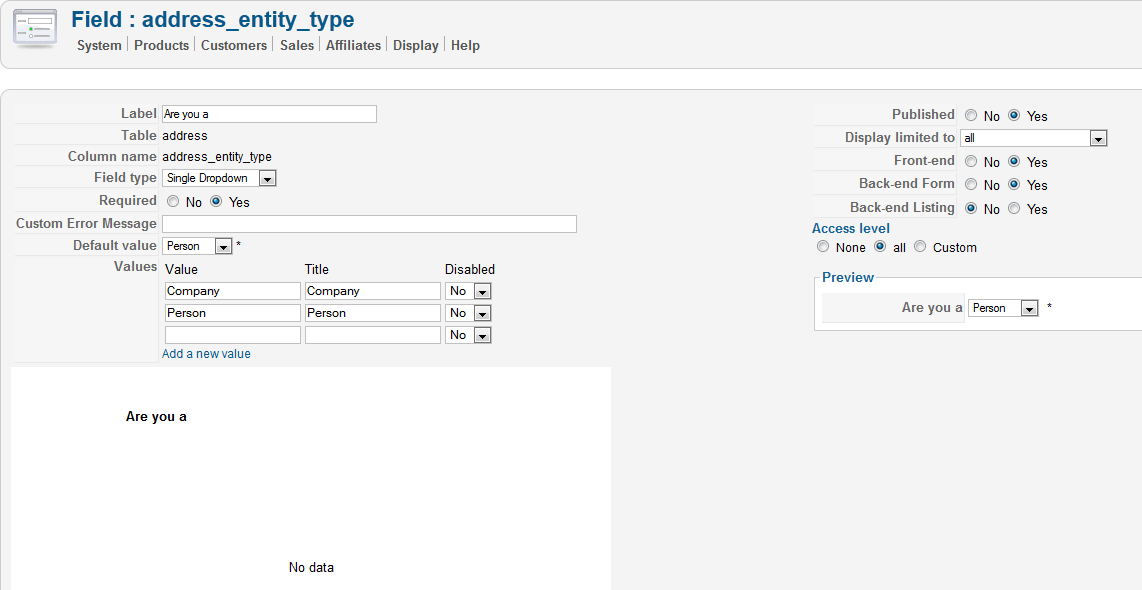
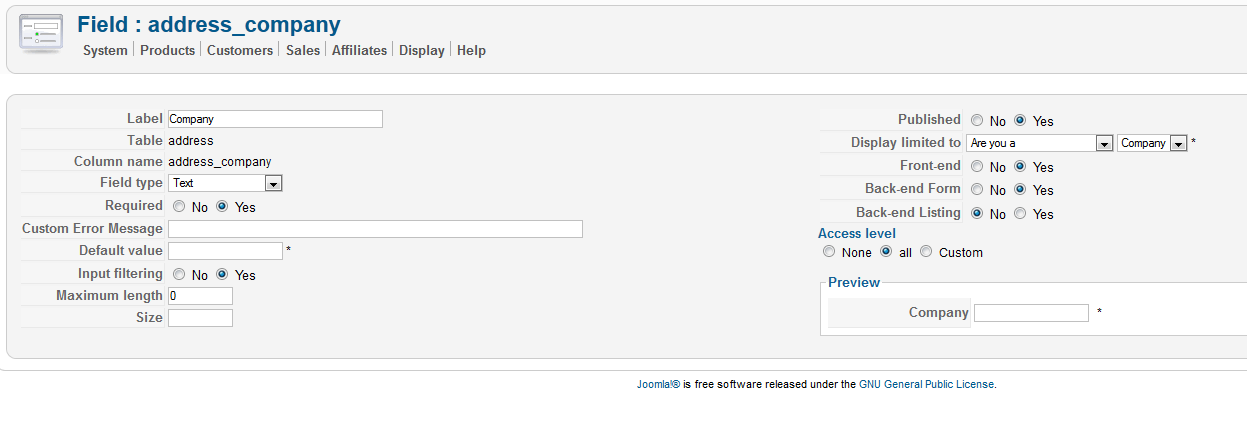
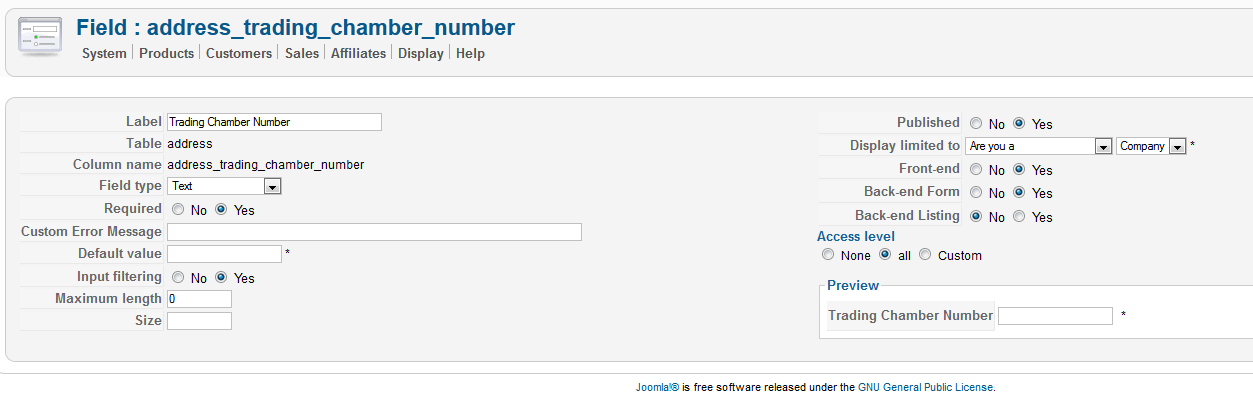
as you maybe remember the website is on my local computer for now, so i'm not able to give you access to it
regarding screenshot of custom fields having setup "display limited to:, please find an example in attachements.
anyway i have the same behavior under a fresh installation of joomla 2.5 and hikashop 1.56. with Beez_20 template
thx.
What does not kill you, makes you stronger.
Last edit: 14 years 9 months ago by alain.roger.
Please Log in or Create an account to join the conversation.
14 years 9 months ago #37599
by nicolas
Replied by nicolas on topic Re: different custom fields in address template
Hi,
We found the problem. It's actually that this was not implemented for address custom fields. We've modified the code to handle it and it's now working fine on our end. Would you please redownload the install package on our website, install it over your current website and try again ?
We found the problem. It's actually that this was not implemented for address custom fields. We've modified the code to handle it and it's now working fine on our end. Would you please redownload the install package on our website, install it over your current website and try again ?
Please Log in or Create an account to join the conversation.
- alain.roger
-
Topic Author
- Offline
14 years 9 months ago - 14 years 9 months ago #37609
by alain.roger
What does not kill you, makes you stronger.
Replied by alain.roger on topic Re: different custom fields in address template
Hi Nicolas,
now it works well for address part.
thx.
now it works well for address part.
thx.
What does not kill you, makes you stronger.
Last edit: 14 years 9 months ago by alain.roger.
Please Log in or Create an account to join the conversation.
Time to create page: 0.139 seconds