

- Posts: 10
- Thank you received: 0
Change color
14 years 9 months ago #37480
by lucky93
Change color was created by lucky93
May I know how to change following color ?
1, Color of category name and product name (from screenshot "RED" color is from template setting, I like to change to "BLACK")
2, Background color of category and product (default is WHITE, I like to change to template background color E6E6E6)
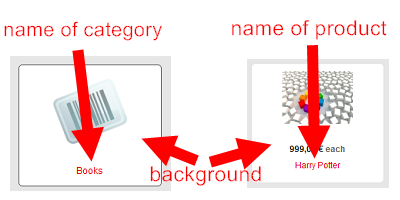
1, Color of category name and product name (from screenshot "RED" color is from template setting, I like to change to "BLACK")
2, Background color of category and product (default is WHITE, I like to change to template background color E6E6E6)
Please Log in or Create an account to join the conversation.
14 years 9 months ago #37755
by lucky93
Replied by lucky93 on topic Re: Change color
Any suggestion ?
Please Log in or Create an account to join the conversation.

14 years 9 months ago #37906
by nicolas
Replied by nicolas on topic Re: Change color
1. For the names, you can edit the front end CSS via the Display tab of the configuration and add:
.hikashop_product_name,.hikashop_category_name{
color: black !important;
}
2. You can do that by changing the background color of your menus and modules via the menu Display->Content menus/modules.
.hikashop_product_name,.hikashop_category_name{
color: black !important;
}
2. You can do that by changing the background color of your menus and modules via the menu Display->Content menus/modules.
Please Log in or Create an account to join the conversation.
Time to create page: 0.062 seconds