

- Posts: 96
- Thank you received: 0
Checkout registration page
16 years 3 days ago - 16 years 3 days ago #381
by manamaga
Checkout registration page was created by manamaga
On the registration page it asks for 'Name' twice, is it possible to remove the top 'Name' field:
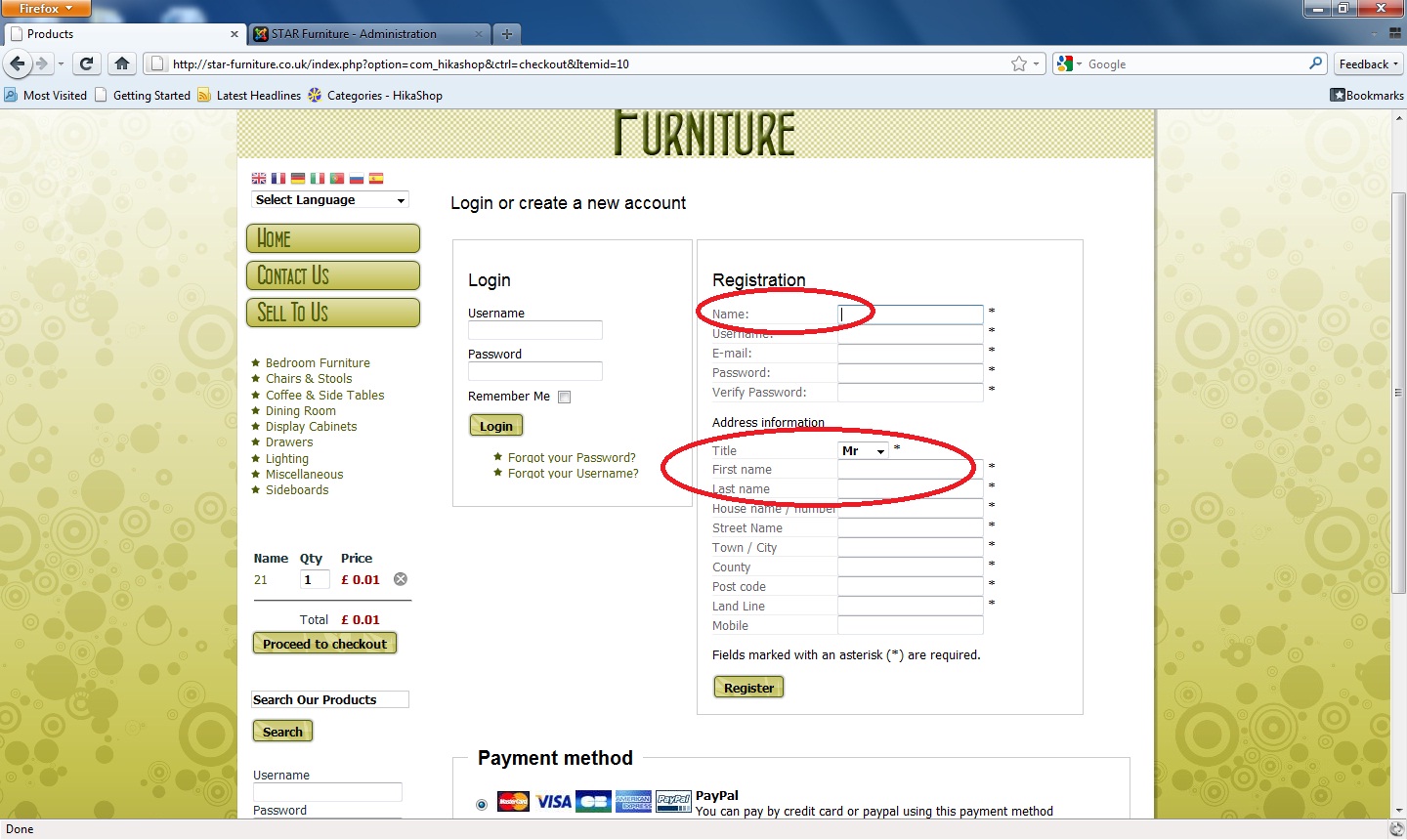
Also, do i need the joomla 'login' module installing?
Also, do i need the joomla 'login' module installing?
Last edit: 16 years 3 days ago by manamaga.
Please Log in or Create an account to join the conversation.

16 years 3 days ago #384
by nicolas
Replied by nicolas on topic Re: Checkout registration page
On HikaShop commercial versions there is an option to remove the name/username/password/password2 fields from this form. Just the email and the address information will be left so that the user has less fields to fill. Now, if you just want to remove the name field, Joomla doesn't allow you to register a user without a name, so what you could do is use the username field value as the name. For that, change the view itself with the display->views menu. You can search for "login_register". In the view code, you could remove the label, change the field type to "hidden" and add the code
to the username field. That way the name of the joomla user will use the username field value. You could also use a concatenation of the other fields value but that requires a bit more javascript code.
You don't need the joomla login module. The login area you see on the HikaShop checkout do not use it at all.
Code:
onchange="document.getElementById('register_name').value=this.value;"
You don't need the joomla login module. The login area you see on the HikaShop checkout do not use it at all.
Please Log in or Create an account to join the conversation.
16 years 3 days ago #386
by manamaga
Replied by manamaga on topic Re: Checkout registration page
Thanks again! One more thing, is it possibe to change the text here:
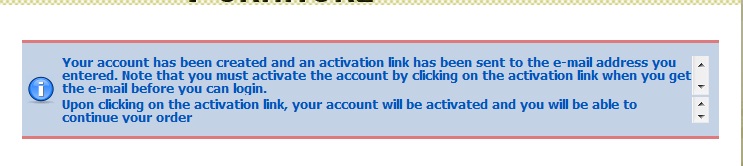
I wanted to add something like 'Please check your junk mail' message.
I wanted to add something like 'Please check your junk mail' message.
Please Log in or Create an account to join the conversation.
16 years 3 days ago #387
by nicolas
Replied by nicolas on topic Re: Checkout registration page
You can edit that message in the translation file. You can edit the translation file in the config under the tab languages. This string should be near the top on the file, around line 60.
Please Log in or Create an account to join the conversation.
16 years 3 days ago #388
by manamaga
Replied by manamaga on topic Re: Checkout registration page
nicolas wrote:
How can a previous customer log in next time before they make another purchase?
You don't need the joomla login module. The login area you see on the HikaShop checkout do not use it at all.
How can a previous customer log in next time before they make another purchase?
Please Log in or Create an account to join the conversation.
16 years 3 days ago #389
by nicolas
Replied by nicolas on topic Re: Checkout registration page
Like I said, if you remove the joomla login module, the login screen will still be displayed on the checkout. They are not related. They just use the same login procedures once the user enter his information but these procedures are not in the joomla login module, they are in the joomla library. So your customers will still be able to login at the beginning of the checkout.
Also, you can still use the joomla login view even without the login module by creating a user login menu but that has nothing to do with HikaShop.
Also, you can still use the joomla login view even without the login module by creating a user login menu but that has nothing to do with HikaShop.
Please Log in or Create an account to join the conversation.
14 years 2 months ago #60581
by Odda
Replied by Odda on topic Re: Checkout registration page
Hi!
I would like to try the trick with editing the "login_register" in the Display > View Code to use the username field value as the name, but I can't find the file (login_register). Has this changed since this topic was last commented?
I would like to try the trick with editing the "login_register" in the Display > View Code to use the username field value as the name, but I can't find the file (login_register). Has this changed since this topic was last commented?
Please Log in or Create an account to join the conversation.
14 years 2 months ago #60663
by nicolas
Replied by nicolas on topic Re: Checkout registration page
Hi,
Yes, it's now the "registration" file of the view "user".
Yes, it's now the "registration" file of the view "user".
Please Log in or Create an account to join the conversation.
14 years 2 months ago #60970
by Odda
Replied by Odda on topic Re: Checkout registration page
Thanks Nicolas, I found the file and did some changes, but obviously not the right one with my very limited skills... This is the first part of the file, can you please help me with how it should look like after the changes?:
*/
defined('_JEXEC') or die('Restricted access');
?>
<table cellpadding="0" cellspacing="0" border="0" class="hikashop_contentpane">
<?php if(!$this->simplified_registration){ ?>
<tr class="hikashop_registration_name_line">
<td class="key">
<label id="namemsg" for="register_name">
<?php echo JText::_( 'HIKA_USER_NAME' ); ?>
</label>
</td>
<td>
<input type="text" name="data[register][name]" id="register_name" value="<?php echo $this->escape($this->mainUser->get( 'name' ));?>" class="inputbox required" maxlength="50" /> *
</td>
</tr>
<!-- <tr class="hikashop_registration_username_line">
<td class="key">
<label id="usernamemsg" for="register_username">
<?php echo JText::_( 'HIKA_USERNAME' ); ?>
</label>
</td>
<td>
<input type="text" id="register_username" name="data[register][username]" value="<?php echo $this->escape($this->mainUser->get( 'username' ));?>" class="inputbox required validate-username" maxlength="25" /> *
</td>
</tr> -->
<?php }?>
*/
defined('_JEXEC') or die('Restricted access');
?>
<table cellpadding="0" cellspacing="0" border="0" class="hikashop_contentpane">
<?php if(!$this->simplified_registration){ ?>
<tr class="hikashop_registration_name_line">
<td class="key">
<label id="namemsg" for="register_name">
<?php echo JText::_( 'HIKA_USER_NAME' ); ?>
</label>
</td>
<td>
<input type="text" name="data[register][name]" id="register_name" value="<?php echo $this->escape($this->mainUser->get( 'name' ));?>" class="inputbox required" maxlength="50" /> *
</td>
</tr>
<!-- <tr class="hikashop_registration_username_line">
<td class="key">
<label id="usernamemsg" for="register_username">
<?php echo JText::_( 'HIKA_USERNAME' ); ?>
</label>
</td>
<td>
<input type="text" id="register_username" name="data[register][username]" value="<?php echo $this->escape($this->mainUser->get( 'username' ));?>" class="inputbox required validate-username" maxlength="25" /> *
</td>
</tr> -->
<?php }?>
Please Log in or Create an account to join the conversation.
14 years 2 months ago #61047
by nicolas
Replied by nicolas on topic Re: Checkout registration page
You should simply remove the whole
HikaShop will automatically put the address first and last names in the user name since a few versions.
Code:
<tr class="hikashop_registration_name_line">
<td class="key">
<label id="namemsg" for="register_name">
<?php echo JText::_( 'HIKA_USER_NAME' ); ?>
</label>
</td>
<td>
<input type="text" name="data[register][name]" id="register_name" value="<?php echo $this->escape($this->mainUser->get( 'name' ));?>" class="inputbox required" maxlength="50" /> *
</td>
</tr>
HikaShop will automatically put the address first and last names in the user name since a few versions.
Please Log in or Create an account to join the conversation.
14 years 1 month ago - 14 years 1 month ago #65084
by Odda
Replied by Odda on topic Re: Checkout registration page
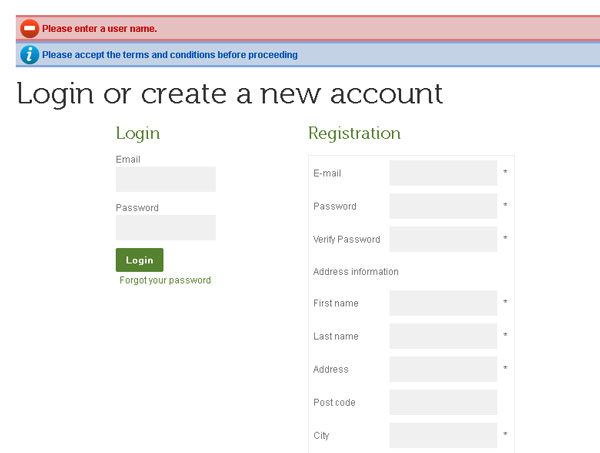
I tried to delete the code, and it seems to work in the Joomla login module. But if I place a product in the basket and go to the check out page to register as a new customer there, I get the message that I need to fill in the user name. Any hint for a solution? (Using the "Email as Username"-plugin combined with making this work makes a really user friendly solution!)
Last edit: 14 years 1 month ago by Odda.
Please Log in or Create an account to join the conversation.
14 years 1 month ago #65241
by nicolas
Replied by nicolas on topic Re: Checkout registration page
Can you give the exact error message that you have ?
Please Log in or Create an account to join the conversation.
14 years 1 month ago #65272
by Odda
Replied by Odda on topic Re: Checkout registration page
Here is a print screen of the message from the checkout page:
Please Log in or Create an account to join the conversation.
14 years 1 month ago #65494
by nicolas
Replied by nicolas on topic Re: Checkout registration page
The code I told you to delete was for the name field. You apparently also deleted the username field.
That field is necessary for joomla.
If you want to use the email as username, you should change the option "registration" of the Checkout tab of the configuration to "simplified registration". That will remove automatically the name and username fields without any view modification and without any error.
That field is necessary for joomla.
If you want to use the email as username, you should change the option "registration" of the Checkout tab of the configuration to "simplified registration". That will remove automatically the name and username fields without any view modification and without any error.
Please Log in or Create an account to join the conversation.
14 years 1 month ago #65566
by Odda
Replied by Odda on topic Re: Checkout registration page
"Simplified registration with password" and the "Email as Username" made it work just the way I wanted to! Perfect! Thank you for great help!
Please Log in or Create an account to join the conversation.
Time to create page: 0.415 seconds