

- Posts: 84
- Thank you received: 2
How to change the color or remove the pane
14 years 9 months ago - 14 years 9 months ago #38232
by sdhakad
How to change the color or remove the pane was created by sdhakad
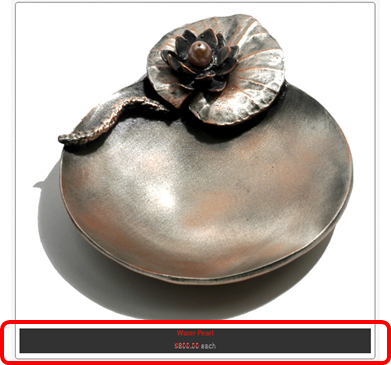
How to change the color or remove the pane marked in red box below:
Last edit: 14 years 9 months ago by sdhakad.
Please Log in or Create an account to join the conversation.

14 years 9 months ago #38294
by nicolas
Replied by nicolas on topic Re: How to change the color or remove the pane
Hi,
That black area displays because you're using the pane item box layout in your menu/module's hikashop options.
You can use another item box layout to not have it.
Or you can change the CSS of HikaShop to change it's color. The CSS code would be:
.hikashop_img_pane_panel{
background-color: white !important;
}
That black area displays because you're using the pane item box layout in your menu/module's hikashop options.
You can use another item box layout to not have it.
Or you can change the CSS of HikaShop to change it's color. The CSS code would be:
.hikashop_img_pane_panel{
background-color: white !important;
}
Please Log in or Create an account to join the conversation.
14 years 9 months ago - 14 years 9 months ago #38380
by sdhakad
Replied by sdhakad on topic Re: How to change the color or remove the pane
Thanks for the quick reply. Some more help needed, please:
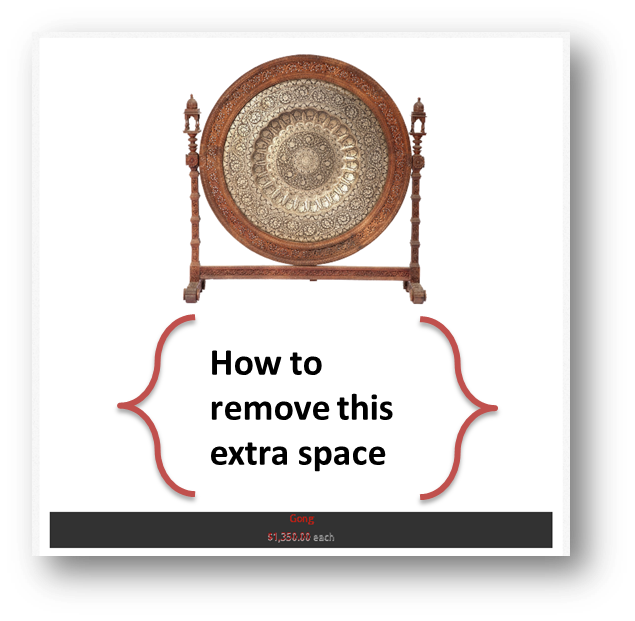
1. How to remove the extra space between the product photo and the black pane. i am not able to find it in CSS.
2. As advised, where can i find to choose another item box layout.
Thanks in advance.
1. How to remove the extra space between the product photo and the black pane. i am not able to find it in CSS.
2. As advised, where can i find to choose another item box layout.
Thanks in advance.
Last edit: 14 years 9 months ago by sdhakad.
Please Log in or Create an account to join the conversation.
14 years 9 months ago #38508
by nicolas
Replied by nicolas on topic Re: How to change the color or remove the pane
For the space, that must be because of the "Pane height" option in the hikashop options of your menu/module.
The hikashop options of your menu/module can be accessed by editing the menu/module via the menu Display>Content menus/modules in the back end of HikaShop.
The hikashop options of your menu/module can be accessed by editing the menu/module via the menu Display>Content menus/modules in the back end of HikaShop.
Please Log in or Create an account to join the conversation.
14 years 7 months ago #45098
by boussog1
Replied by boussog1 on topic Re: How to change the color or remove the pane
Hello,
I am trying to change the pane height for each menu/module individually. I have found the CSS height property which affects all panes in the site (div.hikashop_subcontainer_border), have disabled them, but no matter what value I put in the menu and module height fields, nothing happens.
Btw, all my display content modules are NOT enabled (that's how they appear when created by the system as a result of a new menu creation). Is this how it is supposed to be?
Thanks,
George.
I am trying to change the pane height for each menu/module individually. I have found the CSS height property which affects all panes in the site (div.hikashop_subcontainer_border), have disabled them, but no matter what value I put in the menu and module height fields, nothing happens.
Btw, all my display content modules are NOT enabled (that's how they appear when created by the system as a result of a new menu creation). Is this how it is supposed to be?
Thanks,
George.
Please Log in or Create an account to join the conversation.
14 years 7 months ago #45260
by nicolas
Replied by nicolas on topic Re: How to change the color or remove the pane
If you want to change the pane height (the semi transparent black background) in CSS, you can use that code:
.hikashop_img_pane_panel{
height: 10px !important;
}
And if you want different heights for different listings, you will have to use such CSS:
#hikashop_category_information_module_XX .hikashop_img_pane_panel{
height: 10px !important;
}
where XX is the id of your module.
However, the option in the modules/menus works properly as far as we know...
Yes, it's normal that the content modules when created automatically are disabled.
.hikashop_img_pane_panel{
height: 10px !important;
}
And if you want different heights for different listings, you will have to use such CSS:
#hikashop_category_information_module_XX .hikashop_img_pane_panel{
height: 10px !important;
}
where XX is the id of your module.
However, the option in the modules/menus works properly as far as we know...
Yes, it's normal that the content modules when created automatically are disabled.
Please Log in or Create an account to join the conversation.
14 years 7 months ago #45480
by boussog1
Replied by boussog1 on topic Re: How to change the color or remove the pane
Thanks Nicolas! For some reason in my site although I can define the product image size when I set the pane height nothing happens ...
Please Log in or Create an account to join the conversation.
14 years 5 months ago #53229
by rmcdonald
Replied by rmcdonald on topic Re: How to change the color or remove the pane
Hi I have attempted to change the CSS file as you suggest above to remove the background box but it is not changing - any suggestions?
Please Log in or Create an account to join the conversation.
14 years 5 months ago #53330
by nicolas
Replied by nicolas on topic Re: How to change the color or remove the pane
If you add CSS and you don't see the result, please flush your browser's cache.
Please Log in or Create an account to join the conversation.
14 years 5 months ago #53395
by rmcdonald
Replied by rmcdonald on topic Re: How to change the color or remove the pane
Not sure what I was doing wrong but got it working now , Thankyou
Please Log in or Create an account to join the conversation.
Less
More
- Posts: 10
- Thank you received: 0
13 years 8 months ago #90883
by renewable306
Replied by renewable306 on topic How to change the color or remove the pane
Hi,
I'm trying to change the colour/transperancy of the black img_pane box. I've altered the front end CSS as below. Should this change it? What am I missing?
.hikashop_img_pane_panel{
position: absolute;
bottom:0px;
background: rgba(0,0,0,0. ;
background-color:grey\9;[/b]
filter:alpha(opacity=30)\9;
text-align:center !important;
I'm trying to change the colour/transperancy of the black img_pane box. I've altered the front end CSS as below. Should this change it? What am I missing?
.hikashop_img_pane_panel{
position: absolute;
bottom:0px;
background: rgba(0,0,0,0.
;background-color:grey\9;[/b]
filter:alpha(opacity=30)\9;
text-align:center !important;
Please Log in or Create an account to join the conversation.

13 years 8 months ago #90925
by Eliot
Replied by Eliot on topic How to change the color or remove the pane
Hi there,
You should take a look at your css, I believe the .hikashop_img_pane_panel part is diplicated so you must have edited the first one (and the second one is overriding it)
You should take a look at your css, I believe the .hikashop_img_pane_panel part is diplicated so you must have edited the first one (and the second one is overriding it)
The following user(s) said Thank You: renewable306
Please Log in or Create an account to join the conversation.
Less
More
- Posts: 10
- Thank you received: 0
13 years 8 months ago #90958
by renewable306
Replied by renewable306 on topic How to change the color or remove the pane
Hi Thanks for your reply.
I can see that there is a duplicate CSS entry. I've now changed this to a single entry of this code snippet as below. Still no change though to the original black setting & opacity. Is there another global setting or config setting somewhere?
.hikashop_img_pane_panel{
position: absolute;
bottom:0px;
background: rgba(8,8,0,0.;
background-color:white\9;
filter:alpha(opacity=30)\9;
text-align:center !important;
I can see that there is a duplicate CSS entry. I've now changed this to a single entry of this code snippet as below. Still no change though to the original black setting & opacity. Is there another global setting or config setting somewhere?
.hikashop_img_pane_panel{
position: absolute;
bottom:0px;
background: rgba(8,8,0,0.
;background-color:white\9;
filter:alpha(opacity=30)\9;
text-align:center !important;
Please Log in or Create an account to join the conversation.
13 years 8 months ago #90972
by Eliot
Replied by Eliot on topic How to change the color or remove the pane
Hi there,
Are you sure your are using the custom css? I mean, is the selected front-end css file named "custom"?
also this rule background: rgba(8,8,0,0.; is true for every navigator while this one background-color:white\9; is for IE so you shoudl edit the first one.
Indeed, the values are too close to black.
Try something like background: rgba(255,255,255,0.; it should do the job.
Are you sure your are using the custom css? I mean, is the selected front-end css file named "custom"?
also this rule background: rgba(8,8,0,0.
; is true for every navigator while this one background-color:white\9; is for IE so you shoudl edit the first one.Indeed, the values are too close to black.
Try something like background: rgba(255,255,255,0.
; it should do the job.
The following user(s) said Thank You: renewable306
Please Log in or Create an account to join the conversation.
Less
More
- Posts: 10
- Thank you received: 0
13 years 8 months ago #91225
by renewable306
Replied by renewable306 on topic How to change the color or remove the pane
Eliot your a star - Thanks
Please Log in or Create an account to join the conversation.
Time to create page: 0.082 seconds