
- Posts: 57
- Thank you received: 2
Choose Options button
- expertbeginner
-
 Topic Author
- Offline
Less
More
14 years 9 months ago #38611
by expertbeginner
Choose Options button was created by expertbeginner
Hi,
It may be something that either my client or me has done, I don't know, but a CHOOSE OPTIONS button has appeared on product listings
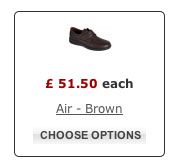
as per above.
I've searched for a setting to turn this on/off without any success. I have also checked that none of the items of stock have options associated with them in the event that it is an automatic feature.
Is it possible or is there a setting to control this? If so, where?
Many thanks
Martyn.
It may be something that either my client or me has done, I don't know, but a CHOOSE OPTIONS button has appeared on product listings
as per above.
I've searched for a setting to turn this on/off without any success. I have also checked that none of the items of stock have options associated with them in the event that it is an automatic feature.
Is it possible or is there a setting to control this? If so, where?
Many thanks
Martyn.
Please Log in or Create an account to join the conversation.

14 years 8 months ago #38747
by nicolas
Replied by nicolas on topic Re: Choose Options button
Hi,
That button replaces the add to cart button automatically when your product has options/characteristics.
If you don't want to see it, you should turn off the option "display add to cart button" in your menu/module's hikashop options that you can easily access via the menu Display->Content menus/modules
That button replaces the add to cart button automatically when your product has options/characteristics.
If you don't want to see it, you should turn off the option "display add to cart button" in your menu/module's hikashop options that you can easily access via the menu Display->Content menus/modules
Please Log in or Create an account to join the conversation.

14 years 1 month ago #66882
by ClickWebDesign
Replied by ClickWebDesign on topic Re: Choose Options button
Hi Nicolas,
"That button replaces the add to cart button automatically when your product has options/characteristics." - This only seems to be the case for me if I have characteristics, I have products with options only that display the "add to cart" button?
Any idea why this might be?
Thanks
Chris
"That button replaces the add to cart button automatically when your product has options/characteristics." - This only seems to be the case for me if I have characteristics, I have products with options only that display the "add to cart" button?
Any idea why this might be?
Thanks
Chris
Please Log in or Create an account to join the conversation.
14 years 1 month ago #67100
by nicolas
Replied by nicolas on topic Re: Choose Options button
That's normal. When I said "options/characteristics" I meant characteristics which some people name "options".
Please Log in or Create an account to join the conversation.
Time to create page: 0.055 seconds