
product_code on the order form/invoice

14 years 7 months ago - 14 years 7 months ago #38954
by Jims
product_code on the order form/invoice was created by Jims
I edited the quantity php file to show the product code and product name on the checkout and on the email form that goes to the customer, but the product_code des not appear on the emailed invoice/order form
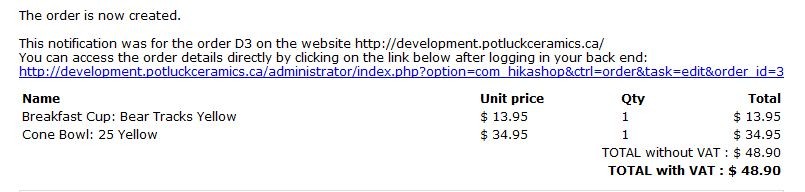
that goes to the business.
What do I need to edit to show the product_code on the emailed order form.
The product_code DOES appear on the order as seen on the backend.
Jim
ADDITIONAL INFORMATION:
I did find the emails section (I was looking in Display/Views earlier) and I added the product code to the email. But I don't know the internal codes because this is what I get in the email.

I get the price not the product_code??
PS I now see why I get the price and not the product code, but my PHP knowledge is not up to getting the correct coding to get the product_code shown, which I would have expected to have been included in this email.
that goes to the business.
What do I need to edit to show the product_code on the emailed order form.
The product_code DOES appear on the order as seen on the backend.
Jim
ADDITIONAL INFORMATION:
I did find the emails section (I was looking in Display/Views earlier) and I added the product code to the email. But I don't know the internal codes because this is what I get in the email.
I get the price not the product_code??
PS I now see why I get the price and not the product code, but my PHP knowledge is not up to getting the correct coding to get the product_code shown, which I would have expected to have been included in this email.
Last edit: 14 years 7 months ago by Jims. Reason: additional information
Please Log in or Create an account to join the conversation.

14 years 7 months ago #39027
by Jerome
Jerome - Obsidev.com
HikaMarket & HikaSerial developer / HikaShop core dev team.
Replied by Jerome on topic Re: product_code on the order form/invoice
Hi,
In the email, you can use this:
You have to past it just before:
Regards,
In the email, you can use this:
Code:
<td>
<?php echo $item->order_product_code; ?>
</td>
You have to past it just before:
Code:
<td>
<?php echo $currencyHelper->format($item->order_product_price+$item->order_product_tax,$data->order_currency_id); ?>
</td>
Regards,
Jerome - Obsidev.com
HikaMarket & HikaSerial developer / HikaShop core dev team.
The following user(s) said Thank You: Jims
Please Log in or Create an account to join the conversation.
14 years 7 months ago #39033
by Jims
Replied by Jims on topic Re: product_code on the order form/invoice
Many thanks indeed, Jerome.
Works perfectly.
Jim
Works perfectly.
Jim
Please Log in or Create an account to join the conversation.
Time to create page: 0.181 seconds