
Categoriboxes

14 years 8 months ago - 14 years 8 months ago #39230
by knh15
Hilsen Knh15
Carpe Diem
Categoriboxes was created by knh15
I just, to day, bought HikaShop Business and I think will be really happy with it.
I use Joomla 2.5.
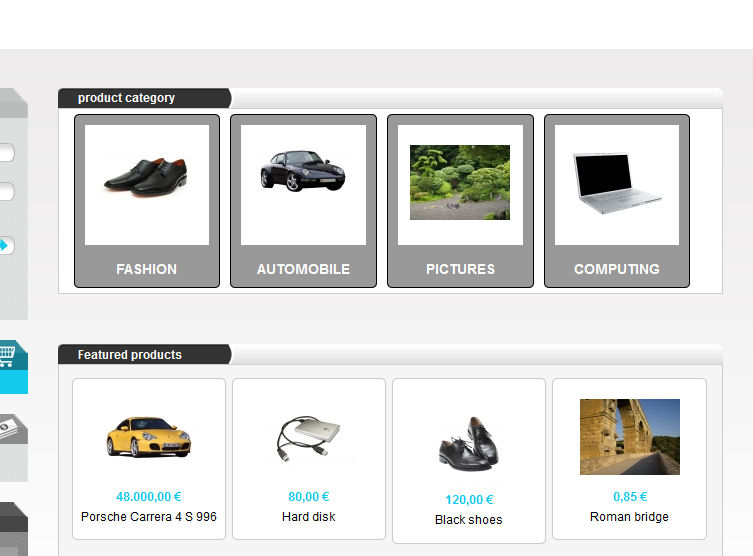
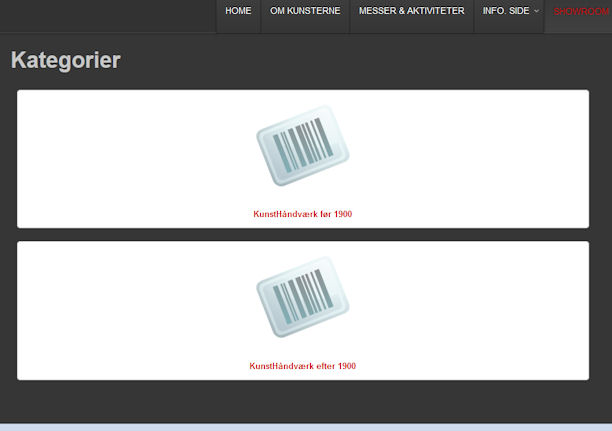
Now I am sitting and practice myself. Just can not find a way to get my kategoriboxe up beside each other, like yours site How do I handle that?
I've attached a picture of both... yours and mine
kemnitz.dk
I use Joomla 2.5.
Now I am sitting and practice myself. Just can not find a way to get my kategoriboxe up beside each other, like yours site How do I handle that?
I've attached a picture of both... yours and mine
kemnitz.dk
Hilsen Knh15
Carpe Diem
Last edit: 14 years 8 months ago by knh15.
Please Log in or Create an account to join the conversation.

14 years 8 months ago #39235
by beevo
Using HikaShop essentials on Joomla 2.6
Replied by beevo on topic Re: Categoriboxes
Hi Knh15
I'm a newbie like you and like you I had the same problem. This is how I did it and got it to work.
Go to your joomla menu that calls the hikashop. In mine it's on the top menu and labeled "Buy Now"
open that menu itme for editing. On the right hand column you'll see a link saying 'HikaShop Options"
Click on it and a new configuration window will open
You can of course click on the context help (top right) for more info on filling this out
But for your purposes here;
On the left scroll down and edit:
Type of layout: DIV
Number of Columns: 4
and on the right hand side you can change the gap between the divs with the
Parameters for DIV
Box item margin: 10
You can edit these to your pleasure - putting on a border if you wish.
ALSO; you can get to this configuration from within the HikaShop admin area by choosing the menu item:
DISPLAY >> CONTENT MENUS
Hope that is not to difficult to follow.
I'm a newbie like you and like you I had the same problem. This is how I did it and got it to work.
Go to your joomla menu that calls the hikashop. In mine it's on the top menu and labeled "Buy Now"
open that menu itme for editing. On the right hand column you'll see a link saying 'HikaShop Options"
Click on it and a new configuration window will open
You can of course click on the context help (top right) for more info on filling this out
But for your purposes here;
On the left scroll down and edit:
Type of layout: DIV
Number of Columns: 4
and on the right hand side you can change the gap between the divs with the
Parameters for DIV
Box item margin: 10
You can edit these to your pleasure - putting on a border if you wish.
ALSO; you can get to this configuration from within the HikaShop admin area by choosing the menu item:
DISPLAY >> CONTENT MENUS
Hope that is not to difficult to follow.
Using HikaShop essentials on Joomla 2.6
The following user(s) said Thank You: knh15
Please Log in or Create an account to join the conversation.
14 years 8 months ago #39287
by knh15
Hilsen Knh15
Carpe Diem
Replied by knh15 on topic Re: Categoriboxes
1000 thanks for your help beevo. Now I think I can do it. Thank you for your perfect description
:laugh:
:laugh:
Hilsen Knh15
Carpe Diem
Please Log in or Create an account to join the conversation.
14 years 8 months ago #39300
by knh15
 Unfortunately I can not make it working
Hilsen Knh15
Carpe Diem
Replied by knh15 on topic Re: Categoriboxes
Unfortunately I can not make it working Hilsen Knh15
Carpe Diem
Please Log in or Create an account to join the conversation.

14 years 8 months ago #39304
by master_b
сайт з перекладами www.benefit.in.ua
PS. спасибо переводить Webmoney : Z207635098627 R152456839841 или ЯД 410011027999056
Replied by master_b on topic Re: Categoriboxes
dont understand how to make horizontal content menu
and how to disable option auto create for each category content menu? (by default they disabled btw i dont need this...)
and how to disable option auto create for each category content menu? (by default they disabled btw i dont need this...)
сайт з перекладами www.benefit.in.ua
PS. спасибо переводить Webmoney : Z207635098627 R152456839841 или ЯД 410011027999056
Please Log in or Create an account to join the conversation.
14 years 8 months ago #39308
by beevo
Using HikaShop essentials on Joomla 2.6
Replied by beevo on topic Re: Categoriboxes
Can you explain a bit more. did you follow the steps I've given exactly. what was the result?
Using HikaShop essentials on Joomla 2.6
Please Log in or Create an account to join the conversation.
14 years 8 months ago #39319
by knh15
 I'm about to work it out now... Following your guide beevo
  ... I think I got to have any products before it works. I return if I can't
Hilsen Knh15
Carpe Diem
Replied by knh15 on topic Re: Categoriboxes
I'm about to work it out now... Following your guide beevo ... I think I got to have any products before it works. I return if I can't Hilsen Knh15
Carpe Diem
Please Log in or Create an account to join the conversation.
14 years 8 months ago #39321
by beevo
Using HikaShop essentials on Joomla 2.6
Replied by beevo on topic Re: Categoriboxes
Well, if you don't have any products and teh categorys are set not to show if there are no products that would be a problem. So yes populate a few test products.
By the way. When you make your memu item - you have to SAVE it first before you get the link to the HikaShop Options.
By the way. When you make your memu item - you have to SAVE it first before you get the link to the HikaShop Options.
Using HikaShop essentials on Joomla 2.6
Please Log in or Create an account to join the conversation.
14 years 8 months ago #39331
by knh15
Hilsen Knh15
Carpe Diem
Replied by knh15 on topic Re: Categoriboxes
:laugh: :laugh: :laugh: Yes now I Know that. Thank you beevo.
Hilsen Knh15
Carpe Diem
Please Log in or Create an account to join the conversation.
14 years 8 months ago #39341
by knh15
I fail to understand what you mean by your message master_b
Hilsen Knh15
Carpe Diem
Replied by knh15 on topic Re: Categoriboxes
I fail to understand what you mean by your message master_b Hilsen Knh15
Carpe Diem
Please Log in or Create an account to join the conversation.

14 years 8 months ago #39344
by nicolas
Replied by nicolas on topic Re: Categoriboxes
The simplest is to go in the menus Display->Content menus/modules, edit all your menus and modules there and set the number of columns option like you want.
Please Log in or Create an account to join the conversation.
Time to create page: 0.094 seconds