

- Posts: 80
- Thank you received: 0
Help with variants
14 years 8 months ago #39427
by CassHW
Help with variants was created by CassHW
Hi Nicola,
I've got a product where the customer can choose up to 5 essences. There are 32 essences in total
So I have created a characteristic called Flower Essence and there are 32 flower essence names in it.
I've tried adding this characteristic 5 times to the product so there are 5 drop down lists for the customer to pick up to 5 essences.
unfortunately, when I save the product, it only keeps 1 characteristic list. I figure it is normal because they all have the same ID so only one is kept.
How can I do this?
Honestly, I don't want to recreate the 32 characteristics 4 more times, unless you tell me a quick and easy way to duplicate the list.
Thank you
I've got a product where the customer can choose up to 5 essences. There are 32 essences in total
So I have created a characteristic called Flower Essence and there are 32 flower essence names in it.
I've tried adding this characteristic 5 times to the product so there are 5 drop down lists for the customer to pick up to 5 essences.
unfortunately, when I save the product, it only keeps 1 characteristic list. I figure it is normal because they all have the same ID so only one is kept.
How can I do this?
Honestly, I don't want to recreate the 32 characteristics 4 more times, unless you tell me a quick and easy way to duplicate the list.
Thank you
Please Log in or Create an account to join the conversation.

14 years 8 months ago #39535
by nicolas
Replied by nicolas on topic Re: Help with variants
You won't be able to have 5 characteristics with 32 options in a product.
That would generate 32*32*32*32*32 variants for your product. Too much data to process for a normal server, it will crash.
Instead, you should use either options www.hikashop.com/en/support/documentatio...ct-form.html#options or custom fields of the table "item" www.hikashop.com/en/support/documentatio...p-field-listing.html
That would generate 32*32*32*32*32 variants for your product. Too much data to process for a normal server, it will crash.
Instead, you should use either options www.hikashop.com/en/support/documentatio...ct-form.html#options or custom fields of the table "item" www.hikashop.com/en/support/documentatio...p-field-listing.html
Please Log in or Create an account to join the conversation.
14 years 8 months ago - 14 years 8 months ago #39576
by CassHW
Replied by CassHW on topic Re: Help with variants
hmm.. ok.
the custom field won't work because it will add the fields to all the products in that category, which is not what I need unless there is a way to add the fields to that specific product only?
as for the options, it means I need to create 5 new products and each one has the variant called "Flower essence" which is the list of the 32 essences, and then add the 5 products as options in the product where I want people to choose the 5 essences? Is that right?
thanks
the custom field won't work because it will add the fields to all the products in that category, which is not what I need unless there is a way to add the fields to that specific product only?
as for the options, it means I need to create 5 new products and each one has the variant called "Flower essence" which is the list of the 32 essences, and then add the 5 products as options in the product where I want people to choose the 5 essences? Is that right?
thanks
Last edit: 14 years 8 months ago by CassHW.
Please Log in or Create an account to join the conversation.
14 years 8 months ago #39722
by nicolas
Replied by nicolas on topic Re: Help with variants
1. You can always create an unpublished category, add it to your product as second category and add it to your custom field and the custom field will only display for that product.
2. That's indeed what you should do.
2. That's indeed what you should do.
Please Log in or Create an account to join the conversation.
14 years 8 months ago #39742
by CassHW
Replied by CassHW on topic Re: Help with variants
Excellent! I think that will work then 
Please Log in or Create an account to join the conversation.
14 years 8 months ago #40008
by CassHW
Replied by CassHW on topic Re: Help with variants
Hi Nicola,
I've done what you said but it's not working.
On the product page, it only displays the word Specifications
I've attached the screen shots
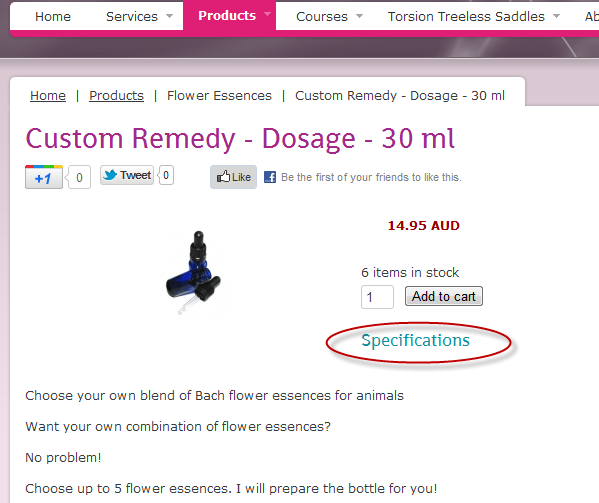
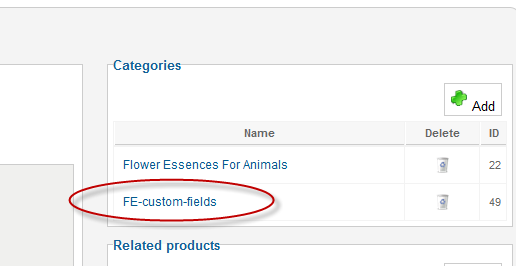
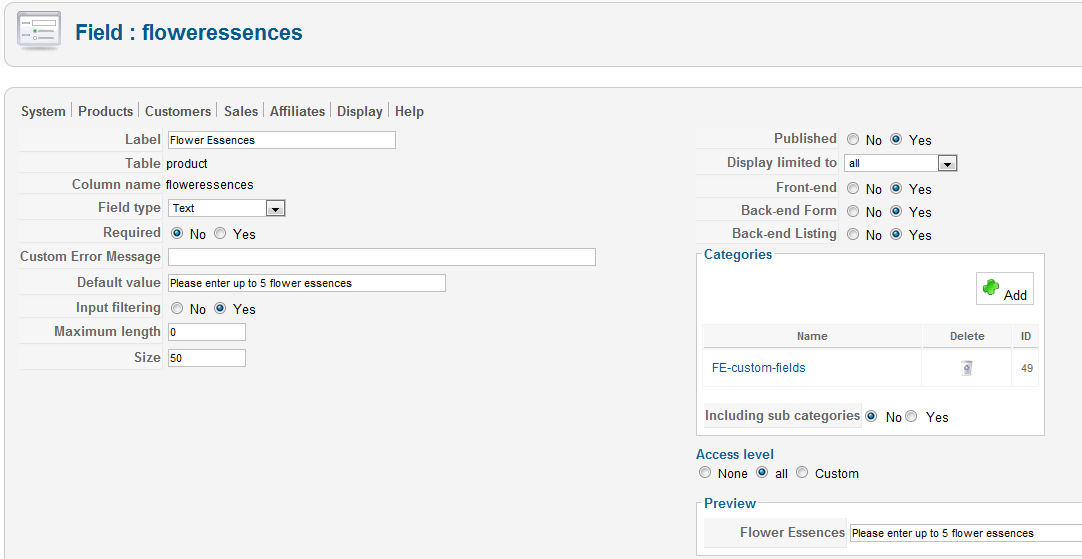
I've done what you said but it's not working.
On the product page, it only displays the word Specifications
I've attached the screen shots
Please Log in or Create an account to join the conversation.
14 years 8 months ago #40107
by CassHW
Replied by CassHW on topic Re: Help with variants
I've changed the custom fields to apply to the category and it's still not showing up
can you have a look at it please?
thanks
can you have a look at it please?
thanks
Please Log in or Create an account to join the conversation.

Less
More
- Posts: 218
- Thank you received: 6
14 years 8 months ago #40170
by woonydanny
Replied by woonydanny on topic Re: Help with variants
Don't want to take the thread off-topic, but you can see nicolas that the variants system isn't that user friendly for quite a few applications. I think the variants system needs to be revised/overhauled to make it capable of handling more situations more intuitively easier. I know you said you put it down on your to-do list, but at the moment it does make adding in products very time consuming.
Ok, sorry for interrupting the thread.
Ok, sorry for interrupting the thread.
Please Log in or Create an account to join the conversation.
14 years 8 months ago #40214
by nicolas
Replied by nicolas on topic Re: Help with variants
Hi,
You created a custom field of the table "product" which displays on the product edition interface.
I told you to create custom fields of the table "item" so that it displays on the product page.
That's why you don't see it
I know peetree21. Rome wasn't built in one day. It will come.
You created a custom field of the table "product" which displays on the product edition interface.
I told you to create custom fields of the table "item" so that it displays on the product page.
That's why you don't see it
I know peetree21. Rome wasn't built in one day. It will come.
The following user(s) said Thank You: CassHW, woonydanny
Please Log in or Create an account to join the conversation.
14 years 8 months ago #40243
by CassHW
Replied by CassHW on topic Re: Help with variants
oops, thanks.
that worked
where can I modify the look of the display? is it in product show_block_custom_item?
thanks
that worked
where can I modify the look of the display? is it in product show_block_custom_item?
thanks
Please Log in or Create an account to join the conversation.
14 years 8 months ago #40359
by nicolas
Replied by nicolas on topic Re: Help with variants
Yes, for custom item fields display, that's the view file to change.
The following user(s) said Thank You: CassHW
Please Log in or Create an account to join the conversation.

14 years 4 months ago #53611
by heikoe
Replied by heikoe on topic Re: Help with variants
Hello,
I´ve got a similar problem. I set up a shop with kitchen furniture. Every Unit has a width, a material, socket height etc.
The order No. (e.g. S-0001-0034-0355) is created because of these characteristics like S-0001-(one door unit)-0001.(white material)-0002(door hinge left) etc. So every product has its unique order No, where another software can find that particular product in a different database to tell a machine exactly what they need to produce that unit.
I figured out how to put the order no into the email send to the admin.
It is not working with characteristics because some units have about 24000 charakteristics in all. I am thinking about using options for that, but I don´t know how to build a unique order no then.
I´ve got a similar problem. I set up a shop with kitchen furniture. Every Unit has a width, a material, socket height etc.
The order No. (e.g. S-0001-0034-0355) is created because of these characteristics like S-0001-(one door unit)-0001.(white material)-0002(door hinge left) etc. So every product has its unique order No, where another software can find that particular product in a different database to tell a machine exactly what they need to produce that unit.
I figured out how to put the order no into the email send to the admin.
It is not working with characteristics because some units have about 24000 charakteristics in all. I am thinking about using options for that, but I don´t know how to build a unique order no then.
Please Log in or Create an account to join the conversation.
14 years 4 months ago #53695
by nicolas
Replied by nicolas on topic Re: Help with variants
Options are different products. If you use options you will have several products in the cart: one for the main product and one for each option. So it won't be a unique product code.
However, you could always generate the product code based on the main product code+the options product code by add some custom code in your admin notification.
However, you could always generate the product code based on the main product code+the options product code by add some custom code in your admin notification.
Please Log in or Create an account to join the conversation.
Time to create page: 0.078 seconds