

- Posts: 5
- Thank you received: 0
Warning: htmlspecialchars() expects parameter1 to
14 years 8 months ago #39841
by len4e
Warning: htmlspecialchars() expects parameter1 to was created by len4e
Hi,
I had a problem when trying to set (for to value) to checkbox so that my product corresponds to the selected check box, and when i go to the registration form and select the product in the shopping cart the product doesn't appears (the other options appears in the cart that are not selected)
Here is screen shot of my problem, please review it and give me quick response.
Regards,
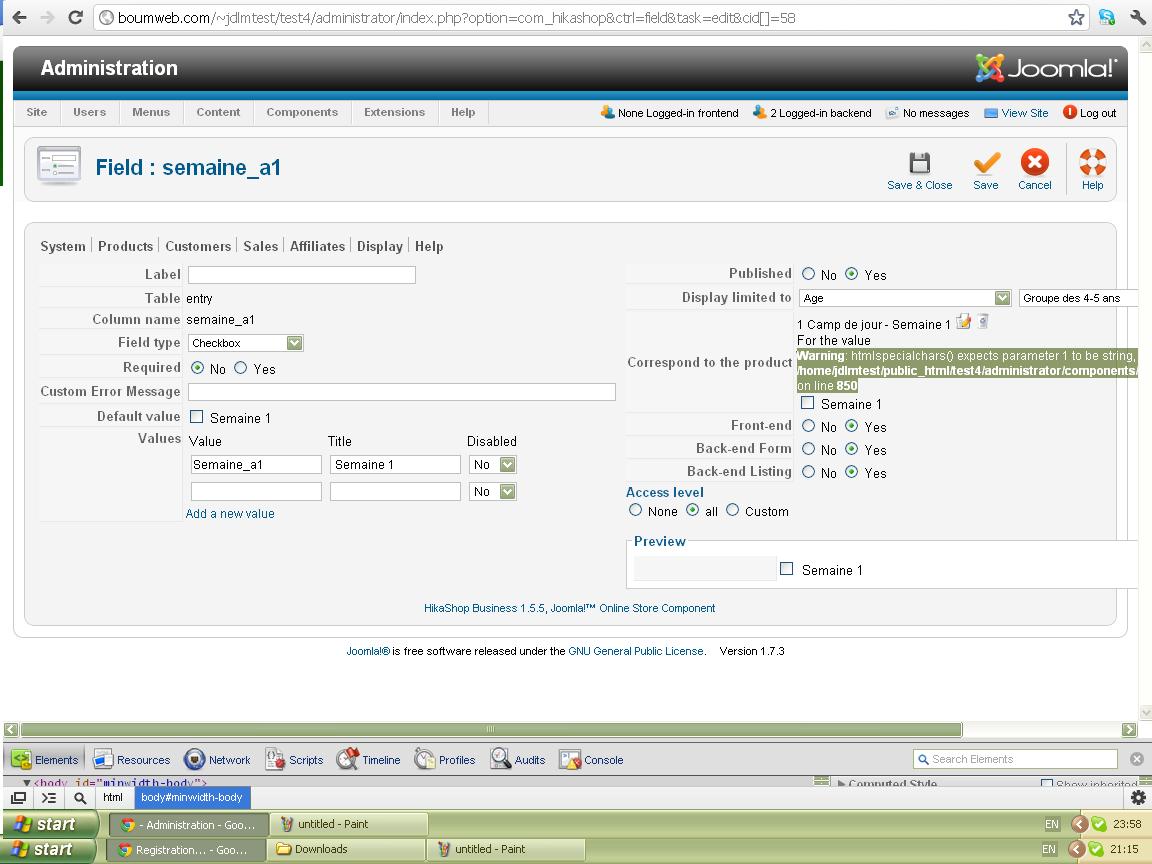
I had a problem when trying to set (for to value) to checkbox so that my product corresponds to the selected check box, and when i go to the registration form and select the product in the shopping cart the product doesn't appears (the other options appears in the cart that are not selected)
Here is screen shot of my problem, please review it and give me quick response.
Regards,
Please Log in or Create an account to join the conversation.

14 years 8 months ago #39881
by nicolas
Replied by nicolas on topic Re: Warning: htmlspecialchars() expects parameter1 to
Hi,
Please change the line:
$html = $class->display($field,htmlspecialchars($value, ENT_COMPAT,'UTF-8'),$map,$inside,$options,$test);
to:
if(is_string($value)) $value = htmlspecialchars($value, ENT_COMPAT,'UTF-8');
$html = $class->display($field,$value,$map,$inside,$options,$test);
in the file administrator/components/com_hikashop/classes/field.php
That will remove the warning.
Regarding the fact that the product gets added to the cart when the checkbox is not ticked, looking at your screenshot, that's normal. It's just that you didn't tick the checkbox in the "For the value". After doing so and saving, it should work like you expect.
Please change the line:
$html = $class->display($field,htmlspecialchars($value, ENT_COMPAT,'UTF-8'),$map,$inside,$options,$test);
to:
if(is_string($value)) $value = htmlspecialchars($value, ENT_COMPAT,'UTF-8');
$html = $class->display($field,$value,$map,$inside,$options,$test);
in the file administrator/components/com_hikashop/classes/field.php
That will remove the warning.
Regarding the fact that the product gets added to the cart when the checkbox is not ticked, looking at your screenshot, that's normal. It's just that you didn't tick the checkbox in the "For the value". After doing so and saving, it should work like you expect.
Please Log in or Create an account to join the conversation.
14 years 8 months ago #39902
by len4e
Replied by len4e on topic Re: Warning: htmlspecialchars() expects parameter1 to
Hi Nikolas,
I copy and replace the code that have give in the massage but now when I ticked the checkbox and click save after saving the checkbox (for the value box) is still unchecked and when I go and fill the registration form and select the products the shopping card is empty ?
Please help me with this because is urgent!
Thanks,
Irena
I copy and replace the code that have give in the massage but now when I ticked the checkbox and click save after saving the checkbox (for the value box) is still unchecked and when I go and fill the registration form and select the products the shopping card is empty ?
Please help me with this because is urgent!
Thanks,
Irena
Please Log in or Create an account to join the conversation.
14 years 8 months ago #39915
by nicolas
Replied by nicolas on topic Re: Warning: htmlspecialchars() expects parameter1 to
Hi,
We were able to reproduce the problem on our end.
Please change the code:
to:
in the file administrator/components/com_hikashop/classes/field.php
and the code:
to:
in the file administrator/components/com_hikashop/classes/cart.php and that should fix the problem.
We were able to reproduce the problem on our end.
Please change the code:
Code:
$value = explode(',',$value);
return parent::display($field,$value,$map,'checkbox',$inside,$options,$test);
Code:
if(!is_array($value)){
$value = explode(',',$value);
}
return parent::display($field,$value,$map,'checkbox',$inside,$options,$test);
and the code:
Code:
}elseif($value == $field->field_options['product_value']){
Code:
}elseif(is_string($value) && in_array($value,$field->field_options['product_value'])){
$ok = true;
}elseif($value == $field->field_options['product_value']){
The following user(s) said Thank You: len4e
Please Log in or Create an account to join the conversation.
14 years 8 months ago #40541
by len4e
Replied by len4e on topic Check box unable!
Hi HikaShopers,
I want to ask Is it possible to unable ticking the check box field when the product is on quantity 0 in the stock, I have a form when user chooses products which are listed as check boxes and I want to unable (make it not clickable unavailable or more gray or something like that, want to stay on site but not to be clickable) the check boxes related to the products which quantity is 0 in the stock.
I hope that you understand what I'm trying to do and If you have any suggestions please write me.
Thanks a lot.
Best regards,
Irena
I want to ask Is it possible to unable ticking the check box field when the product is on quantity 0 in the stock, I have a form when user chooses products which are listed as check boxes and I want to unable (make it not clickable unavailable or more gray or something like that, want to stay on site but not to be clickable) the check boxes related to the products which quantity is 0 in the stock.
I hope that you understand what I'm trying to do and If you have any suggestions please write me.
Thanks a lot.
Best regards,
Irena
Please Log in or Create an account to join the conversation.
Time to create page: 0.091 seconds