

- Posts: 35
- Thank you received: 0
How to... move my products in cart over to left...
15 years 9 months ago #4077
by gemmill
How to... move my products in cart over to left... was created by gemmill
Hi all,
This might be asking a bit much, but I thought I'd try anyway.
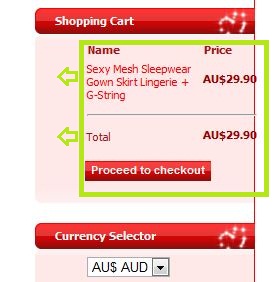
in the attached image, you can see my cart contents are too far over to the right, and i'd like to move them to the left so they fit.
the other menus are not over this far.... just the shopping cart.
Thanks in advance for any help.
Much appreciated.
Stu.
This might be asking a bit much, but I thought I'd try anyway.
in the attached image, you can see my cart contents are too far over to the right, and i'd like to move them to the left so they fit.
the other menus are not over this far.... just the shopping cart.
Thanks in advance for any help.
Much appreciated.
Stu.
Please Log in or Create an account to join the conversation.

15 years 9 months ago #4082
by nicolas
Replied by nicolas on topic Re: How to... move my products in cart over to left...
Could you give us a link to to your page ? It would help to test the CSS with firebug (an addon to debug CSS on firefox)
Please Log in or Create an account to join the conversation.
15 years 9 months ago #4083
by gemmill
Replied by gemmill on topic Re: How to... move my products in cart over to left...
Thanks nicolas... you're very helpful
jonnybgifts.com
its not live yet so..
user = guest
password = hikarules
jonnybgifts.com
its not live yet so..
user = guest
password = hikarules
Please Log in or Create an account to join the conversation.
15 years 9 months ago #4085
by nicolas
Replied by nicolas on topic Re: How to... move my products in cart over to left...
You can add the CSS:
.hikashop_cart{ margin-left: -30px; }
Either add it in the configuration of HikaShop in the tab display in the area CSS, or in your template CSS file.
.hikashop_cart{ margin-left: -30px; }
Either add it in the configuration of HikaShop in the tab display in the area CSS, or in your template CSS file.
Please Log in or Create an account to join the conversation.
15 years 9 months ago #4086
by gemmill
Replied by gemmill on topic Re: How to... move my products in cart over to left...
I added it.. I THINK.... maybe its in the wrong place....
(sorry my css knowledge is poor.)
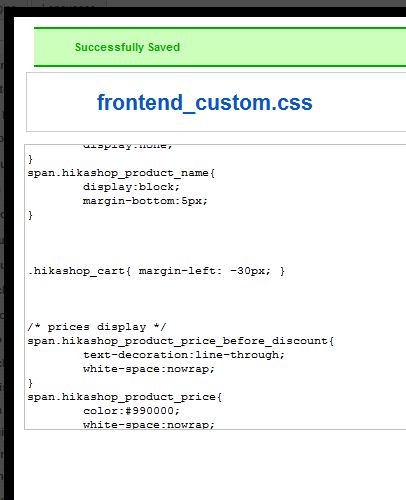
config > display > Front end css file.... is this right?
(sorry my css knowledge is poor.)
config > display > Front end css file.... is this right?
Please Log in or Create an account to join the conversation.
15 years 9 months ago #4088
by nicolas
Replied by nicolas on topic Re: How to... move my products in cart over to left...
Yes. You also need to use that frontend_custom.css file in the dropdown (so you have to save the configuration).
Please Log in or Create an account to join the conversation.
15 years 9 months ago #4089
by gemmill
Replied by gemmill on topic Re: How to... move my products in cart over to left...
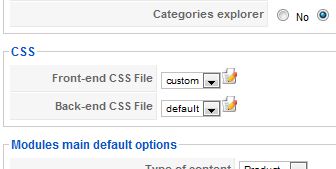
This is how I have saved it....
is that what you mean?
sorry again.. and thank you .... again..
is that what you mean?
sorry again.. and thank you .... again..
Please Log in or Create an account to join the conversation.
15 years 9 months ago #4090
by nicolas
Replied by nicolas on topic Re: How to... move my products in cart over to left...
Mmm, that CSS is superceded by the CSS in your template.
Please try instead this one:
div#hikashop_cart{ margin-left : -30px; }
Please try instead this one:
div#hikashop_cart{ margin-left : -30px; }
Please Log in or Create an account to join the conversation.
15 years 9 months ago - 15 years 9 months ago #4092
by gemmill
Replied by gemmill on topic Re: How to... move my products in cart over to left...
didn't work.....
Should I try editing my template css?
edit..
I tried putting the first line of code you gave me in the template .css.... no change
(well at least I think thats where I put it)
Should I try editing my template css?
edit..
I tried putting the first line of code you gave me in the template .css.... no change
(well at least I think thats where I put it)
Last edit: 15 years 9 months ago by gemmill.
Please Log in or Create an account to join the conversation.
15 years 9 months ago #4094
by nicolas
Replied by nicolas on topic Re: How to... move my products in cart over to left...
Again, the CSS is overriden by your template CSS.
Let's do it differently.
Please edit your template css file jonnybgifts.com/templates/siteground-j15-123/css/template.css
near line 769 you will have
Please remove the line
Let's do it differently.
Please edit your template css file jonnybgifts.com/templates/siteground-j15-123/css/template.css
near line 769 you will have
Code:
#leftcolumn div.module_menu div div div div,#leftcolumn div.module div div div div,#leftcolumn div.module_text div div div div,
#rightcolumn div.module_menu div div div div,#rightcolumn div.module div div div div,#rightcolumn div.module_text div div div div {
background: none;
margin:0 auto;
padding:0;
color:#a51313;
}
Code:
margin:0 auto;
Please Log in or Create an account to join the conversation.
15 years 9 months ago #4095
by gemmill
Replied by gemmill on topic Re: How to... move my products in cart over to left...
Perfect!
You're a champion.
Thank you so much.
Stu.
You're a champion.
Thank you so much.
Stu.
Please Log in or Create an account to join the conversation.
Time to create page: 0.337 seconds