

- Posts: 35
- Thank you received: 0
How to: change the layout of my cart?
15 years 9 months ago #4117
by gemmill
How to: change the layout of my cart? was created by gemmill
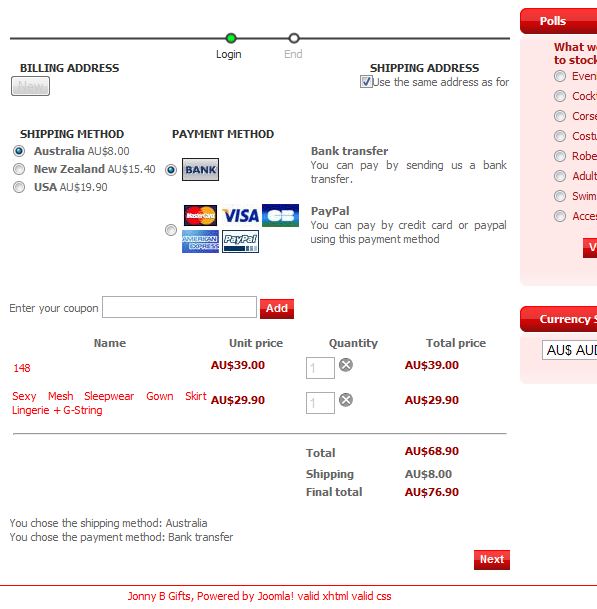
how can I make my cart that looks like this.....
Please Log in or Create an account to join the conversation.
15 years 9 months ago #4118
by gemmill
Replied by gemmill on topic Re: How to: change the layout of my cart?
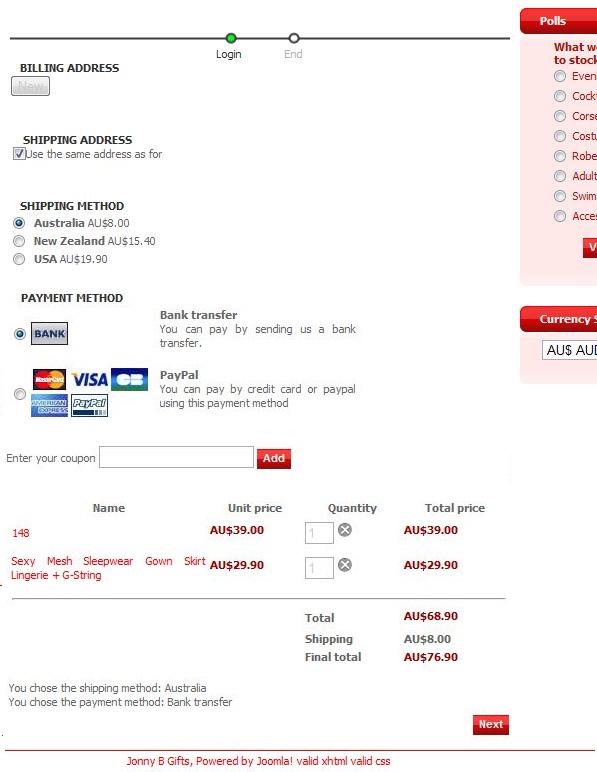
To look like this.
Please Log in or Create an account to join the conversation.

15 years 9 months ago #4119
by nicolas
Replied by nicolas on topic Re: How to: change the layout of my cart?
Like for the previous CSS issue, pleas post a link to your website (with an access if the website is in maintenance) so that we can have a look at it.
Please Log in or Create an account to join the conversation.
15 years 9 months ago #4120
by gemmill
Replied by gemmill on topic Re: How to: change the layout of my cart?
Please Log in or Create an account to join the conversation.
15 years 9 months ago #4121
by nicolas
Replied by nicolas on topic Re: How to: change the layout of my cart?
You need to add the CSS:
You also have to edit the CSS file of hikashop and remove the code
from the code
Code:
.hikashop_payment_methods{ clear:both;}
.hikashop_checkout_coupon{ clear:both;float:left;width:100% }
You also have to edit the CSS file of hikashop and remove the code
Code:
float: left;
Code:
.hikashop_checkout_address_right_part {
width: 350px;
float: left;
}
Please Log in or Create an account to join the conversation.
15 years 9 months ago #4123
by nicolas
Replied by nicolas on topic Re: How to: change the layout of my cart?
Also, I invite you to use Firebug. It's a nice addon for Firefox which helps tweak CSS code:
www.tutorial9.net/web-tutorials/quick-ea...opment-with-firebug/
www.tutorial9.net/web-tutorials/quick-ea...opment-with-firebug/
Please Log in or Create an account to join the conversation.
15 years 9 months ago - 15 years 9 months ago #4125
by gemmill
Replied by gemmill on topic Re: How to: change the layout of my cart?
B E A utiful
Thanks again.
Edit.. - firebug...
Thanks... i'll do some reading...
Stu.
Thanks again.
Edit.. - firebug...
Thanks... i'll do some reading...
Stu.
Last edit: 15 years 9 months ago by gemmill.
Please Log in or Create an account to join the conversation.
Time to create page: 0.184 seconds