
- Posts: 12
- Thank you received: 0
Re: Workflow! No matter what I do it wont work
- micksmoney
-
 Topic Author
- Offline
Less
More
14 years 8 months ago #41339
by micksmoney
Re: Workflow! No matter what I do it wont work was created by micksmoney
Nicolas,
Thanks for the great extension and the commitment to it. Not many people create something so nice, for free, and still stick by it afterwards. I know it takes a lot of work to support this, and I do appreciate it.
On this issue, I unfortunately have to confirm that it is happening to me also. I installed, added a few products, then went to the configuration page. I noticed the workflow error he mentioned yet I had not changed anything from default at the time. So I read the documentation, and it only mentioned the existence of this dynamic view tool.
So I switched it off, being more comfortable with the text based stuff. Old programmer habits die hard hehe.
But as he said, the radio button selection does not survive the save. I'm now going to try his work around to see if that works.
Thanks for the great extension and the commitment to it. Not many people create something so nice, for free, and still stick by it afterwards. I know it takes a lot of work to support this, and I do appreciate it.
On this issue, I unfortunately have to confirm that it is happening to me also. I installed, added a few products, then went to the configuration page. I noticed the workflow error he mentioned yet I had not changed anything from default at the time. So I read the documentation, and it only mentioned the existence of this dynamic view tool.
So I switched it off, being more comfortable with the text based stuff. Old programmer habits die hard hehe.
But as he said, the radio button selection does not survive the save. I'm now going to try his work around to see if that works.
Please Log in or Create an account to join the conversation.

14 years 8 months ago #41474
by nicolas
Replied by nicolas on topic Re: Workflow! No matter what I do it wont work
There is a bug on that end that we cannot reproduce on our end so far. Normally, if you use another browser, you should be able to save it properly.
Please Log in or Create an account to join the conversation.
Less
More
- Posts: 13
- Thank you received: 0
13 years 6 months ago #99508
by miraiserver
Replied by miraiserver on topic Re: Workflow! No matter what I do it wont work
Hello Nicolas
I have the same problem with "Check box" and "Multiple Drop down"
I tried on several browsers. Tried on Google Chrome, Firefox and Explorer 8 but the selection does not survive the save.
Looking forward your reply.
Best regards
Mirai
I have the same problem with "Check box" and "Multiple Drop down"
I tried on several browsers. Tried on Google Chrome, Firefox and Explorer 8 but the selection does not survive the save.
Looking forward your reply.
Best regards
Mirai
nicolas wrote: There is a bug on that end that we cannot reproduce on our end so far. Normally, if you use another browser, you should be able to save it properly.
Please Log in or Create an account to join the conversation.
13 years 6 months ago #99510
by nicolas
Replied by nicolas on topic Re: Workflow! No matter what I do it wont work
The bug mentioned on that thread has been fixed several months ago in HikaShop.
So it's not possible that you have the same one.
It must be something else.
What do you mean by "I have the same problem with "Check box" and "Multiple Drop down"" ?
There is no such options in the configuration page of HikaShop.
So it's not possible that you have the same one.
It must be something else.
What do you mean by "I have the same problem with "Check box" and "Multiple Drop down"" ?
There is no such options in the configuration page of HikaShop.
The following user(s) said Thank You: miraiserver
Please Log in or Create an account to join the conversation.
Less
More
- Posts: 13
- Thank you received: 0
13 years 6 months ago - 13 years 6 months ago #99527
by miraiserver
Replied by miraiserver on topic Re: Workflow! No matter what I do it wont work
Hello Nicolas!
Thank you for the quick answer.
Sorry. I'm not sure but It may be other issue.
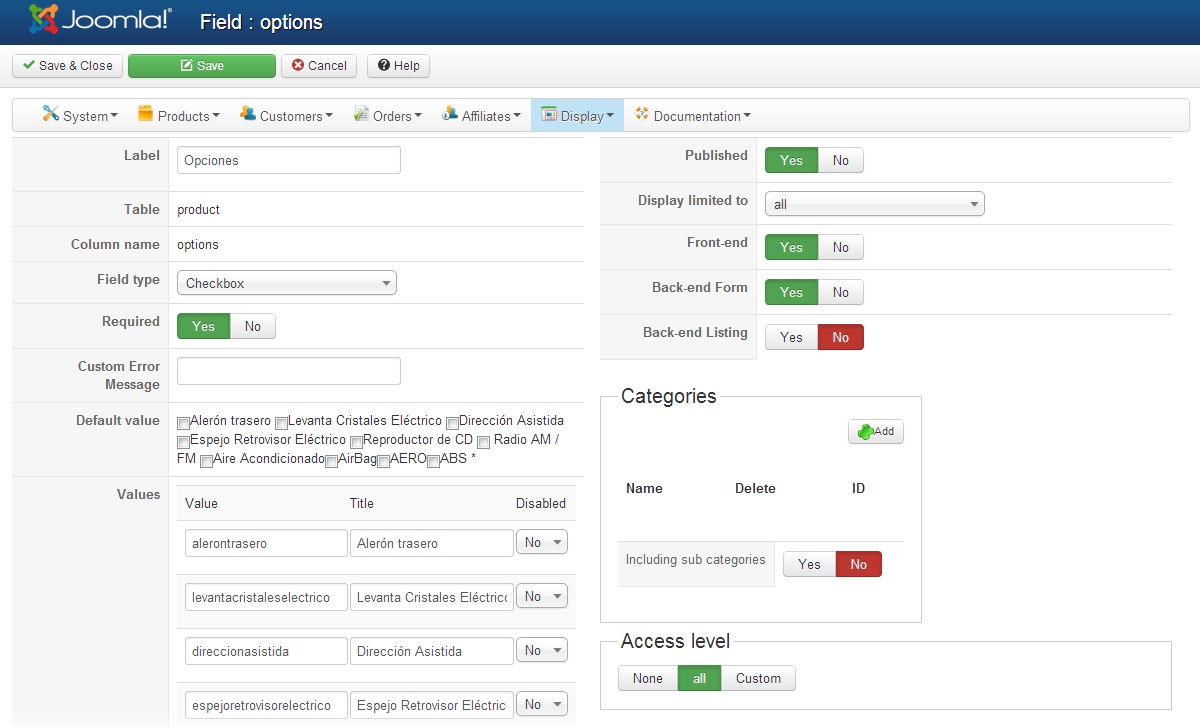
I'm talking about the "Check box" and "Multiple Drop down" in "Custom fields" --> "Field type" settings
Thank you for the quick answer.
Sorry. I'm not sure but It may be other issue.
I'm talking about the "Check box" and "Multiple Drop down" in "Custom fields" --> "Field type" settings
nicolas wrote: The bug mentioned on that thread has been fixed several months ago in HikaShop.
So it's not possible that you have the same one.
It must be something else.
What do you mean by "I have the same problem with "Check box" and "Multiple Drop down"" ?
There is no such options in the configuration page of HikaShop.
Last edit: 13 years 6 months ago by miraiserver.
Please Log in or Create an account to join the conversation.
13 years 6 months ago #99622
by nicolas
Replied by nicolas on topic Re: Workflow! No matter what I do it wont work
And what is the problem ?
You can't change the "Field type" option of your custom fields ?
If so, can you try again with the "debug mode" option of the joomla configuration turned on and see if you get error messages ?
You can't change the "Field type" option of your custom fields ?
If so, can you try again with the "debug mode" option of the joomla configuration turned on and see if you get error messages ?
Please Log in or Create an account to join the conversation.
Less
More
- Posts: 13
- Thank you received: 0
13 years 6 months ago - 13 years 6 months ago #99688
by miraiserver
Replied by miraiserver on topic Re: Workflow! No matter what I do it wont work
Hello Nocolas
The problem is that all "Checks", if made, are lost after save.
I can change the "Field Type". The problem is with multiple choice fields.
No errors at back end.
Front end shows next error :
Warning: trim() expects parameter 1 to be string, array given in /var/www/vhosts/domain.com/japon-usados/components/com_hikashop/views/product/tmpl/show_block_custom_main.php on line 19
Best regards.
Mirai
The problem is that all "Checks", if made, are lost after save.
I can change the "Field Type". The problem is with multiple choice fields.
No errors at back end.
Front end shows next error :
Warning: trim() expects parameter 1 to be string, array given in /var/www/vhosts/domain.com/japon-usados/components/com_hikashop/views/product/tmpl/show_block_custom_main.php on line 19
Best regards.
Mirai
nicolas wrote: And what is the problem ?
You can't change the "Field type" option of your custom fields ?
If so, can you try again with the "debug mode" option of the joomla configuration turned on and see if you get error messages ?
Last edit: 13 years 6 months ago by miraiserver. Reason: added "if made"
Please Log in or Create an account to join the conversation.
13 years 6 months ago #99749
by nicolas
Replied by nicolas on topic Re: Workflow! No matter what I do it wont work
I still don't understand your problem.
What checks are you talking about ?
You're talking about the default value of the custom field ?
I'm sorry but I need to understand what is wrong before trying to reproduce the problem in order to tell you what to do...
What checks are you talking about ?
You're talking about the default value of the custom field ?
I'm sorry but I need to understand what is wrong before trying to reproduce the problem in order to tell you what to do...
Please Log in or Create an account to join the conversation.
Less
More
- Posts: 13
- Thank you received: 0
13 years 6 months ago #99774
by miraiserver
Replied by miraiserver on topic Re: Workflow! No matter what I do it wont work
Sorry for my poor English.
Well... when I add a product and check some items of the "Check List" like the image below

checks disappears after saving the product.

Best regards.
Mirai
Well... when I add a product and check some items of the "Check List" like the image below
checks disappears after saving the product.
Best regards.
Mirai
nicolas wrote: I still don't understand your problem.
What checks are you talking about ?
You're talking about the default value of the custom field ?
I'm sorry but I need to understand what is wrong before trying to reproduce the problem in order to tell you what to do...
Please Log in or Create an account to join the conversation.

13 years 6 months ago #99910
by Xavier
Replied by Xavier on topic Re: Workflow! No matter what I do it wont work
Hi,
Can you enable the debug mode of Joomla, and set the error reporting to maximum to see if an error is returned ?
Thanks to give us a screenshot of your options configuration.
Can you enable the debug mode of Joomla, and set the error reporting to maximum to see if an error is returned ?
Thanks to give us a screenshot of your options configuration.
Please Log in or Create an account to join the conversation.
Less
More
- Posts: 13
- Thank you received: 0
13 years 6 months ago #100241
by miraiserver
Replied by miraiserver on topic Re: Workflow! No matter what I do it wont work
Dear Xavier
Thank you for the message.
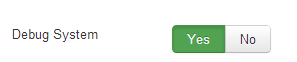
I enabled the debug mode of joomla and set the error reporting to maximum.

But still no error at back-end.

At the Frontend just the next message:
Warning: trim() expects parameter 1 to be string, array given in /var/www/vhosts/domain.com/japon-usados/components/com_hikashop/views/product/tmpl/show_block_custom_main.php on line 19
Best regards
Mirai
Thank you for the message.
I enabled the debug mode of joomla and set the error reporting to maximum.
But still no error at back-end.
At the Frontend just the next message:
Warning: trim() expects parameter 1 to be string, array given in /var/www/vhosts/domain.com/japon-usados/components/com_hikashop/views/product/tmpl/show_block_custom_main.php on line 19
Best regards
Mirai
Xavier wrote: Hi,
Can you enable the debug mode of Joomla, and set the error reporting to maximum to see if an error is returned ?
Thanks to give us a screenshot of your options configuration.
Please Log in or Create an account to join the conversation.
13 years 6 months ago #100603
by nicolas
Replied by nicolas on topic Re: Workflow! No matter what I do it wont work
The problem comes from the column name of your custom field.
Please change it to something else and it will work.
options is used for storing the options of your products so HikaShop will overwrite it and thus it won't save your selection.
Please change it to something else and it will work.
options is used for storing the options of your products so HikaShop will overwrite it and thus it won't save your selection.
Please Log in or Create an account to join the conversation.
Less
More
- Posts: 13
- Thank you received: 0
13 years 6 months ago #100707
by miraiserver
Replied by miraiserver on topic Re: Workflow! No matter what I do it wont work
Thank you Nicolas!
I created a new field with other column name and the issue was solver!!
Excellent support and product!!
Best regards.
Mirai
I created a new field with other column name and the issue was solver!!
Excellent support and product!!
Best regards.
Mirai
nicolas wrote: The problem comes from the column name of your custom field.
Please change it to something else and it will work.
options is used for storing the options of your products so HikaShop will overwrite it and thus it won't save your selection.
Please Log in or Create an account to join the conversation.
Time to create page: 0.117 seconds