

- Posts: 14
- Thank you received: 0
Import from VM not work
14 years 7 months ago - 14 years 7 months ago #42456
by lives
Import from VM not work was created by lives
Hi, i try to import from VM
but i see this
HikaShop: Importa da VirtueMart
[Initialization Tables]
Elasped time: 135.75ms
Prosegui
If i click on prosegui, the page is refreshed.
i use vm1.1.9 and joomla 1.5.25
Thank's
sorry for my english
........ ops, this is wrong section of forum? :S
but i see this
HikaShop: Importa da VirtueMart
[Initialization Tables]
Elasped time: 135.75ms
Prosegui
If i click on prosegui, the page is refreshed.
i use vm1.1.9 and joomla 1.5.25
Thank's
sorry for my english
........ ops, this is wrong section of forum? :S
Last edit: 14 years 7 months ago by lives.
Please Log in or Create an account to join the conversation.

14 years 7 months ago #42631
by nicolas
Replied by nicolas on topic Re: Import from VM not work
What if you turn on the debug mode of the joomla configuration and try again ?
Do you get some errors when doing the import ?
Also, try with another browser.
And try to click several times on "continue".
Do you get some errors when doing the import ?
Also, try with another browser.
And try to click several times on "continue".
Please Log in or Create an account to join the conversation.
14 years 7 months ago #42811
by lives
Replied by lives on topic Re: Import from VM not work
When i turn on debug mode i dont see any errors..
If i try another browser i see this error
HikaShop: Importa da VirtueMart
[Import Taxes]
Import taxes: 1
Imported Taxes Categories: 1
Imported Taxations: 1
Elasped time: 120.89ms
I try whit firefox, crhome and safari.
I click severl time on continue, but the problem not solved..
Help me please
joomla 1.5.25 vm 1.1.9
If i try another browser i see this error
HikaShop: Importa da VirtueMart
[Import Taxes]
Import taxes: 1
Imported Taxes Categories: 1
Imported Taxations: 1
Elasped time: 120.89ms
I try whit firefox, crhome and safari.
I click severl time on continue, but the problem not solved..
Help me please
joomla 1.5.25 vm 1.1.9
Please Log in or Create an account to join the conversation.
14 years 7 months ago #42818
by nicolas
Replied by nicolas on topic Re: Import from VM not work
The message you posted now is different. It seems that the import is moving from one step to another as it should.
Please continue until the end of the import.
Please continue until the end of the import.
Please Log in or Create an account to join the conversation.
14 years 7 months ago #42827
by lives
Replied by lives on topic Re: Import from VM not work
But the import is stopped
in i click continue nothing happens
the import not work, is blocked in this point
Imported Taxations: 1
Elasped time: 120.89ms
in i click continue nothing happens
the import not work, is blocked in this point
Imported Taxations: 1
Elasped time: 120.89ms
Please Log in or Create an account to join the conversation.
14 years 7 months ago #42828
by lives
Replied by lives on topic Re: Import from VM not work
Is possible to import csv?
i export a csv of vm, but in another post you said
to change header of file, whath is header? sorry,
but my english is very bad :silly:
i export a csv of vm, but in another post you said
to change header of file, whath is header? sorry,
but my english is very bad :silly:
Please Log in or Create an account to join the conversation.
14 years 7 months ago #42841
by nicolas
Replied by nicolas on topic Re: Import from VM not work
Then I don't know why that would happen.
For the import of CSV file, before doing it, you need to open the file and change the column names in order to fit with the column names in HikaShop. To know what are the column names in HikaShop, create one product in HikaShop and export it. In the CSV file, you will be able to see what column name is for what information.
For the import of CSV file, before doing it, you need to open the file and change the column names in order to fit with the column names in HikaShop. To know what are the column names in HikaShop, create one product in HikaShop and export it. In the CSV file, you will be able to see what column name is for what information.
Please Log in or Create an account to join the conversation.
14 years 7 months ago #42952
by lives
Replied by lives on topic Re: Import from VM not work
sorry, how to export csv from hikashop?
thanks
thanks
Please Log in or Create an account to join the conversation.
14 years 7 months ago #43085
by nicolas
Replied by nicolas on topic Re: Import from VM not work
You can go in the products listing and click on the export button.
Please Log in or Create an account to join the conversation.
14 years 7 months ago - 14 years 7 months ago #43137
by lives
Replied by lives on topic Re: Import from VM not work
Ok nicolas, thank's, i export products from hika...
Now... how to exprot product from vm?
i try whitk csvi vm export, when i try to export i see this windows:
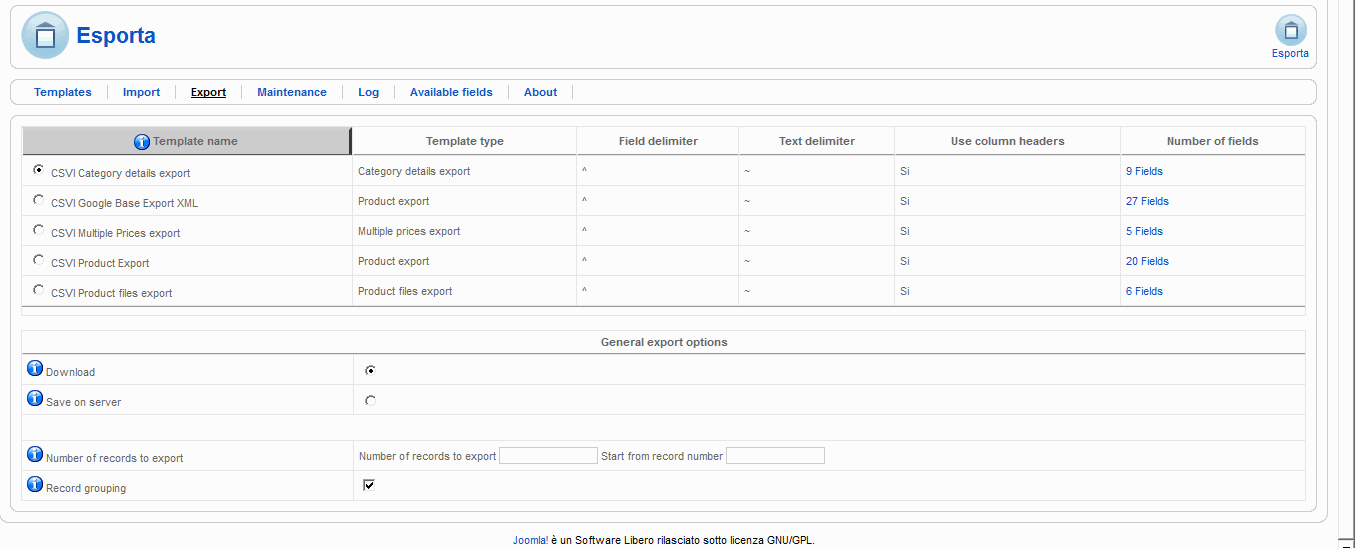
i try all 5 option, but work only export in xml file...
the other export generate i file like this
but the file is empty..
Now... how to exprot product from vm?
i try whitk csvi vm export, when i try to export i see this windows:
i try all 5 option, but work only export in xml file...
the other export generate i file like this
This attachment is hidden for guests.
Please log in or register to see it.
Please log in or register to see it.
but the file is empty..
Last edit: 14 years 7 months ago by lives.
Please Log in or Create an account to join the conversation.
14 years 7 months ago #43273
by nicolas
Replied by nicolas on topic Re: Import from VM not work
I suppose that you first need to create a CSVi template. You can follow the tutorial here:
www.csvimproved.com/index.php?option=com...&catid=33&Itemid=142
www.csvimproved.com/index.php?option=com...&catid=33&Itemid=142
Please Log in or Create an account to join the conversation.
14 years 7 months ago #43278
by lives
but is very difficult
Replied by lives on topic Re: Import from VM not work
but is very difficult Please Log in or Create an account to join the conversation.
14 years 7 months ago #43469
by nicolas
Replied by nicolas on topic Re: Import from VM not work
Yes. That's why we made the import from VM. It's really strange that it doesn't work for you.
Maybe you could try to do a copy of your website on your local computer and do the import from VM there. That might help avoid the problem you have on your website with it...
Maybe you could try to do a copy of your website on your local computer and do the import from VM there. That might help avoid the problem you have on your website with it...
Please Log in or Create an account to join the conversation.
14 years 7 months ago #43505
by lives
Replied by lives on topic Re: Import from VM not work
Ok nicolas, i copy site in my pc e try to import from vm..
Thanks
Thanks
Please Log in or Create an account to join the conversation.
14 years 7 months ago #43545
by lives
Replied by lives on topic Re: Import from VM not work
dont't work
HikaShop: Import from VirtueMart
[Initialization Tables]
Elasped time: 298.44ms
Next
i click next every time, but don't work
A question nicolas, is possible to import product from xml file?
or is possible to implement this features in next version?
Thank
HikaShop: Import from VirtueMart
[Initialization Tables]
Elasped time: 298.44ms
Next
i click next every time, but don't work
A question nicolas, is possible to import product from xml file?
or is possible to implement this features in next version?
Thank
Please Log in or Create an account to join the conversation.
14 years 7 months ago #43559
by nicolas
Replied by nicolas on topic Re: Import from VM not work
Could you give a back end access to your website so that we can have a look at the import from VM ?
It's strange that it doesn't work for you.
XML import is not possible for now. We won't implement it for next release as we are already working on other things for next release. Also, it's not really a priority as there are other features more requested that we want to do before that.
It's strange that it doesn't work for you.
XML import is not possible for now. We won't implement it for next release as we are already working on other things for next release. Also, it's not really a priority as there are other features more requested that we want to do before that.
Please Log in or Create an account to join the conversation.
14 years 7 months ago #43716
by lives
Replied by lives on topic Re: Import from VM not work
I send you pass for my back and... please, see why the import dont work,
i dont understand
i dont understand
Please Log in or Create an account to join the conversation.
14 years 7 months ago #43720
by nicolas
Replied by nicolas on topic Re: Import from VM not work
For some reasons the page was not fetched again when pressing next.
I had to press ctrl+F5 for it to go to the next step each time.
That way, I was able to finish the import on your website.
I had to press ctrl+F5 for it to go to the next step each time.
That way, I was able to finish the import on your website.
Please Log in or Create an account to join the conversation.
14 years 7 months ago #43722
by lives
Replied by lives on topic Re: Import from VM not work
You are great
I try this way in local and work great
But at the end i see this message
You can publish the VirtueMart Fallback Redirect Plugin so that your old VirtueMart links are automatically redirected to HikaShop pages and thus not loose the ranking of your content on search engines.
This plugin redirect301 the old links?
Thanks
I try this way in local and work great
But at the end i see this message
You can publish the VirtueMart Fallback Redirect Plugin so that your old VirtueMart links are automatically redirected to HikaShop pages and thus not loose the ranking of your content on search engines.
This plugin redirect301 the old links?
Thanks
Please Log in or Create an account to join the conversation.
14 years 7 months ago #43723
by nicolas
Replied by nicolas on topic Re: Import from VM not work
Yes, but you need to keep VM on your website if you use it.
Please Log in or Create an account to join the conversation.
Time to create page: 0.115 seconds