

- Posts: 6
- Thank you received: 0
Cart Module - Background Image
14 years 7 months ago #43603
by Rigter
Cart Module - Background Image was created by Rigter
Hello!
Just starting to use Hikashop ( and joomla..)! Excellent product and for what i've seen, excellent support.
One question, that i could not find the answer!
- How to add an background image to Cart / mini Cart? (and change its size properties, etc.)
(using Hikashop on localhost, still much to learn)
Thank you A LOT!!
Just starting to use Hikashop ( and joomla..)! Excellent product and for what i've seen, excellent support.
One question, that i could not find the answer!
- How to add an background image to Cart / mini Cart? (and change its size properties, etc.)
(using Hikashop on localhost, still much to learn)
Thank you A LOT!!
Please Log in or Create an account to join the conversation.

14 years 7 months ago #43606
by manuxx
Replied by manuxx on topic Re: Cart Module - Background Image
I was wondering the same,
I'm looking at the demo template but that code seems included in the template.css
Any simple way to add an image background to the cart as on the demo website.
image missing http://img696.imageshack.us/img696/3606/hikacart.jpg
Uploaded with ImageShack.us
I'm looking at the demo template but that code seems included in the template.css
Any simple way to add an image background to the cart as on the demo website.
image missing http://img696.imageshack.us/img696/3606/hikacart.jpg
Uploaded with ImageShack.us
Please Log in or Create an account to join the conversation.
14 years 7 months ago #43609
by Rigter
Replied by Rigter on topic Re: Cart Module - Background Image
Hello manuxx,
I'm not the only one!
I'm seeing CSS for the first time! But i'm starting to scratch the surface....
Yesterday i as able to change the PRICE COLOR! (needed to clean the cache of browser ... :pinch:
Now I've been trying to change the color/sizes off : ADD TO CART BUTTON
On Hikashop Configuration -> Display -> Front End CSS file to Custom -> (see attach.)
Tried to change color and font size, but nothings happeans
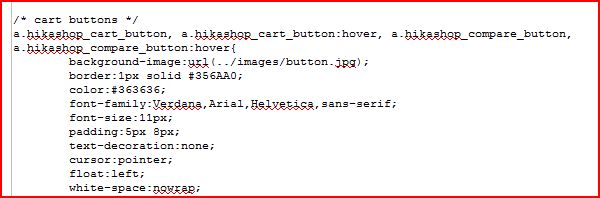
I'm not the only one!
I'm seeing CSS for the first time! But i'm starting to scratch the surface....
Yesterday i as able to change the PRICE COLOR! (needed to clean the cache of browser ... :pinch:
Now I've been trying to change the color/sizes off : ADD TO CART BUTTON
On Hikashop Configuration -> Display -> Front End CSS file to Custom -> (see attach.)
Tried to change color and font size, but nothings happeans
Please Log in or Create an account to join the conversation.
14 years 7 months ago - 14 years 7 months ago #43612
by manuxx
Replied by manuxx on topic Re: Cart Module - Background Image
Hi
Maybe this post helps you www.hikashop.com/en/forum/4-how-to/19519...-to-cart-button.html
For the background image of the cart let's see what Nicolas says about it.
I always use firebug extension for firefox to check what file I have to modify, I'm quite new to joomla 2.5 and still learning this template override things.
image missing http://img100.imageshack.us/img100/6596/hikacart2.jpg
Uploaded with ImageShack.us
Regards
Maybe this post helps you www.hikashop.com/en/forum/4-how-to/19519...-to-cart-button.html
For the background image of the cart let's see what Nicolas says about it.
I always use firebug extension for firefox to check what file I have to modify, I'm quite new to joomla 2.5 and still learning this template override things.
image missing http://img100.imageshack.us/img100/6596/hikacart2.jpg
Uploaded with ImageShack.us
Regards
Last edit: 14 years 7 months ago by manuxx.
Please Log in or Create an account to join the conversation.
14 years 7 months ago #43614
by Rigter
Replied by Rigter on topic Re: Cart Module - Background Image
Hello manuxx ! Thank you. Firebug, must get it.
and also thank you for the post link. I'll jump right to it.
Hope that Nicolas comes up with a nice and easy way to alter/define Cart/Minicart module display properties
and also thank you for the post link. I'll jump right to it.
Hope that Nicolas comes up with a nice and easy way to alter/define Cart/Minicart module display properties
Please Log in or Create an account to join the conversation.



14 years 7 months ago #43629
by nicolas
Replied by nicolas on topic Re: Cart Module - Background Image
That has to be done is CSS yes. I don't see how we could had options for styling the cart module. There are just too many possibilities and it also depends on your template's CSS.
The CSS to add a background image to the cart module is quite simple:
You can add it in the front end CSS file of HikaShop in the Display tab of the configuration.
The CSS to add a background image to the cart module is quite simple:
Code:
#hikashop_cart_module {
background-image: url('http://mywebsite.com/mybackground.png');
}
Please Log in or Create an account to join the conversation.
14 years 7 months ago #43663
by Rigter
Replied by Rigter on topic Re: Cart Module - Background Image
Thank you nicolas.
But still struggling with CSS...
1 - I have inserted your code at the bottom of frontend_custom.css - Can i do that ? Place this code anywhere?
2 - I'm still in "learning/training" mode, so the path to my image should be from my localhost as I've inserted? (please see attach.)
Thanks in advance.
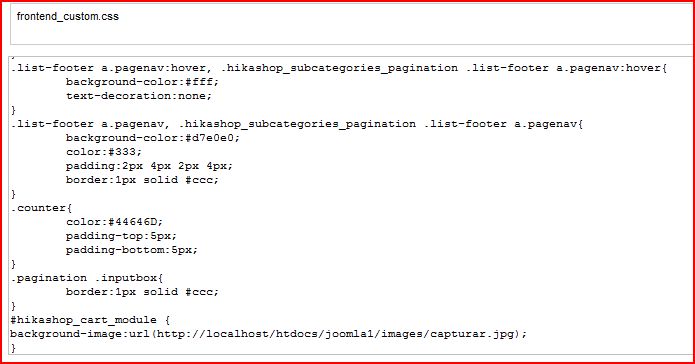
But still struggling with CSS...
1 - I have inserted your code at the bottom of frontend_custom.css - Can i do that ? Place this code anywhere?
2 - I'm still in "learning/training" mode, so the path to my image should be from my localhost as I've inserted? (please see attach.)
Thanks in advance.
Please Log in or Create an account to join the conversation.
14 years 7 months ago #43664
by nicolas
Replied by nicolas on topic Re: Cart Module - Background Image
Yes, it should be like that.
Please Log in or Create an account to join the conversation.
14 years 7 months ago #43673
by Rigter
Replied by Rigter on topic Re: Cart Module - Background Image
Thank you. But something is wrong! It's not working
Please Log in or Create an account to join the conversation.
14 years 7 months ago #43675
by nicolas
Replied by nicolas on topic Re: Cart Module - Background Image
We would need to look at the page with firebug in order to understand what's wrong.
Could you put it online ?
Could you put it online ?
Please Log in or Create an account to join the conversation.
14 years 7 months ago - 14 years 7 months ago #43685
by manuxx
Replied by manuxx on topic Re: Cart Module - Background Image
That line
#hikashop_cart_module {
background-image: url(' mywebsite.com/mybackground.png ');
}
Why it refers to the hikashop cart module? I'm trying to understand how joomla 2.5 and hikashop works here with css.
I miss joomla 1.5 in this cases, it was so easy just to take the image of a module that already had a css and replace it via ftp.
I see frontend_custom.css and adding that line you just say that the background for that css is "mybackground.png" but that css is only for the cart module?
Don't get it soz :dry:
#hikashop_cart_module {
background-image: url(' mywebsite.com/mybackground.png ');
}
Why it refers to the hikashop cart module? I'm trying to understand how joomla 2.5 and hikashop works here with css.
I miss joomla 1.5 in this cases, it was so easy just to take the image of a module that already had a css and replace it via ftp.
I see frontend_custom.css and adding that line you just say that the background for that css is "mybackground.png" but that css is only for the cart module?
Don't get it soz :dry:
Last edit: 14 years 7 months ago by manuxx.
Please Log in or Create an account to join the conversation.
14 years 7 months ago #43690
by Rigter
Replied by Rigter on topic Re: Cart Module - Background Image
Hello, thank you again for the quick reply.
Sorry, i do not have it online yet .... :blush:
Sorry, i do not have it online yet .... :blush:
Please Log in or Create an account to join the conversation.
14 years 7 months ago #43857
by nicolas
Replied by nicolas on topic Re: Cart Module - Background Image
@manuxx:
hikashop_cart_module is the id of the div that HikaShop adds around the cart module content. So yes, that CSS is only for the cart module. That's what our friend Rigter wants.
@Rigter:
No worry. Let us know when you put it online so that we can look at that.
hikashop_cart_module is the id of the div that HikaShop adds around the cart module content. So yes, that CSS is only for the cart module. That's what our friend Rigter wants.
@Rigter:
No worry. Let us know when you put it online so that we can look at that.
Please Log in or Create an account to join the conversation.
Time to create page: 1.537 seconds