

- Posts: 198
- Thank you received: 4
How to show order history in frontend?
14 years 7 months ago #44184
by arnask
How to show order history in frontend? was created by arnask
now i'm only can show list of orders and here user can see last updated order status. But what if i want to show for user all his order history:
When order status changed, what was the name of order status and even what was the Modification reason for that.
When order status changed, what was the name of order status and even what was the Modification reason for that.
Please Log in or Create an account to join the conversation.

14 years 7 months ago - 14 years 7 months ago #44347
by Xavier
Replied by Xavier on topic Re: How to show order history in frontend?
Hi arnask,
You can display these different informations, you have to edit:
yourSite\components\com_hikashop\views\order\view.html.php > function listing().
Add:
Before:
And in :
yourSite\components\com_hikashop\views\order\tmpl\listing.php
Add:
In the listing table, after the line:
<?php echo $row->order_number; ?>
You can display these different informations, you have to edit:
yourSite\components\com_hikashop\views\order\view.html.php > function listing().
Add:
Code:
foreach($rows as $k => $hist){
$database->setQuery('SELECT * FROM '.hikashop_table('history').' WHERE history_id IN(SELECT max(history_id) FROM '.hikashop_table('history').' WHERE `history_order_id` = '.$rows[$k]->order_id.' AND history_type = "modification" )');
$rows[$k]->history = $database->loadObjectList();
}
Before:
Code:
$this->assignRef('rows',$rows);
And in :
yourSite\components\com_hikashop\views\order\tmpl\listing.php
Add:
Code:
<?php
echo '<br/>'.hikashop_getDate($row->order_modified,'%Y-%m-%d %H:%M').' / ';
echo $row->history[0]->history_new_status.' / ';
echo $row->history[0]->history_reason; ?>
In the listing table, after the line:
<?php echo $row->order_number; ?>
Last edit: 14 years 7 months ago by nicolas.
Please Log in or Create an account to join the conversation.
14 years 7 months ago #44408
by arnask
Replied by arnask on topic Re: How to show order history in frontend?
Parse error: syntax error, unexpected T_VARIABLE in .../components/com_hikashop/views/order/tmpl/listing.php on line 123
where exactly is "In the listing table, between <tr><td> tags for each elements" can you provide line numbers?
where exactly is "In the listing table, between <tr><td> tags for each elements" can you provide line numbers?
Please Log in or Create an account to join the conversation.

14 years 7 months ago #44410
by nicolas
Replied by nicolas on topic Re: How to show order history in frontend?
I've fixed the code in the previous message, please try with that new code.
Please Log in or Create an account to join the conversation.
14 years 7 months ago - 14 years 7 months ago #44418
by arnask
Replied by arnask on topic Re: How to show order history in frontend?
no good:
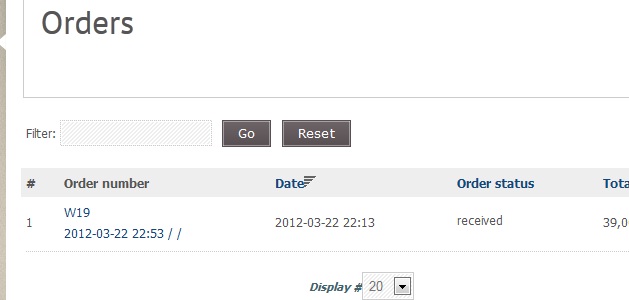
Last edit: 14 years 7 months ago by arnask.
Please Log in or Create an account to join the conversation.
14 years 7 months ago #44420
by nicolas
Replied by nicolas on topic Re: How to show order history in frontend?
Make sure that you also add the first modification in your view.html.php file
Please Log in or Create an account to join the conversation.
14 years 7 months ago #44426
by arnask
Replied by arnask on topic Re: How to show order history in frontend?
yes i've done that. Now it loks like:
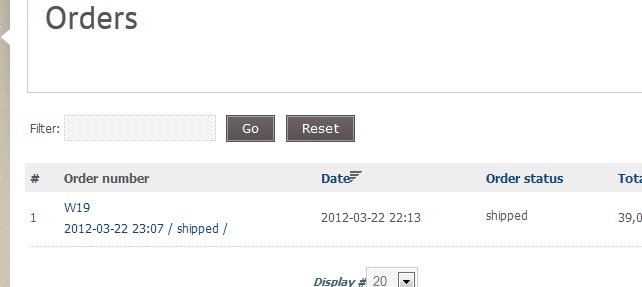
Code:
$this->assignRef('params',$params);
foreach($rows as $k => $hist){
$database->setQuery('SELECT * FROM '.hikashop_table('history').' WHERE history_id IN(SELECT max(history_id) FROM '.hikashop_table('history').' WHERE `history_order_id` = '.$rows[$k]->order_id.' AND history_type = "modification" )');
$rows[$k]->history = $database->loadObjectList();
}
$this->assignRef('rows',$rows);
Please Log in or Create an account to join the conversation.
14 years 7 months ago #44436
by nicolas
Replied by nicolas on topic Re: How to show order history in frontend?
So that means that there was no reason given in the last modification of the order.
Please Log in or Create an account to join the conversation.
14 years 7 months ago #44442
by arnask
Replied by arnask on topic Re: How to show order history in frontend?
yes, but i still can not see all the history of order. Only the last change.
What if there was 5 order changes with different reasons in different time. I can not see that.
What if there was 5 order changes with different reasons in different time. I can not see that.
Please Log in or Create an account to join the conversation.
14 years 7 months ago #44445
by nicolas
Replied by nicolas on topic Re: How to show order history in frontend?
You would have to use that code then:
Code:
<?php
foreach($row->history as $hist){
echo '<br/>'.hikashop_getDate($row->order_modified,'%Y-%m-%d %H:%M').' / ';
echo $hist->history_new_status.' / ';
echo $hist->history_reason;
}
?>
Please Log in or Create an account to join the conversation.
14 years 7 months ago #44446
by arnask
Replied by arnask on topic Re: How to show order history in frontend?
still the last one. No history.
Please Log in or Create an account to join the conversation.
14 years 7 months ago #44447
by nicolas
Replied by nicolas on topic Re: How to show order history in frontend?
Change also the line:
$database->setQuery('SELECT * FROM '.hikashop_table('history').' WHERE history_id IN(SELECT max(history_id) FROM '.hikashop_table('history').' WHERE `history_order_id` = '.$rows[$k]->order_id.' AND history_type = "modification" )');
to:
$database->setQuery('SELECT * FROM '.hikashop_table('history').' WHERE history_id IN(SELECT history_id FROM '.hikashop_table('history').' WHERE `history_order_id` = '.$rows[$k]->order_id.' AND history_type = "modification" )');
in the other file (the view.html.php)
$database->setQuery('SELECT * FROM '.hikashop_table('history').' WHERE history_id IN(SELECT max(history_id) FROM '.hikashop_table('history').' WHERE `history_order_id` = '.$rows[$k]->order_id.' AND history_type = "modification" )');
to:
$database->setQuery('SELECT * FROM '.hikashop_table('history').' WHERE history_id IN(SELECT history_id FROM '.hikashop_table('history').' WHERE `history_order_id` = '.$rows[$k]->order_id.' AND history_type = "modification" )');
in the other file (the view.html.php)
Please Log in or Create an account to join the conversation.
14 years 7 months ago #44474
by arnask
Replied by arnask on topic Re: How to show order history in frontend?
now it ok, onnly we need to handle dates, because everything is in the same last modification date.
And of course we need to handle languages of order statuses to disply correctly with Falang.
But already thank you nicolas!
And of course we need to handle languages of order statuses to disply correctly with Falang.
But already thank you nicolas!
Please Log in or Create an account to join the conversation.
14 years 7 months ago - 14 years 7 months ago #44484
by Xavier
Replied by Xavier on topic Re: How to show order history in frontend?
Hi arnask,
For the dates, you can use :
For the dates, you can use :
Code:
$hist->history_created;
Last edit: 14 years 7 months ago by Xavier.
Please Log in or Create an account to join the conversation.
14 years 7 months ago #44678
by arnask
Replied by arnask on topic Re: How to show order history in frontend?
still it shows the last modification date for all modifications.
Date is in some numbers format.
Order statuses are not in correct language.
now code in listing.php looks:
and in website it looks like:
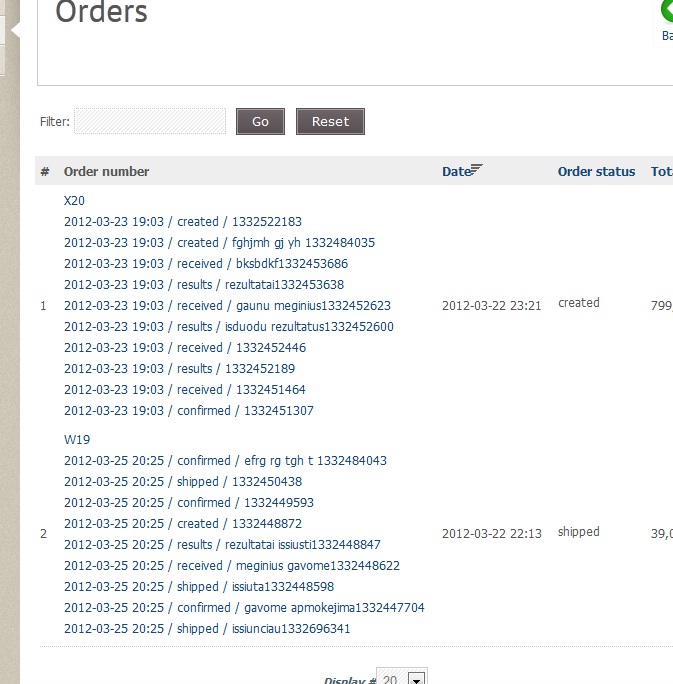
Date is in some numbers format.
Order statuses are not in correct language.
now code in listing.php looks:
Code:
<?php
foreach($row->history as $hist){
echo '<br/>'.hikashop_getDate($row->order_modified,'%Y-%m-%d %H:%M').' / ';
echo $hist->history_new_status.' / ';
echo $hist->history_reason;
echo $hist->history_created;
}
?>
and in website it looks like:
Please Log in or Create an account to join the conversation.
14 years 7 months ago #44860
by nicolas
Replied by nicolas on topic Re: How to show order history in frontend?
Do like that instead:
Code:
<?php
foreach($row->history as $hist){
echo '<br/>'.hikashop_getDate($hist->history_created,'%Y-%m-%d %H:%M').' / ';
echo $hist->history_new_status.' / ';
echo $hist->history_reason;
}
?>
Please Log in or Create an account to join the conversation.
14 years 7 months ago #45008
by arnask
Replied by arnask on topic Re: How to show order history in frontend?
Thanks, it works now. But there is still language issue. How to make "history_new_status" display correct language?
Please Log in or Create an account to join the conversation.
14 years 7 months ago #45167
by nicolas
Replied by nicolas on topic Re: How to show order history in frontend?
You can replace:
$hist->history_new_status
by:
$this->order_statuses->trans($hist->history_new_status)
in the previous code.
$hist->history_new_status
by:
$this->order_statuses->trans($hist->history_new_status)
in the previous code.
Please Log in or Create an account to join the conversation.
14 years 2 months ago - 14 years 2 months ago #62200
by arnask
Replied by arnask on topic Re: How to show order history in frontend?
after updating hikashop, everything has gone, and now i need to do it all again. Is there a chance that it will be implemented in future hikashop?
I think this feature is very useful, and VM is a big competitor in this field.
Is there a possibility to attache file in frontend near all users orders? I need to give a special reports for my customers about theirs orders.
For example when i'm changing order status, i'm putting a modification reason and need to attache a file to it. So that this file could be in email and in frontend "My orders" section.
I think this feature is very useful, and VM is a big competitor in this field.
Is there a possibility to attache file in frontend near all users orders? I need to give a special reports for my customers about theirs orders.
For example when i'm changing order status, i'm putting a modification reason and need to attache a file to it. So that this file could be in email and in frontend "My orders" section.
Last edit: 14 years 2 months ago by arnask.
Please Log in or Create an account to join the conversation.
14 years 2 months ago #62262
by nicolas
Replied by nicolas on topic Re: How to show order history in frontend?
If you do your modifications via the menu Display->Views you won't loose them when you update.
If you create a custom field of the table "order" and of the type "file" which is unpublished for the front end, you can have such upload possibility. The file will be in the email and in the order details page automatically.
If you create a custom field of the table "order" and of the type "file" which is unpublished for the front end, you can have such upload possibility. The file will be in the email and in the order details page automatically.
Please Log in or Create an account to join the conversation.
Time to create page: 0.127 seconds