

- Posts: 27
- Thank you received: 0
Where must I change VAT besides language file?
15 years 8 months ago #4424
by mollyf
Where must I change VAT besides language file? was created by mollyf
My store is really coming along. I've been able to overcome almost every obstacle thanks to this forum and the attentive Nicolas.
For my store, I need to change "VAT" to "sales tax" everywhere it appears. I've changed the System->Configuration->Languages->English(UnitedKingdom) file as much as I can, but I keep finding VAT in other places and can't locate which settings or files I need to edit. Is there a map? A list of every place VAT appears?
For my store, I need to change "VAT" to "sales tax" everywhere it appears. I've changed the System->Configuration->Languages->English(UnitedKingdom) file as much as I can, but I keep finding VAT in other places and can't locate which settings or files I need to edit. Is there a map? A list of every place VAT appears?
Please Log in or Create an account to join the conversation.

15 years 8 months ago #4425
by nicolas
Replied by nicolas on topic Re: Where must I change VAT besides language file?
All the text used in HikaShop should be found in your language file.
Where did you find other "VAT" text ? Are you sure that it's not a cache problem ?
Where did you find other "VAT" text ? Are you sure that it's not a cache problem ?
Please Log in or Create an account to join the conversation.
15 years 8 months ago - 15 years 8 months ago #4431
by mollyf
Replied by mollyf on topic Re: Where must I change VAT besides language file?
Yes, the last email notification test I did was probably a caching problem. When I rechecked it just now it was successfully changed in the email message.
However, VAT's still in the customer's order page:
www.mirocellars.com/index.php?option=com...ask=show&cid%5B%5D=7 (username=Tuna; password=test or see attached screen shot)
...and I think that's all.
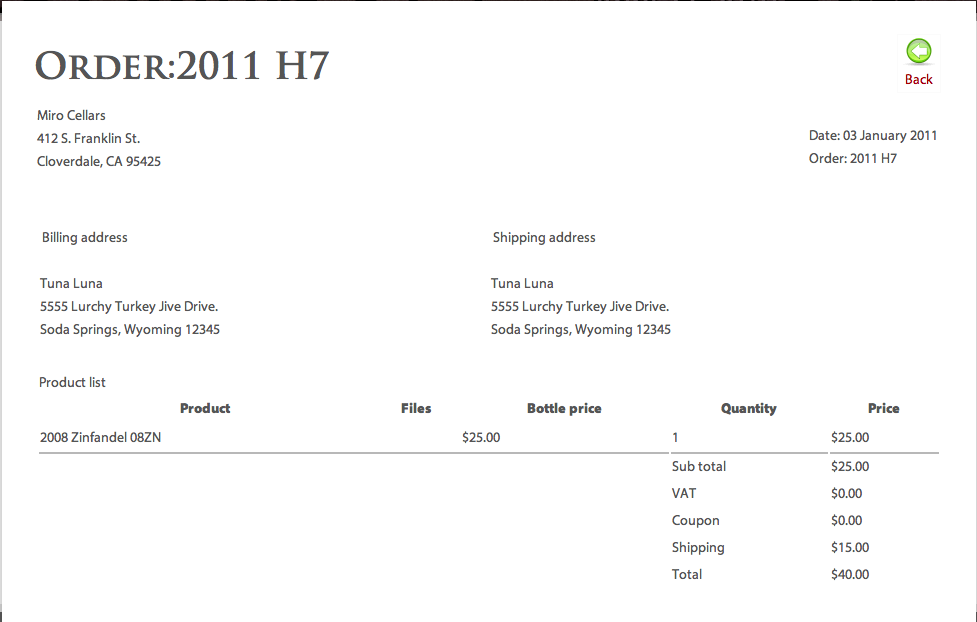
Nope!
Edited to add:
It's in the invoices: Sales->Order number->Invoice
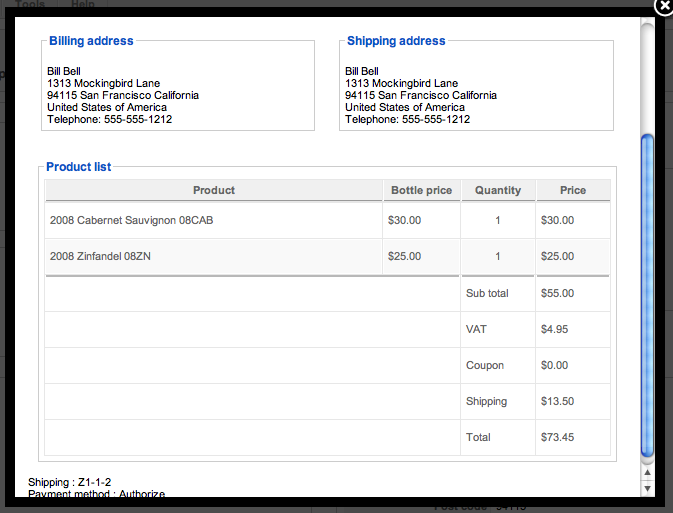
However, VAT's still in the customer's order page:
www.mirocellars.com/index.php?option=com...ask=show&cid%5B%5D=7 (username=Tuna; password=test or see attached screen shot)
...and I think that's all.
Nope!
Edited to add:
It's in the invoices: Sales->Order number->Invoice
Last edit: 15 years 8 months ago by mollyf. Reason: corrected mistake
Please Log in or Create an account to join the conversation.
15 years 8 months ago #4432
by nicolas
Replied by nicolas on topic Re: Where must I change VAT besides language file?
That one is the same as in the checkout and the email. So if it works there, it shuld here here as well.
Are you sure it's not a cache problem as well ? Or maybe you edited that view ?
Are you sure it's not a cache problem as well ? Or maybe you edited that view ?
Please Log in or Create an account to join the conversation.
15 years 8 months ago #4433
by mollyf
Replied by mollyf on topic Re: Where must I change VAT besides language file?
I'm sure this is not a caching problem. I just tested it in a browser I have not used to test the shop before.
I did a completely clean reinstall (uninstalled components, plugins and modules through Joomla's administration interface, removed all jos_hikashop_* tables via phpMyAdmin and checked for stray files through FTP) when I was having trouble with tax, states and shipping. I have not touched this view. Especially since I'm not sure where to find it.
I did a completely clean reinstall (uninstalled components, plugins and modules through Joomla's administration interface, removed all jos_hikashop_* tables via phpMyAdmin and checked for stray files through FTP) when I was having trouble with tax, states and shipping. I have not touched this view. Especially since I'm not sure where to find it.
Please Log in or Create an account to join the conversation.
15 years 8 months ago #4434
by nicolas
Replied by nicolas on topic Re: Where must I change VAT besides language file?
On our end I4m also sure that this string can be changed via the language files.
Anyway, you can go around that:
Go in the menu Display->Views and edit the file invoice of the view order the backend. There, search for VAT and replace it with what you want.
Anyway, you can go around that:
Go in the menu Display->Views and edit the file invoice of the view order the backend. There, search for VAT and replace it with what you want.
Please Log in or Create an account to join the conversation.
15 years 8 months ago #4435
by nicolas
Replied by nicolas on topic Re: Where must I change VAT besides language file?
I got your translation file and I didn't see the line in there:
VAT="VAT"
VAT="VAT"
Please Log in or Create an account to join the conversation.
15 years 8 months ago #4436
by mollyf
Replied by mollyf on topic Re: Where must I change VAT besides language file?
Cool! That must be the problem! Lines 146 and 1238 had been changed from VAT="VAT" to CA Sales Tax="CA Sales Tax" because I was sloppy (for shame) using find & replace. You are truly awesome.
Please Log in or Create an account to join the conversation.
Time to create page: 0.219 seconds