

- Posts: 5
- Thank you received: 0
characteristics variants-not showing all
14 years 7 months ago #44503
by tahni777
characteristics variants-not showing all was created by tahni777
ive followed step by step the adding of the characteristic variants, but in the front end only 2 variants show up. in the product page all the variants show up in the drop down list. what am i doing wrong? ive deleted them and tried to add one by one, saving, but it doesnt work.
Please Log in or Create an account to join the conversation.

14 years 7 months ago #44514
by Xavier
Replied by Xavier on topic Re: characteristics variants-not showing all
Hi tahni777,
In HikaShop > Display > Custom fields
Check if your custom fields are enabled for the front-end. If this options is disable, the variants will not show up.
In HikaShop > Display > Custom fields
Check if your custom fields are enabled for the front-end. If this options is disable, the variants will not show up.
Please Log in or Create an account to join the conversation.
14 years 7 months ago #44522
by tahni777
Replied by tahni777 on topic Re: characteristics variants-not showing all
i dont have options on custom fields...only adress options, but anyway, the variants show up, only two...the rest dont so maybe its got to do with selecting how many variants can show up in the front end...im so lost right now im just shooting at the wind.
Please Log in or Create an account to join the conversation.
14 years 7 months ago #44552
by Xavier
Replied by Xavier on topic Re: characteristics variants-not showing all
In the product edition page, click on "Manage variants", check if there are values in the columns.
If values are missing, it's because you add new variants after create the product, and then these variants don't appear on the front-end because they are empty.
Edit the variants to fill the missing values, and they will be shown up in the front-end.
If values are missing, it's because you add new variants after create the product, and then these variants don't appear on the front-end because they are empty.
Edit the variants to fill the missing values, and they will be shown up in the front-end.
Please Log in or Create an account to join the conversation.
14 years 7 months ago #44703
by tahni777
Replied by tahni777 on topic Re: characteristics variants-not showing all
Thanks for the help, took me a while to get there, i guess i get frustraded, gotta step back and breathe a little.
Please Log in or Create an account to join the conversation.
13 years 11 months ago #78687
by greener
Replied by greener on topic Re: characteristics variants-not showing all
This is happening to my shop. Cannot see all the variants.
Sorry, but when I edit the variants per your suggestion I do not see the missing variants. Can you explain that step a bit more? thank you very much in advance!
Sorry, but when I edit the variants per your suggestion I do not see the missing variants. Can you explain that step a bit more? thank you very much in advance!
Please Log in or Create an account to join the conversation.

13 years 11 months ago #78742
by Jerome
Jerome - Obsidev.com
HikaMarket & HikaSerial developer / HikaShop core dev team.
Replied by Jerome on topic Re: characteristics variants-not showing all
Hi,
If you have missing variants, you have to create them.
Some improvements have been added in HikaShop 2.0 for variants but it is still possible to have some missing variants, sometimes.
Regards,
If you have missing variants, you have to create them.
Some improvements have been added in HikaShop 2.0 for variants but it is still possible to have some missing variants, sometimes.
Regards,
Jerome - Obsidev.com
HikaMarket & HikaSerial developer / HikaShop core dev team.
Please Log in or Create an account to join the conversation.
11 years 4 months ago #205991
by milesreid
Replied by milesreid on topic variants not showing on product page
Hi
Hikashop Essentails version 2.4.0
I cannot see my variants on the product page - all I get is as shown in the attachment. I have two characteristics defined - size and colour, and I am able to add each characteristic along with a default variant value. I have checked that all of the variants are defined correctly. I have also checked custom fields, and they do not appear there (only a list of address fields)
According to the documentation, there is supposed to be a button captioned 'Manage Variants'. I do not have this.
Do you have any ideas pls?
Miles
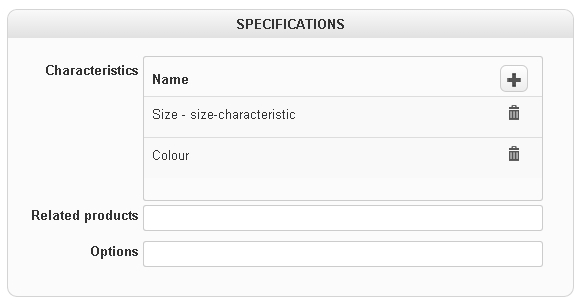
Hikashop Essentails version 2.4.0
I cannot see my variants on the product page - all I get is as shown in the attachment. I have two characteristics defined - size and colour, and I am able to add each characteristic along with a default variant value. I have checked that all of the variants are defined correctly. I have also checked custom fields, and they do not appear there (only a list of address fields)
According to the documentation, there is supposed to be a button captioned 'Manage Variants'. I do not have this.
Do you have any ideas pls?
Miles
Please Log in or Create an account to join the conversation.
11 years 4 months ago #206001
by milesreid
Replied by milesreid on topic characteristics variants-not showing all
I'm sorry guys - I had a senior moment there  All is OK now
Miles
All is OK nowMiles
Please Log in or Create an account to join the conversation.
11 years 2 months ago #211146
by achouffe
Replied by achouffe on topic characteristics variants-not showing all
I have the same problem. I hadn't the problem in version 2.4.0. The problem appeared in version Starter 2.5.0 as well as in Essential 2.5.0.
This is the only dialogbox I see when added a characteristics option.
This is the only dialogbox I see when added a characteristics option.
Please Log in or Create an account to join the conversation.
11 years 2 months ago #211147
by achouffe
Replied by achouffe on topic characteristics variants-not showing all
When I just returned to the backend of my site I noticed that has appeared a Variants tab just near the products tab. When I clicked on it I could choose the variants I want. So my problem is solved.
The following user(s) said Thank You: Jerome
Please Log in or Create an account to join the conversation.
10 years 7 months ago #233367
by treybraid
Replied by treybraid on topic characteristics variants-not showing all
variants tab is knowhere to be found with me...how do you get to it... very frustrating to say the least...
tery
tery
Please Log in or Create an account to join the conversation.

10 years 7 months ago #233371
by nicolas
Replied by nicolas on topic characteristics variants-not showing all
Hi,
Just add a characteristic to the product, select the default value and validate and the variants tab will appear automatically at the top of the page.
Just add a characteristic to the product, select the default value and validate and the variants tab will appear automatically at the top of the page.
Please Log in or Create an account to join the conversation.
Time to create page: 0.105 seconds