

- Posts: 86239
- Thank you received: 14228
No choice of "state" when editing billing address
15 years 5 months ago #15140
by nicolas
Replied by nicolas on topic Re: No choice of "state" when editing billing address
As I said in my previous message, the login and registration boxes do NOT overlap on our end. Did you flush the cache of your browser ? Which browser are you using ? If you use another browser, do you still have the problem ?
For the button, it's a styling problem of your template.
You can add the CSS below to correct it:
.art-button-wrapper{
margin-bottom : 20px;
}
For the button, it's a styling problem of your template.
You can add the CSS below to correct it:
.art-button-wrapper{
margin-bottom : 20px;
}
Please Log in or Create an account to join the conversation.

15 years 5 months ago #15175
by grafix
Replied by grafix on topic Re: No choice of "state" when editing billing address
Nicolas, I fixed the overlapped "boxes". My main template was set up with 660px width... That's why I couldn't control width through HikaShop css.
Also, thanks for css for button... It looks like the most issues are already solved!!! Thanks a lot for a great support )
)
Also, thanks for css for button... It looks like the most issues are already solved!!! Thanks a lot for a great support
) Please Log in or Create an account to join the conversation.

14 years 9 months ago #31908
by mollyf
Replied by mollyf on topic Re: No choice of "state" when editing billing address
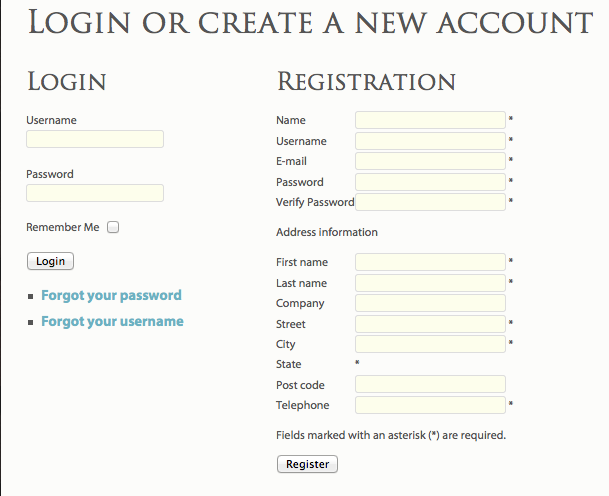
I wonder if something similar occurred in the 1.5.3 to 1.5.4 update?
Please Log in or Create an account to join the conversation.
14 years 9 months ago #31938
by nicolas
Replied by nicolas on topic Re: No choice of "state" when editing billing address
Please don't post your questions through several threads.
The following will be here:
www.hikashop.com/en/support/forum/3-bug-...t-showing.html#31924
The following will be here:
www.hikashop.com/en/support/forum/3-bug-...t-showing.html#31924
Please Log in or Create an account to join the conversation.
Time to create page: 0.165 seconds