

- Posts: 51
- Thank you received: 0
how to show weight in sales backend
14 years 5 months ago - 14 years 5 months ago #46330
by loling
how to show weight in sales backend was created by loling
Hi Nikolas
how to display weight in total and per product quantity at back end?
like below pictures
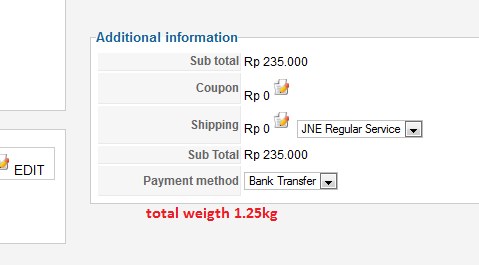
and
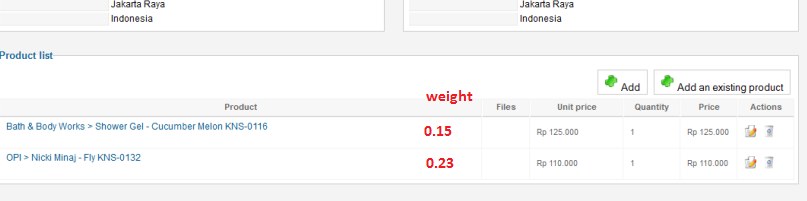
If it is not doable, how to include total weight in email notification to administrator??
like 'new order has been created... order (number).. sub total (number)... weight (number)'
Or any other way to inform administrator the total weight of one order??
Thanks
how to display weight in total and per product quantity at back end?
like below pictures
and
If it is not doable, how to include total weight in email notification to administrator??
like 'new order has been created... order (number).. sub total (number)... weight (number)'
Or any other way to inform administrator the total weight of one order??
Thanks
Last edit: 14 years 5 months ago by loling.
Please Log in or Create an account to join the conversation.

14 years 5 months ago #46412
by nicolas
Replied by nicolas on topic Re: how to show weight in sales backend
That information is not stored in the orders.
You can always edit the view file and load the data from the product, and do the maths but it's complex if you're not a programmer.
For the order creation email, it should be simpler I think. Try to add such code in it:
Total weight: <?php echo $data->cart->weight; ?>
You can always edit the view file and load the data from the product, and do the maths but it's complex if you're not a programmer.
For the order creation email, it should be simpler I think. Try to add such code in it:
Total weight: <?php echo $data->cart->weight; ?>
Please Log in or Create an account to join the conversation.
14 years 5 months ago #46494
by loling
Replied by loling on topic Re: how to show weight in sales backend
i think order creation email will do the job, where do i insert that code into??
Please Log in or Create an account to join the conversation.
14 years 5 months ago #46500
by nicolas
Replied by nicolas on topic Re: how to show weight in sales backend
In the "order creation notification" email that you can edit via the menu System->Emails in the Business edition.
Please Log in or Create an account to join the conversation.
14 years 5 months ago #46513
by loling
Replied by loling on topic Re: how to show weight in sales backend
how to do it in starter edition??
Please Log in or Create an account to join the conversation.
14 years 5 months ago #46535
by nicolas
Replied by nicolas on topic Re: how to show weight in sales backend
You can edit the file in the folder media/com_hikashop/mail but beware that unlike when you do it via the interface, you will loose your changes when you update HikaShop.
Please Log in or Create an account to join the conversation.
14 years 5 months ago - 14 years 5 months ago #46853
by loling
Replied by loling on topic Re: how to show weight in sales backend
so i edited order_admin_notification.text.php file in media/com_hikashop/mail/ into something like below. i have tried Total weight: <?php echo $data->cart->weight; ?>, Total weight: $data->cart->weight;, and echo "\r\n".JText::_('CART_WEIGHT').' : '.$data->cart->weight; .. Nothing works, please help 
<?php
$url = HIKASHOP_LIVE.'administrator/index.php?option=com_hikashop&ctrl=order&task=edit&order_id='.$data->order_id;
echo JText::sprintf('ORDER_STATUS_CHANGED',$data->mail_status)."\r\n".JText::sprintf('NOTIFICATION_OF_ORDER_ON_WEBSITE',$data->order_number,HIKASHOP_LIVE);
echo $data->cart->weight;
$currency = hikashop_get('class.currency');
echo "\r\n".JText::_('HIKASHOP_TOTAL').' : '.$currency->format($data->order_full_price,$data->order_currency_id);
echo "\r\n".str_replace('<br/>',"\r\n",JText::sprintf('ACCESS_ORDER_WITH_LINK',$url));
if($data->order_payment_method=='creditcard' && !empty($data->credit_card_info->cc_number)){
echo "\r\n".JText::_('CUSTOMER_PAID_WITH_CREDIT_CARD');
if(!empty($data->credit_card_info->cc_owner)){
echo "\r\n".JText::_('CREDIT_CARD_OWNER').' : '.$data->credit_card_info->cc_owner;
}
echo "\r\n".JText::_('END_OF_CREDIT_CARD_NUMBER').' : '.substr($data->credit_card_info->cc_number, ;
;
if(!empty($data->credit_card_info->cc_CCV)){
echo "\r\n".JText::_('CARD_VALIDATION_CODE').' : '.$data->credit_card_info->cc_CCV;
}
echo "\r\n".JText::_('CREDITCARD_WARNING');
}
$fieldsClass = hikashop_get('class.field');
$fields = $fieldsClass->getFields('frontcomp',$data,'order','');
foreach($fields as $fieldName => $oneExtraField) {
echo "\r\n".$fieldsClass->trans($oneExtraField->field_realname).' : '.$fieldsClass->show($oneExtraField,$data->$fieldName);
}
<?php
$url = HIKASHOP_LIVE.'administrator/index.php?option=com_hikashop&ctrl=order&task=edit&order_id='.$data->order_id;
echo JText::sprintf('ORDER_STATUS_CHANGED',$data->mail_status)."\r\n".JText::sprintf('NOTIFICATION_OF_ORDER_ON_WEBSITE',$data->order_number,HIKASHOP_LIVE);
echo $data->cart->weight;
$currency = hikashop_get('class.currency');
echo "\r\n".JText::_('HIKASHOP_TOTAL').' : '.$currency->format($data->order_full_price,$data->order_currency_id);
echo "\r\n".str_replace('<br/>',"\r\n",JText::sprintf('ACCESS_ORDER_WITH_LINK',$url));
if($data->order_payment_method=='creditcard' && !empty($data->credit_card_info->cc_number)){
echo "\r\n".JText::_('CUSTOMER_PAID_WITH_CREDIT_CARD');
if(!empty($data->credit_card_info->cc_owner)){
echo "\r\n".JText::_('CREDIT_CARD_OWNER').' : '.$data->credit_card_info->cc_owner;
}
echo "\r\n".JText::_('END_OF_CREDIT_CARD_NUMBER').' : '.substr($data->credit_card_info->cc_number,
;if(!empty($data->credit_card_info->cc_CCV)){
echo "\r\n".JText::_('CARD_VALIDATION_CODE').' : '.$data->credit_card_info->cc_CCV;
}
echo "\r\n".JText::_('CREDITCARD_WARNING');
}
$fieldsClass = hikashop_get('class.field');
$fields = $fieldsClass->getFields('frontcomp',$data,'order','');
foreach($fields as $fieldName => $oneExtraField) {
echo "\r\n".$fieldsClass->trans($oneExtraField->field_realname).' : '.$fieldsClass->show($oneExtraField,$data->$fieldName);
}
Last edit: 14 years 5 months ago by loling.
Please Log in or Create an account to join the conversation.
14 years 5 months ago #46942
by nicolas
Replied by nicolas on topic Re: how to show weight in sales backend
You should edit the html version, not the text version of the email which is rarely displayed by email clients.
Please Log in or Create an account to join the conversation.
14 years 5 months ago #46958
by loling
Replied by loling on topic Re: how to show weight in sales backend
i have edited the html version as well, but it is not showing either.
When i tried to insert Total weight: $data->cart->weight; or echo "\r\n".JText::_('CART_WEIGHT').' : '.$data->cart->weight; ,, the 'Total weight:' was shown, but there was no total weight for that order. so the email that admin receives is like this:
The order is now created.
Order C1A0N70
Total Weight:
Sub Total : Rp 72.000
You can access the order details directly by clicking on the link below after logging in your back end:
www.kliknshop.com/administrator/index.ph...k=edit&order_id=1070
Where did i do wrong??
When i tried to insert Total weight: $data->cart->weight; or echo "\r\n".JText::_('CART_WEIGHT').' : '.$data->cart->weight; ,, the 'Total weight:' was shown, but there was no total weight for that order. so the email that admin receives is like this:
The order is now created.
Order C1A0N70
Total Weight:
Sub Total : Rp 72.000
You can access the order details directly by clicking on the link below after logging in your back end:
www.kliknshop.com/administrator/index.ph...k=edit&order_id=1070
Where did i do wrong??
Please Log in or Create an account to join the conversation.
14 years 5 months ago #47065
by nicolas
Replied by nicolas on topic Re: how to show weight in sales backend
Then if that doesn't work you'll have to calculate the weight yourself...
It can be done with a few lines:
$class = hikashop_get('class.product');
$weight = 0;
foreach($data->cart->products as $prod){
$info = $class->get($prod->product_id);
$weight +=$info->product_weight*$prod->order_product_quantity;
}
echo $weight;
That should be done after:
$data->cart = $class->loadFullOrder($data->order_id,true,false);
It can be done with a few lines:
$class = hikashop_get('class.product');
$weight = 0;
foreach($data->cart->products as $prod){
$info = $class->get($prod->product_id);
$weight +=$info->product_weight*$prod->order_product_quantity;
}
echo $weight;
That should be done after:
$data->cart = $class->loadFullOrder($data->order_id,true,false);
Please Log in or Create an account to join the conversation.
14 years 5 months ago #47339
by clunky
Replied by clunky on topic Re: how to show weight in sales backend
Hi
Apologies for hijacking on this thread but this is exactly what I would like to achieve as well.
I would also like to be able to show hazardous products with a combined weight/fluid volume too, is there a way of pulling this through in the same way?
Apologies for hijacking on this thread but this is exactly what I would like to achieve as well.
I would also like to be able to show hazardous products with a combined weight/fluid volume too, is there a way of pulling this through in the same way?
Please Log in or Create an account to join the conversation.
14 years 5 months ago #47687
by nicolas
Replied by nicolas on topic Re: how to show weight in sales backend
Yes, it's basically the same... Just replace $info->product_weight by ($info->product_width*$info->product_length*$info->product_height)
Please Log in or Create an account to join the conversation.
Time to create page: 0.200 seconds