

- Posts: 2
- Thank you received: 0
Cart shows up on the checkout page
14 years 6 months ago #47219
by Crombe
Cart shows up on the checkout page was created by Crombe
I read through the forums but didn't find anything directly addressing my problem so I hope you can help.
I love hikashop but have a problem.
I have the shopping cart show up on the right side. It shows the "Proceed to checkout" button below the cart.
That all works great -- adding. deleting, proceeding to checkout.
When I proceed to checkout, everything shows up as it should BUT the cart continues to show up on the right side with the proceed to check out button.
But, the customer is at check out. This is confusing to the customer and me, frankly.
I've attached a screenshot of the checkout page. You'll see the cart still on the right.
(Just off the bottom of the screen shot are the "contining shopping" and "Next" Buttons.
So, how do I proceed to checkout and NIOT have the cart show up on the right.
Thanks.
I love hikashop but have a problem.
I have the shopping cart show up on the right side. It shows the "Proceed to checkout" button below the cart.
That all works great -- adding. deleting, proceeding to checkout.
When I proceed to checkout, everything shows up as it should BUT the cart continues to show up on the right side with the proceed to check out button.
But, the customer is at check out. This is confusing to the customer and me, frankly.
I've attached a screenshot of the checkout page. You'll see the cart still on the right.
(Just off the bottom of the screen shot are the "contining shopping" and "Next" Buttons.
So, how do I proceed to checkout and NIOT have the cart show up on the right.
Thanks.
Please Log in or Create an account to join the conversation.

14 years 6 months ago #47249
by Xavier
Replied by Xavier on topic Re: Cart shows up on the checkout page
Hi Crombe,
To not have the cart show up on the right, you have to go in: HikaShop > Display > Content modules.
Edit the "HikaShop cart module", and clic on "Joomla module options" in the bar on the top.
And here, in "Menu assignment" select "Only on the pages selected".
To not have the cart show up on the right, you have to go in: HikaShop > Display > Content modules.
Edit the "HikaShop cart module", and clic on "Joomla module options" in the bar on the top.
And here, in "Menu assignment" select "Only on the pages selected".
Please Log in or Create an account to join the conversation.
14 years 6 months ago #47269
by Crombe
Replied by Crombe on topic Re: Cart shows up on the checkout page
Hi Xavier,
Thanks for your reply.
The shop is a menu item on the main menu (Shop Crombe). I had already set-up the menu assignment for the shopping cart
to appear only on selected pages (Shop Crombe). I guess because checkout is under "Shop Crombe" ( www.crombecartoons.com/index.php/shop-crombe/checkout )
the cart shows up there as well.
While I do want to have the cart show up on the right when shopping, I don't want it to show up on the right
when the customer goes to the checkout (i.e. clicks on "proceed to checkout"). The items already show up on the lower
part of the page during checking with the "Next" and "return to shopping" buttons.
Any other ideas, please?
Thanks.
Thanks for your reply.
The shop is a menu item on the main menu (Shop Crombe). I had already set-up the menu assignment for the shopping cart
to appear only on selected pages (Shop Crombe). I guess because checkout is under "Shop Crombe" ( www.crombecartoons.com/index.php/shop-crombe/checkout )
the cart shows up there as well.
While I do want to have the cart show up on the right when shopping, I don't want it to show up on the right
when the customer goes to the checkout (i.e. clicks on "proceed to checkout"). The items already show up on the lower
part of the page during checking with the "Next" and "return to shopping" buttons.
Any other ideas, please?
Thanks.
Please Log in or Create an account to join the conversation.
14 years 6 months ago #47286
by Xavier
Replied by Xavier on topic Re: Cart shows up on the checkout page
It's not the menu assignment that you have to edit, but the module.
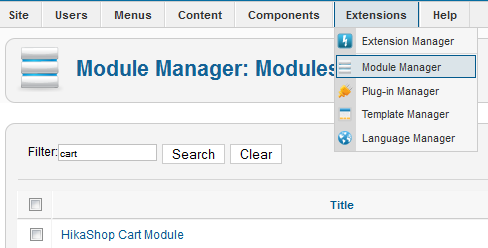
In the edition page, select "Only on the pages selected". And don't forget to uncheck "Checkout" if you have a checkout menu.
If it doesn't work, I will search for another solution.
In the edition page, select "Only on the pages selected". And don't forget to uncheck "Checkout" if you have a checkout menu.
If it doesn't work, I will search for another solution.
Please Log in or Create an account to join the conversation.
Time to create page: 0.071 seconds