
- Posts: 7
- Thank you received: 0
how can i do automatic update manufacturer price.
- senelakbas
-
 Topic Author
- Offline
Less
More
14 years 6 months ago #47221
by senelakbas
how can i do automatic update manufacturer price. was created by senelakbas
dear all
I use hikashop and I am so happy with it.
but i want to discount all product or manufacturer category's items all of them.
is it possible?
thanks.
I use hikashop and I am so happy with it.
but i want to discount all product or manufacturer category's items all of them.
is it possible?
thanks.
Please Log in or Create an account to join the conversation.

14 years 6 months ago - 14 years 6 months ago #47250
by Xavier
Replied by Xavier on topic Re: how can i do automatic update manufacturer price.
Hi senelakbas,
You can create a discount for all product or manufacturer's category's item.
To do this, go in HikaShop > System > Discounts, and in the category click on edit, click on "Root", and then you can choose "Product category" or "Manufacturer".
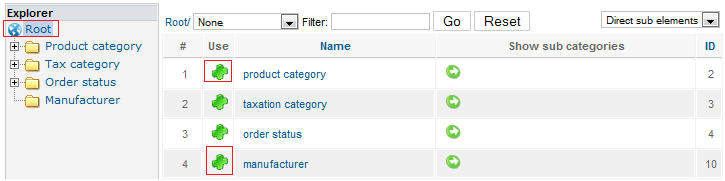
You can create a discount for all product or manufacturer's category's item.
To do this, go in HikaShop > System > Discounts, and in the category click on edit, click on "Root", and then you can choose "Product category" or "Manufacturer".
Last edit: 14 years 6 months ago by Xavier.
Please Log in or Create an account to join the conversation.
- senelakbas
-
Topic Author
- Offline
Less
More
- Posts: 7
- Thank you received: 0
14 years 6 months ago #47273
by senelakbas
Replied by senelakbas on topic Re: how can i do automatic update manufacturer price.
thank you
thats good
ok also I want to update all items price same style. is it possible to?
thanks again...
thats good
ok also I want to update all items price same style. is it possible to?
thanks again...
Please Log in or Create an account to join the conversation.
14 years 6 months ago #47284
by Xavier
Replied by Xavier on topic Re: how can i do automatic update manufacturer price.
You cannot update item price by this way.
But it's possible by the "import" method.
In the backend, click on Products, then in the menu bar click on Export.
Edit your csv file, and keep only the columns "product_code" and "price_value". Edit the prices.
Go back in the backend of HikaShop, Products > Import. For the option "Update products information if the product_code already exists " check "Yes".
And click on "Import" in the menu bar. All your prices will be updated.
But it's possible by the "import" method.
In the backend, click on Products, then in the menu bar click on Export.
Edit your csv file, and keep only the columns "product_code" and "price_value". Edit the prices.
Go back in the backend of HikaShop, Products > Import. For the option "Update products information if the product_code already exists " check "Yes".
And click on "Import" in the menu bar. All your prices will be updated.
The following user(s) said Thank You: senelakbas
Please Log in or Create an account to join the conversation.
- senelakbas
-
Topic Author
- Offline
Less
More
- Posts: 7
- Thank you received: 0
14 years 5 months ago #52639
by senelakbas
Replied by senelakbas on topic Re: how can i do automatic update manufacturer price.
hi again..
I treid to change all product price use the your way.
I export csv file but i can see just one row. like this. can you check following csv file and please explain to me how can i fix it...
I treid to change all product price use the your way.
I export csv file but i can see just one row. like this. can you check following csv file and please explain to me how can i fix it...
Please Log in or Create an account to join the conversation.
14 years 5 months ago #52641
by Xavier
Replied by Xavier on topic Re: how can i do automatic update manufacturer price.
Hi senelakbas,
I think that you forgot the CSV file.
I think that you forgot the CSV file.
Please Log in or Create an account to join the conversation.
- senelakbas
-
Topic Author
- Offline
Less
More
- Posts: 7
- Thank you received: 0
14 years 5 months ago #52644
by senelakbas
Replied by senelakbas on topic Re: how can i do automatic update manufacturer price.
yes
i am sorry
This attachment is hidden for guests.
Please log in or register to see it.
Please log in or register to see it.
i am sorry
Please Log in or Create an account to join the conversation.
14 years 5 months ago #52645
by Xavier
Replied by Xavier on topic Re: how can i do automatic update manufacturer price.
Check from line 87.
You can delete lines 2 -> 86 because theses lines are only for categories.
I think the export failed, so you can delete lines 136 to 259. And only one product will be to edit in the backend, the product with product_id: 889.
Then delete all columns except the column "product_code", "product_name" and "product_price" and edit the price for each products.
You can delete lines 2 -> 86 because theses lines are only for categories.
I think the export failed, so you can delete lines 136 to 259. And only one product will be to edit in the backend, the product with product_id: 889.
Then delete all columns except the column "product_code", "product_name" and "product_price" and edit the price for each products.
The following user(s) said Thank You: senelakbas
Please Log in or Create an account to join the conversation.
- senelakbas
-
Topic Author
- Offline
Less
More
- Posts: 7
- Thank you received: 0
14 years 5 months ago #52780
by senelakbas
Replied by senelakbas on topic Re: how can i do automatic update manufacturer price.
thanks..
i did it..
i did it..
Please Log in or Create an account to join the conversation.
Time to create page: 0.093 seconds