

- Posts: 2
- Thank you received: 0
how to make the product list on the home page?
14 years 6 months ago #47565
by PePPe!
how to make the product list on the home page? was created by PePPe!
Hi
sorry for my english and sorry for lack of experience on the subject.
A little question.
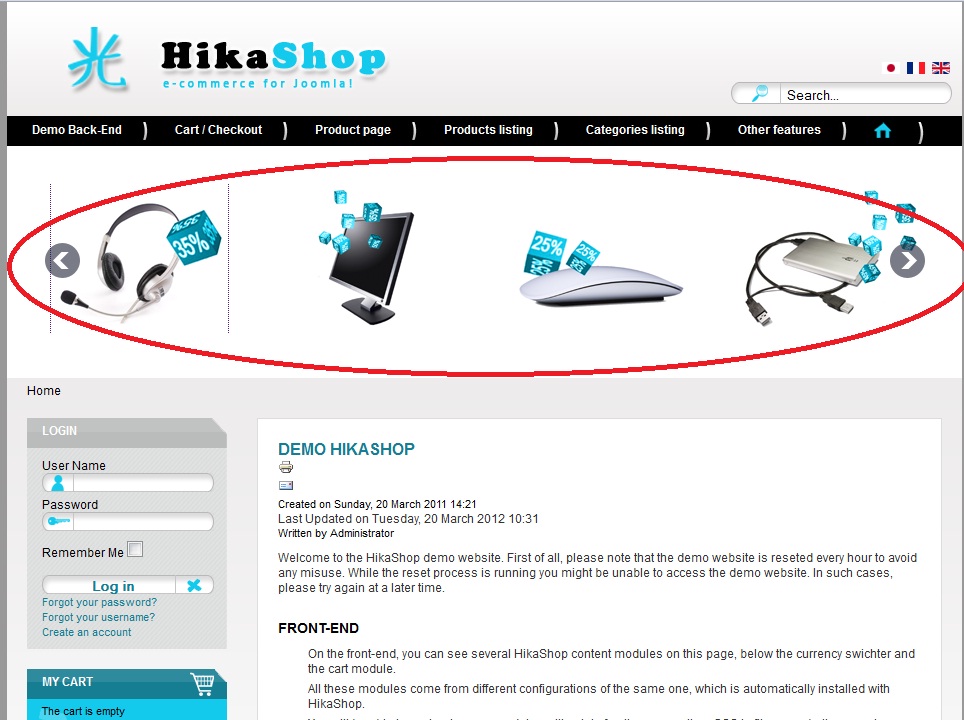
How to make in home page a list of product in home page similar demo (image in attachments)?
Is it a particular features of a particular release?
Thanks very much and congratulations for forum.
PePPe
sorry for my english and sorry for lack of experience on the subject.
A little question.
How to make in home page a list of product in home page similar demo (image in attachments)?
Is it a particular features of a particular release?
Thanks very much and congratulations for forum.
PePPe
Please Log in or Create an account to join the conversation.

14 years 6 months ago #47595
by Xavier
Replied by Xavier on topic Re: how to make the product list on the home page?
Hi PePPe!,
To make it, you have to create a "HikaShop Content Module" in Joomla.
Choose a position, for you the position is "Top". Choose on which pages it's available, just check your home page. And select: "Only the pages selected" in "Module Assignment".
Then save this module, click on "HikaShop options".
Here you can set your option, Type of content: "Product", Type of layout: "Div".
At this step, a list of products is present in home page.
The carousel animation is available in the business version of HikaShop.
To make it, you have to create a "HikaShop Content Module" in Joomla.
Choose a position, for you the position is "Top". Choose on which pages it's available, just check your home page. And select: "Only the pages selected" in "Module Assignment".
Then save this module, click on "HikaShop options".
Here you can set your option, Type of content: "Product", Type of layout: "Div".
At this step, a list of products is present in home page.
The carousel animation is available in the business version of HikaShop.
The following user(s) said Thank You: PePPe!
Please Log in or Create an account to join the conversation.
14 years 6 months ago #47604
by PePPe!
Replied by PePPe! on topic Re: how to make the product list on the home page?
Thank you very much....
Please Log in or Create an account to join the conversation.
Time to create page: 0.072 seconds