

- Posts: 19
- Thank you received: 0
Heading or Product category on top of the display
14 years 6 months ago #47963
by Nobrainer
Heading or Product category on top of the display was created by Nobrainer
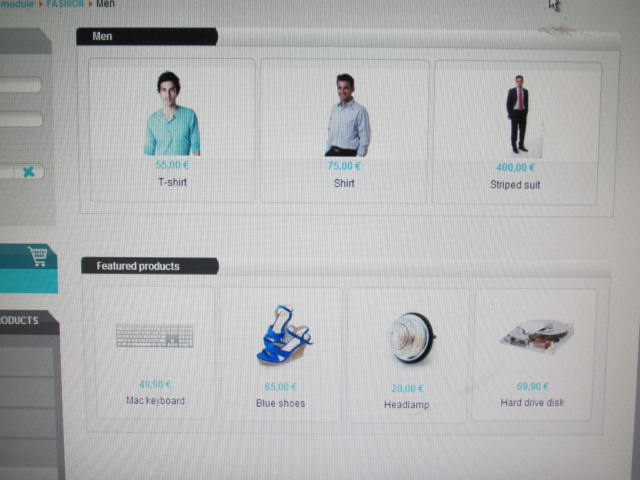
How to create a Heading or title on the product listing page like the Hikashop demo page, on the category of product, fashion tab, click men, then the men product page show up, please see the attachment if you don't see what I mean. I want the Title (Men) Highlight in BLACK to show up in the table exactly as the attachment, anyone can help? Thanks!
Please Log in or Create an account to join the conversation.

14 years 6 months ago #48021
by nicolas
Replied by nicolas on topic Re: Heading or Product category on top of the display
You can add the same CSS in your template CSS (that you can edit via the templates manager of joomla).
You can look at the CSS code we used there with Firebug:
www.tutorial9.net/tutorials/web-tutorial...opment-with-firebug/
You can look at the CSS code we used there with Firebug:
www.tutorial9.net/tutorials/web-tutorial...opment-with-firebug/
Please Log in or Create an account to join the conversation.
14 years 6 months ago #48025
by Nobrainer
Replied by Nobrainer on topic Re: Heading or Product category on top of the display
Thanks you for the reply. Can you explain more detail in term of step by step, I need more guideline to figure it out.
Please Log in or Create an account to join the conversation.
14 years 6 months ago #48081
by nicolas
Replied by nicolas on topic Re: Heading or Product category on top of the display
No. You should learn to use Firebug for CSS customization if you want to customize the style of your website.
Please Log in or Create an account to join the conversation.
14 years 6 months ago #48094
by Nobrainer
Replied by Nobrainer on topic Re: Heading or Product category on top of the display
Yes, just give me a major guide, or a flow chart, like a GPS, I am eager to learn by my own, without the hint, I am going nowhere, please help, thanks again! 
Please Log in or Create an account to join the conversation.
14 years 6 months ago #48150
by nicolas
Replied by nicolas on topic Re: Heading or Product category on top of the display
There is nothing to explain if you follow and understand the tutorial I gave.
Just look at the CSS for that element on the demo website... That will give you that CSS:
h1 {
background-color: transparent;
background-image: url("../images/under_shoes.png");
background-repeat: no-repeat;
color: white;
padding-left: 20px;
padding-top: 2px;
text-decoration: none;
font-size: 12px;
height: 18px;
}
Get the image from the demo website to your website, change the image url accordingly in the CSS code and add the CSS to your website and you will get the same result.
Just look at the CSS for that element on the demo website... That will give you that CSS:
h1 {
background-color: transparent;
background-image: url("../images/under_shoes.png");
background-repeat: no-repeat;
color: white;
padding-left: 20px;
padding-top: 2px;
text-decoration: none;
font-size: 12px;
height: 18px;
}
Get the image from the demo website to your website, change the image url accordingly in the CSS code and add the CSS to your website and you will get the same result.
Please Log in or Create an account to join the conversation.
Time to create page: 0.082 seconds