

- Posts: 10
- Thank you received: 0
Change or delete 'navigator' (div.list-footer)
14 years 6 months ago #49162
by Rojen
Change or delete 'navigator' (div.list-footer) was created by Rojen
Hello,
I hope somebody could help me figure out how to change or delete the div.list-footer (navigator) after checking out. It looks very strange now... You can see the picture in my attachment and I think you will understand what I mean (well I hope.. ).
).
Thanks a lot!
I hope somebody could help me figure out how to change or delete the div.list-footer (navigator) after checking out. It looks very strange now... You can see the picture in my attachment and I think you will understand what I mean (well I hope..
).Thanks a lot!
Please Log in or Create an account to join the conversation.
14 years 6 months ago #49177
by Rojen
Replied by Rojen on topic Re: Change or delete 'navigator' (div.list-footer)
Nobody? 
I want to open my website to day, would be really nice if I can fix this one thing.
I want to open my website to day, would be really nice if I can fix this one thing.
Please Log in or Create an account to join the conversation.

14 years 6 months ago #49280
by nicolas
Replied by nicolas on topic Re: Change or delete 'navigator' (div.list-footer)
Hi,
If you want to hide the pagination, you can add the following CSS in the front end css file of HikaShop via the Display tab of the configuration:
.hikashop_subcategories_pagination, .hikashop_products_pagination{
display:none;
}
But it's not related to the checkout.
The page where the user is redirected to after the checkout is usually configured by yourself in the payment plugin. So you should change it there if you want to go somewhere else.
If you want to hide the pagination, you can add the following CSS in the front end css file of HikaShop via the Display tab of the configuration:
.hikashop_subcategories_pagination, .hikashop_products_pagination{
display:none;
}
But it's not related to the checkout.
The page where the user is redirected to after the checkout is usually configured by yourself in the payment plugin. So you should change it there if you want to go somewhere else.
The following user(s) said Thank You: Rojen
Please Log in or Create an account to join the conversation.
14 years 6 months ago #49311
by Rojen
Replied by Rojen on topic Re: Change or delete 'navigator' (div.list-footer)
Hi Nicolas,
Thanks again for your help.
I try'd the code in front-end CSSfile of Hikashop, but didn't work
.
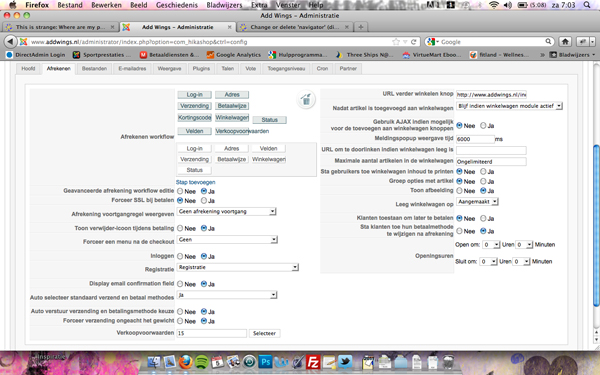
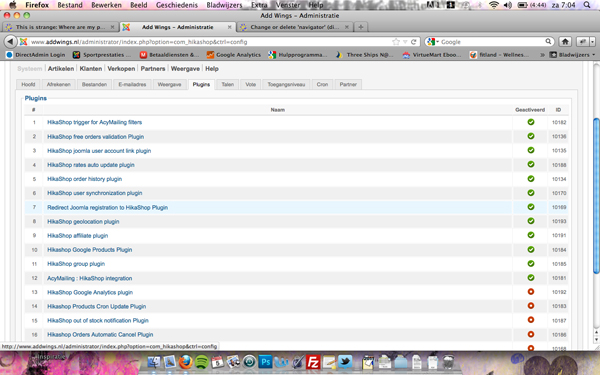
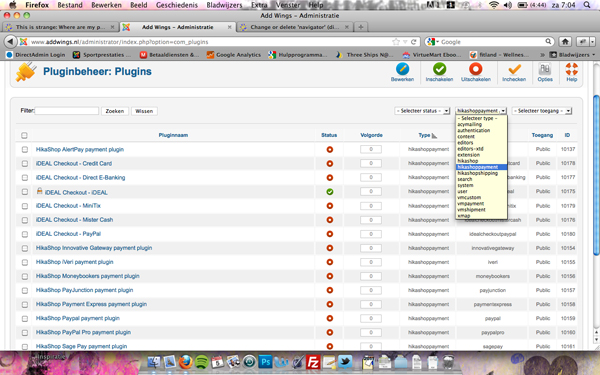
In the configuration - payment (see photo1) I try'd yesterday many different things in 'forcing a menu after checkout', but I could not fix it. You also saying something about the plugin... do you mean the pluging in Hikashop or plugin in Joomla (and there Hikashoppayment). See photo 2 & 3.
Thanks again for your help.
I try'd the code in front-end CSSfile of Hikashop, but didn't work
.
In the configuration - payment (see photo1) I try'd yesterday many different things in 'forcing a menu after checkout', but I could not fix it. You also saying something about the plugin... do you mean the pluging in Hikashop or plugin in Joomla (and there Hikashoppayment). See photo 2 & 3.
Please Log in or Create an account to join the conversation.
14 years 6 months ago #49362
by nicolas
Replied by nicolas on topic Re: Change or delete 'navigator' (div.list-footer)
I'm talking about the plugin options in HikaShop.
.
There is no option called 'forcing a menu after checkout'. The correct name is: 'forcing a menu on checkout'. So it won't do anything after the checkout.
If the CSS didn't work, it's either:
that you didn't clear your browser's cache.
and/or that you didn't save the configuration and thus the default CSS file is still selected instead of the "custom" css file. So please check that front end CSS option.
.
There is no option called 'forcing a menu after checkout'. The correct name is: 'forcing a menu on checkout'. So it won't do anything after the checkout.
If the CSS didn't work, it's either:
that you didn't clear your browser's cache.
and/or that you didn't save the configuration and thus the default CSS file is still selected instead of the "custom" css file. So please check that front end CSS option.
The following user(s) said Thank You: Rojen
Please Log in or Create an account to join the conversation.
14 years 5 months ago #49763
by Rojen
Replied by Rojen on topic Re: Change or delete 'navigator' (div.list-footer)
Thanks a lot for your help Nicolas,
Now it's working. Like you said I had to change it from 'default' to 'custom'.... now it's fixed. I have just one last question, but I will make a new topic for that.
Now it's working. Like you said I had to change it from 'default' to 'custom'.... now it's fixed. I have just one last question, but I will make a new topic for that.
Please Log in or Create an account to join the conversation.
Time to create page: 0.089 seconds