

- Posts: 3
- Thank you received: 0
Custom Sortable Columns on Product Display Tables
14 years 5 months ago #50568
by vuudoo85
Custom Sortable Columns on Product Display Tables was created by vuudoo85
Hello,
I would like:
1) To have several columns that display custom-field attributes of the product instead of just three columns.
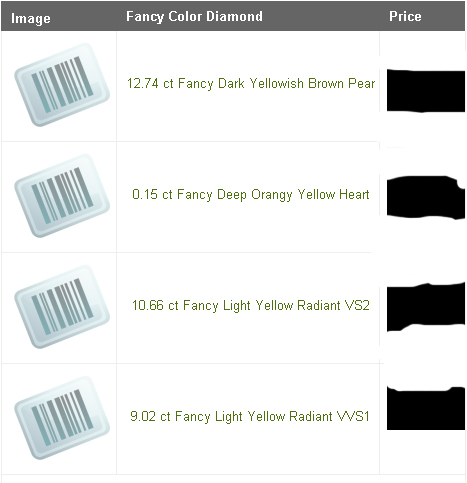
Per the picture above, I would like to have four additional columns, Carat Weight, Color, Shape, and Clarity in the product display table as opposed to having all those attributes in one column.
2) Make it so clicking on the title of the column will sort between ascending and descending.
Thank you,
Jason
I would like:
1) To have several columns that display custom-field attributes of the product instead of just three columns.
Per the picture above, I would like to have four additional columns, Carat Weight, Color, Shape, and Clarity in the product display table as opposed to having all those attributes in one column.
2) Make it so clicking on the title of the column will sort between ascending and descending.
Thank you,
Jason
Please Log in or Create an account to join the conversation.

14 years 5 months ago #50661
by nicolas
Replied by nicolas on topic Re: Custom Sortable Columns on Product Display Tables
1. You will have to edit the file "listing_table" of the view "product" via the menu Display->Views and change the code there in order to add your columns. Custom product field data can be displayed easily like that:
<?php echo $this->row->COLUMN_NAME; ?>
where COLUMN_NAME is the name of the column of the custom product field.
2. You can do that at the same place. If you're not familiar with Joomla php coding, it's a lot harder than point 1 though.
<?php echo $this->row->COLUMN_NAME; ?>
where COLUMN_NAME is the name of the column of the custom product field.
2. You can do that at the same place. If you're not familiar with Joomla php coding, it's a lot harder than point 1 though.
Please Log in or Create an account to join the conversation.
Time to create page: 0.051 seconds