

- Posts: 60
- Thank you received: 0
SEF URLs dont work
14 years 5 months ago - 14 years 5 months ago #51059
by Dzumla
SEF URLs dont work was created by Dzumla
SEF URLS dont work.
It is a hikashop issue.
I remember this problem from when i worked with hikashop last time, but that was like 6 months ago.
Basically when you hover over a category menu item link the url should yoursite/category/catname but is should go like yoursite/menuitemforcategorylisting100/category/catname or something like that, that menuitemcategory listing has to be in the url for it to work correctly, but I connected everything properly and it works without SEF but not with SEF.
How do I fix that?
you can check it at www.ultranetdesign.net/hika/ admin/admin
Tried both joomla 2.5 and 2.5.4
EDIT:
I just tried again on my localhost with a new installation, and same thing, it won't work with SEF URLs, without SEF URL it works. What is the solution to this? I can't be the only one with this problem.
It is a hikashop issue.
I remember this problem from when i worked with hikashop last time, but that was like 6 months ago.
Basically when you hover over a category menu item link the url should yoursite/category/catname but is should go like yoursite/menuitemforcategorylisting100/category/catname or something like that, that menuitemcategory listing has to be in the url for it to work correctly, but I connected everything properly and it works without SEF but not with SEF.
How do I fix that?
you can check it at www.ultranetdesign.net/hika/ admin/admin
Tried both joomla 2.5 and 2.5.4
EDIT:
I just tried again on my localhost with a new installation, and same thing, it won't work with SEF URLs, without SEF URL it works. What is the solution to this? I can't be the only one with this problem.
Last edit: 14 years 5 months ago by Dzumla.
Please Log in or Create an account to join the conversation.

14 years 5 months ago #51183
by nicolas
Replied by nicolas on topic Re: SEF URLs dont work
Your menus tree was not synched. I just clicked on the button "rebuild" here
www.ultranetdesign.net/hika/administrato...type=hikashop_hidden
and the links work on the module.
Note that this is a problem with the SEF system of Joomla which can't process the SEF links when the corresponding menu is not synched.
Note that this is a problem with the SEF system of Joomla which can't process the SEF links when the corresponding menu is not synched.
Please Log in or Create an account to join the conversation.
14 years 5 months ago - 14 years 5 months ago #51208
by Dzumla
Replied by Dzumla on topic Re: SEF URLs dont work
OK, I'll keep the rebuild in mind, thanks.
Also, any idea why the hikashop content module (basically the category listing) disappeares when you actually click on one of the categories? It's set to display on every page in the same position, and works in the normal menu but not if you click on a category.
For example click on "Swatch", cart module will be there but category listing will not?
EDIT:
I set "syncronize with currently displayed item when possible" to NO in the hikashop content module (the one that displays the category listing) and it works, BUT I also get some stuff on top of the products in the main area. I guess i could make that disappear with css, but i'd really prefer if it just worked normally. Any ideas? Admin / pass are still the same if you have time.
Also, any idea why the hikashop content module (basically the category listing) disappeares when you actually click on one of the categories? It's set to display on every page in the same position, and works in the normal menu but not if you click on a category.
For example click on "Swatch", cart module will be there but category listing will not?
EDIT:
I set "syncronize with currently displayed item when possible" to NO in the hikashop content module (the one that displays the category listing) and it works, BUT I also get some stuff on top of the products in the main area. I guess i could make that disappear with css, but i'd really prefer if it just worked normally. Any ideas? Admin / pass are still the same if you have time.
Last edit: 14 years 5 months ago by Dzumla.
Please Log in or Create an account to join the conversation.
14 years 5 months ago #51284
by nicolas
Replied by nicolas on topic Re: SEF URLs dont work
Hi,
Indeed the "syncronize with currently displayed item when possible" to NO avoids that the module displays the subcategories of the current category and instead always displays the same categories.
I don't see anything at the top of your products listing? Did you already figured it out ?
Indeed the "syncronize with currently displayed item when possible" to NO avoids that the module displays the subcategories of the current category and instead always displays the same categories.
I don't see anything at the top of your products listing? Did you already figured it out ?
Please Log in or Create an account to join the conversation.
14 years 5 months ago #51289
by Dzumla
Replied by Dzumla on topic Re: SEF URLs dont work
Hey Nicolas,
I think you misunderstood me.
The category listing, or the "Watches Catalogue" menu on my site, disappears when you click on a category, even though it's set to display in the same position on every page.
Hikashop cart module (my cart) is always there, but the category listing menu disappears. Just click on any of the categories in teh Watches Catalogue and you will it won't be there when it displays the products from that category.
If i set synronize to "no" it works normally (i mean the category menu is alwys there) but i also get stuff in my maincontent area as well.
Just click on anything in watvhes catalogue and you'll see it disappears.
Thanks for helping.
I think you misunderstood me.
The category listing, or the "Watches Catalogue" menu on my site, disappears when you click on a category, even though it's set to display in the same position on every page.
Hikashop cart module (my cart) is always there, but the category listing menu disappears. Just click on any of the categories in teh Watches Catalogue and you will it won't be there when it displays the products from that category.
If i set synronize to "no" it works normally (i mean the category menu is alwys there) but i also get stuff in my maincontent area as well.
Just click on anything in watvhes catalogue and you'll see it disappears.
Thanks for helping.
Please Log in or Create an account to join the conversation.
14 years 5 months ago #51366
by nicolas
Replied by nicolas on topic Re: SEF URLs dont work
That's normal if the syncrhonize option is not activated for the module and that you don't have sub categories below the currently selected category.
You should have that option on in your module.
What "stuff" do you get on your main content area ?
You should have that option on in your module.
What "stuff" do you get on your main content area ?
Please Log in or Create an account to join the conversation.
14 years 5 months ago - 14 years 5 months ago #51384
by Dzumla
Replied by Dzumla on topic Re: SEF URLs dont work
If you simply clicked on a category on the site you'd see what happens. I guess it's easier that I upload 4 pictures than that you click once on a link.
SYNC ON:
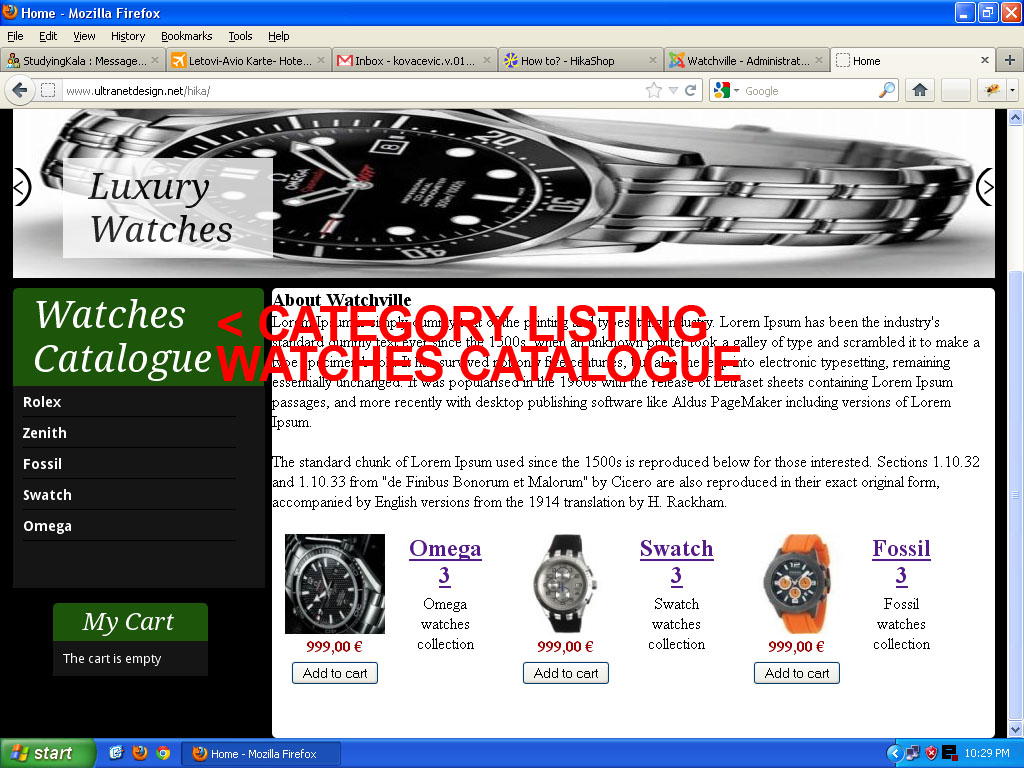
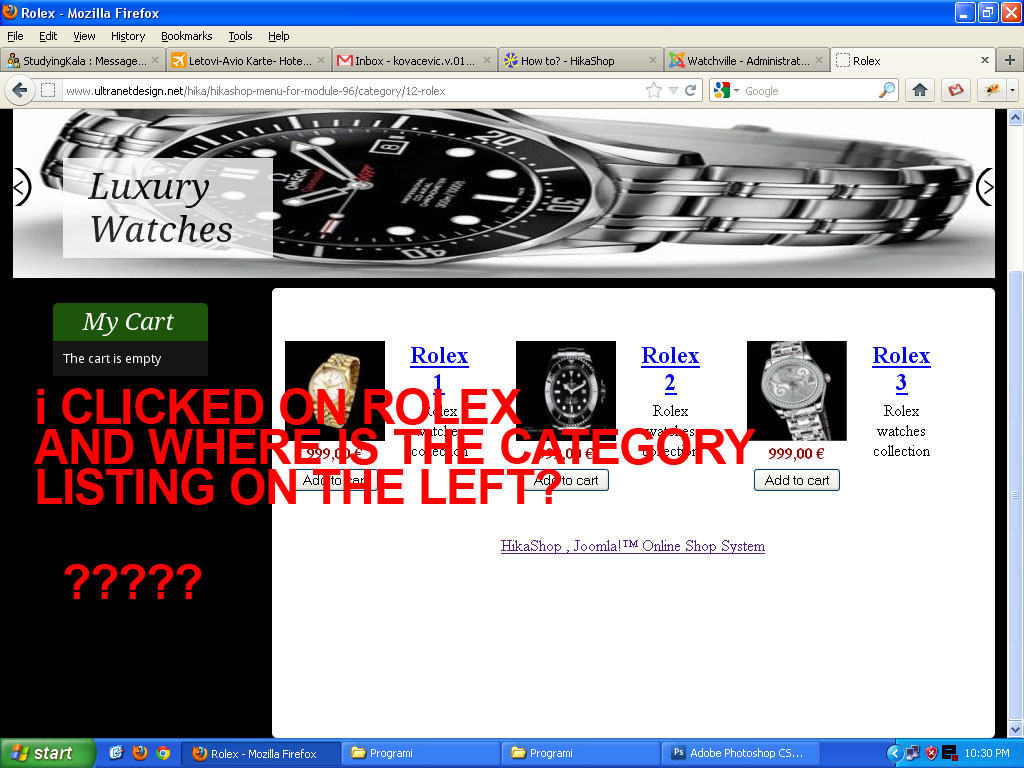
SYNC OFF:
As you can see, with sync on (img1, img2), the category listing menu disappears when I click on a category, e.g. swatch, even though it's set to display on every page in the same position, as i already simply said.
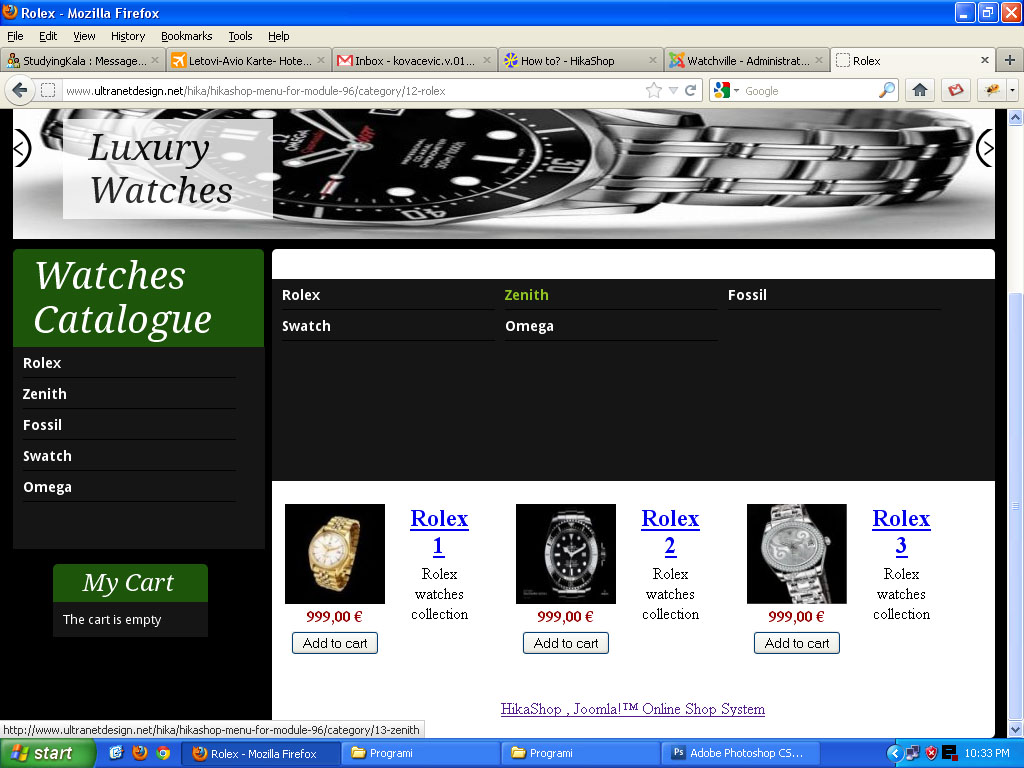
If sync is set to OFF, the cat listing stays there when you click on a category, but I also get a different style listing of the categories in the main content area (img 3).
SYNC ON:
SYNC OFF:
As you can see, with sync on (img1, img2), the category listing menu disappears when I click on a category, e.g. swatch, even though it's set to display on every page in the same position, as i already simply said.
If sync is set to OFF, the cat listing stays there when you click on a category, but I also get a different style listing of the categories in the main content area (img 3).
Last edit: 14 years 5 months ago by Dzumla.
Please Log in or Create an account to join the conversation.
14 years 5 months ago #51503
by nicolas
Replied by nicolas on topic Re: SEF URLs dont work
Thank you for the screenshots.
Now I understand what you're talking about. I wasn't able to see the pages with the synch off since you have it on and that the access you provided to your backend doesn't work anymore so I can't turn it off... So it was hard to see what it was.
Could you keept he synch off so that we can look at the HTML of the two instances of the module ?
Now I understand what you're talking about. I wasn't able to see the pages with the synch off since you have it on and that the access you provided to your backend doesn't work anymore so I can't turn it off... So it was hard to see what it was.
Could you keept he synch off so that we can look at the HTML of the two instances of the module ?
Please Log in or Create an account to join the conversation.
14 years 5 months ago #51518
by Dzumla
Replied by Dzumla on topic Re: SEF URLs dont work
I set sync to NO now.
Backend access works, it's admin / admin.
Sync is set to NO now, but I think it should work normally with sync ON. Like I said, I can hide this extra category listing in main area with css, but i think it should work normally with sync on.
Backend access works, it's admin / admin.
Sync is set to NO now, but I think it should work normally with sync ON. Like I said, I can hide this extra category listing in main area with css, but i think it should work normally with sync on.
Please Log in or Create an account to join the conversation.
14 years 5 months ago #51569
by nicolas
Replied by nicolas on topic Re: SEF URLs dont work
Ok, now I get it.
In your menu with the id 135, you have assignated two modules. The category listing module and the products listing module. Only the second one should be there
Go in the menu System->Content menus and edit the menu with the id 135. There, in the associated modules option, disable the module with the id 96, save the options and it should then not display the categories on the main area.
In your menu with the id 135, you have assignated two modules. The category listing module and the products listing module. Only the second one should be there
Go in the menu System->Content menus and edit the menu with the id 135. There, in the associated modules option, disable the module with the id 96, save the options and it should then not display the categories on the main area.
Please Log in or Create an account to join the conversation.
14 years 5 months ago - 14 years 5 months ago #51591
by Dzumla
Replied by Dzumla on topic Re: SEF URLs dont work
Solved. Thanks.\
One more thing:
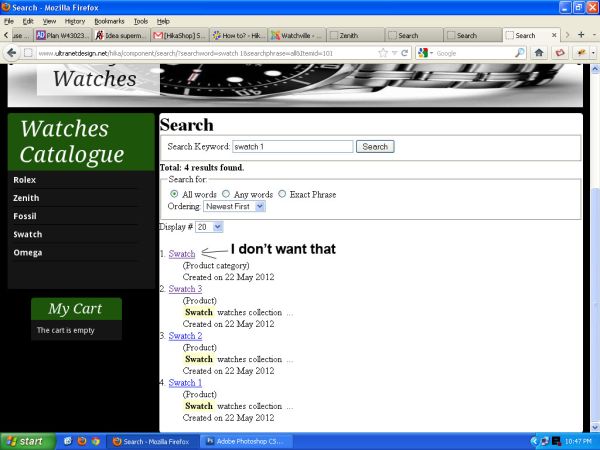
If I search for swatch in the search box, I get the products nicely, but I also get a 'product category' result, and if you click on it it links to a blank page.
Can I make the search so it only searches products?
Also, if I click on a search result it opens in a new page, how do I make it open in the same page?
One more thing:
If I search for swatch in the search box, I get the products nicely, but I also get a 'product category' result, and if you click on it it links to a blank page.
Can I make the search so it only searches products?
Also, if I click on a search result it opens in a new page, how do I make it open in the same page?
Last edit: 14 years 5 months ago by Dzumla.
Please Log in or Create an account to join the conversation.
14 years 5 months ago #51608
by nicolas
Replied by nicolas on topic Re: SEF URLs dont work
Disable the hikashop category search plugin and in the hikashop product search plugin, toggle the option for displaying products in a new window. You can do that via the plugins manager of Joomla.
Please Log in or Create an account to join the conversation.
14 years 5 months ago #51612
by Dzumla
Replied by Dzumla on topic Re: SEF URLs dont work
Perfect.
Please Log in or Create an account to join the conversation.
Time to create page: 0.159 seconds