
- Posts: 76
- Thank you received: 1
RESOLVED: How to Assign Buyer to Custom Group
- scottshort
-
 Topic Author
- Offline
- Respect the Stash
Less
More
14 years 4 months ago - 14 years 4 months ago #51682
by scottshort
RESOLVED: How to Assign Buyer to Custom Group was created by scottshort
Hi,
I would like to know how to assign a buyer to a custom group. I searched HS docs but came up empty. I would like to be able to filter future buyers possibly by "retail buyer" vs "wholesale buyer", or also possibly by product purchased [for example "shoe buyer". [If there is a better way of doing this in HikaShop, please let me know]
I did the following:
Pic 1. Created two new user groups: Retail Buyer & Wholesale Buyer [these are with Registered as Parent Group]
Pic 2. On Product page, "Buyer assigned to custom user group after purchase" selected
Pic 3. Had test buyer "purchase" product - and went to order and "confirmed" and "shipped" order
Pic 4. User still shows only as "Registered" and is not assigned to Custom User Group.
Can you help me to better understand Custom User Groups and how to make this work?
Thanks
Scott
I would like to know how to assign a buyer to a custom group. I searched HS docs but came up empty. I would like to be able to filter future buyers possibly by "retail buyer" vs "wholesale buyer", or also possibly by product purchased [for example "shoe buyer". [If there is a better way of doing this in HikaShop, please let me know]
I did the following:
Pic 1. Created two new user groups: Retail Buyer & Wholesale Buyer [these are with Registered as Parent Group]
Pic 2. On Product page, "Buyer assigned to custom user group after purchase" selected
Pic 3. Had test buyer "purchase" product - and went to order and "confirmed" and "shipped" order
Pic 4. User still shows only as "Registered" and is not assigned to Custom User Group.
Can you help me to better understand Custom User Groups and how to make this work?
Thanks
Scott
Last edit: 14 years 4 months ago by scottshort. Reason: RESOLVED
Please Log in or Create an account to join the conversation.

14 years 4 months ago #51783
by nicolas
Replied by nicolas on topic Re: How to Assign Buyer to Custom Group
Hi,
Are you sure that you changed the status of the order to confirmed and saved the modification before passing the order to shipped ?
The user group is added at the moment the order goes from a status to confirmed.
That feature works great on our end. I just tested it, just to be sure.
Are you sure that you changed the status of the order to confirmed and saved the modification before passing the order to shipped ?
The user group is added at the moment the order goes from a status to confirmed.
That feature works great on our end. I just tested it, just to be sure.
Please Log in or Create an account to join the conversation.
- scottshort
-
Topic Author
- Offline
- Respect the Stash
Less
More
- Posts: 76
- Thank you received: 1
14 years 4 months ago #51797
by scottshort
Replied by scottshort on topic Re: How to Assign Buyer to Custom Group
Hi Nicolas,
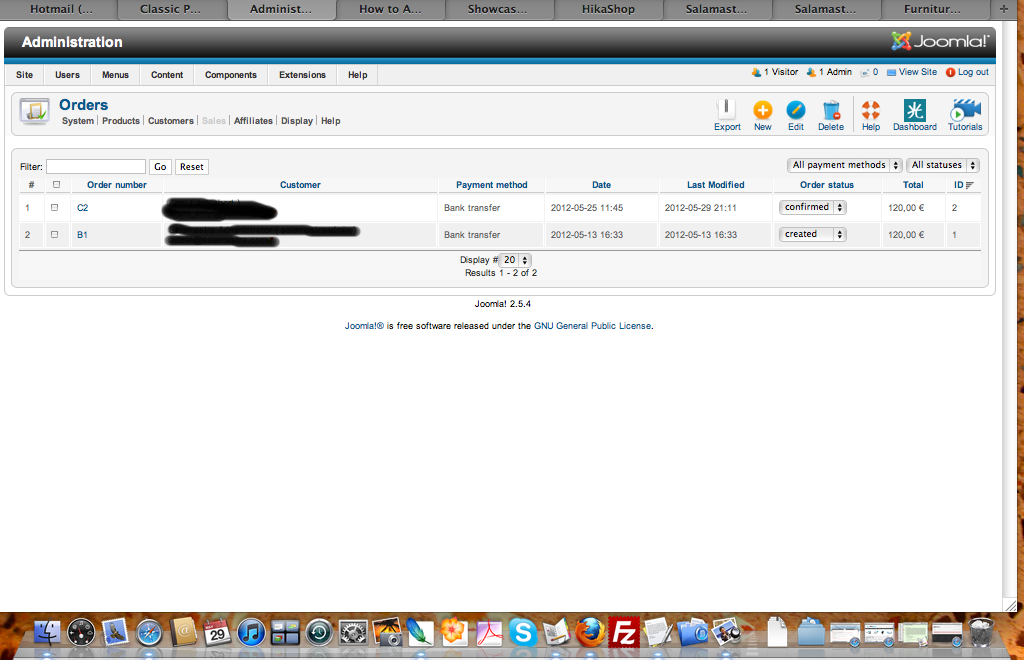
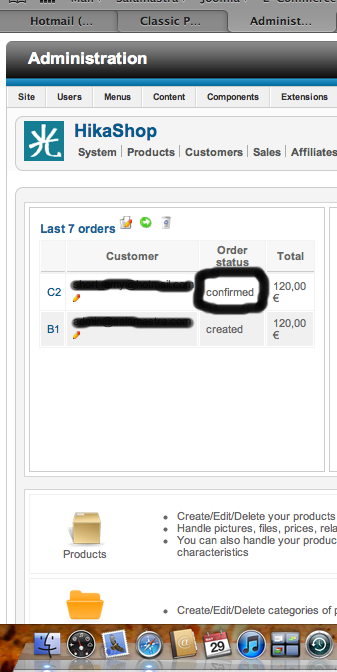
1. I resaved order as confirmed as in next two pics:
2. User still shows only "registered" and not as "retail buyer":
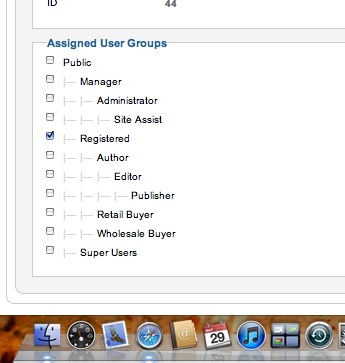
Could this be because I set the assign to custom user on the parent product page and not on the variant product page which was purchased? [please tell me that I won't have to change this field on over 200 variants products pages!]
Regards
Scott
1. I resaved order as confirmed as in next two pics:
2. User still shows only "registered" and not as "retail buyer":
Could this be because I set the assign to custom user on the parent product page and not on the variant product page which was purchased? [please tell me that I won't have to change this field on over 200 variants products pages!]
Regards
Scott
Please Log in or Create an account to join the conversation.
14 years 4 months ago #51799
by nicolas
Replied by nicolas on topic Re: How to Assign Buyer to Custom Group
That's indeed the case. You need to set the option for each variant.
Please Log in or Create an account to join the conversation.
- scottshort
-
Topic Author
- Offline
- Respect the Stash
Less
More
- Posts: 76
- Thank you received: 1
14 years 4 months ago #51805
by scottshort
Replied by scottshort on topic Re: How to Assign Buyer to Custom Group
:sick:
Ok, Thanks for the clarification
best,
Scott
Ok, Thanks for the clarification
best,
Scott
Please Log in or Create an account to join the conversation.
- scottshort
-
Topic Author
- Offline
- Respect the Stash
Less
More
- Posts: 76
- Thank you received: 1
14 years 4 months ago - 14 years 4 months ago #51844
by scottshort
Replied by scottshort on topic Re: How to Assign Buyer to Custom Group
Hi again
1. Along the same lines.... say if I want all buyers of my various shoes to be assigned to a "shoe buyer" group, while those who purchase handbags to a "purse group".... Is there not a way to make this setting at the category level?
2. I also notice that currently, the 'Customer' view doesn't have 'User Group' Field. Ideally if I create these custom groups, I would want to be able to filter this view to see each group. Can this field be easily added to the HS Users view?
[EDIT: I forgot to mention that I confirmed it works after changing the exact variant that was purchased. .....
 Please put this on the wish-list for next release: If you select 'custom' to 'assign to user group after purchase' on parent product BEFORE generating variants, then all variants would take on this same field and all variants would be assigned to same user group, otherwise, if you select 'none', then it would remain as it is now.. in otherwords, if you select 'custom' AFTER generating variants, then none of the variants would have this selection, and you could manually assign them to same or different groups as you prefer. This would be great. Thanks]
Thanks
Scott
1. Along the same lines.... say if I want all buyers of my various shoes to be assigned to a "shoe buyer" group, while those who purchase handbags to a "purse group".... Is there not a way to make this setting at the category level?
2. I also notice that currently, the 'Customer' view doesn't have 'User Group' Field. Ideally if I create these custom groups, I would want to be able to filter this view to see each group. Can this field be easily added to the HS Users view?
[EDIT: I forgot to mention that I confirmed it works after changing the exact variant that was purchased. .....
Please put this on the wish-list for next release: If you select 'custom' to 'assign to user group after purchase' on parent product BEFORE generating variants, then all variants would take on this same field and all variants would be assigned to same user group, otherwise, if you select 'none', then it would remain as it is now.. in otherwords, if you select 'custom' AFTER generating variants, then none of the variants would have this selection, and you could manually assign them to same or different groups as you prefer. This would be great. Thanks]Thanks
Scott
Last edit: 14 years 4 months ago by scottshort. Reason: forgot to add
Please Log in or Create an account to join the conversation.
14 years 4 months ago #51923
by nicolas
Replied by nicolas on topic Re: How to Assign Buyer to Custom Group
1. No, there is no category-wide option for that.
2. It's not easy to add but always possible for the future...
3. That's a good easy and not too complicated to add. We'll do that for next release !
2. It's not easy to add but always possible for the future...
3. That's a good easy and not too complicated to add. We'll do that for next release !
Please Log in or Create an account to join the conversation.
- scottshort
-
Topic Author
- Offline
- Respect the Stash
Less
More
- Posts: 76
- Thank you received: 1
14 years 4 months ago #52312
by scottshort
Replied by scottshort on topic Re: How to Assign Buyer to Custom Group
Hi again Nicolas
1. ok bummer
2. So we [users] can not go in and easily modify the back end Customer View in HS/Display/Views to add this field to the view? This is a change that only you will need to add?
3. This is good news as this would make it easy to add to product and all variants. Would still need to do for all products in category, but would not be that bad to accomplish.. Thanks for considering this!
Regards
Scott
1. ok bummer
2. So we [users] can not go in and easily modify the back end Customer View in HS/Display/Views to add this field to the view? This is a change that only you will need to add?
3. This is good news as this would make it easy to add to product and all variants. Would still need to do for all products in category, but would not be that bad to accomplish.. Thanks for considering this!
Regards
Scott
Please Log in or Create an account to join the conversation.
14 years 4 months ago #52380
by nicolas
Replied by nicolas on topic Re: How to Assign Buyer to Custom Group
2. You can edit the file "listing" of the view "user" via the menu Display->Views in order to add the dropdown. However, you will also have to add the filtering in the query loading the users in the file administrator/components/com_hikashop/views/user/view.html.php which is a hack.
So you could do it, but you will have to either share back your modifications with us so that we integrate them back in HikaShop or you will have to backup the modification and reapply it after each update of HikaShop.
So you could do it, but you will have to either share back your modifications with us so that we integrate them back in HikaShop or you will have to backup the modification and reapply it after each update of HikaShop.
The following user(s) said Thank You: scottshort
Please Log in or Create an account to join the conversation.
- scottshort
-
Topic Author
- Offline
- Respect the Stash
Less
More
- Posts: 76
- Thank you received: 1
14 years 4 months ago #52542
by scottshort
Replied by scottshort on topic Re: How to Assign Buyer to Custom Group
Hi Nicolas
I am definitely not ready for any serious hacking yet... will wait for this in a future release....
Related, I saw a few tutorials on Fabrik component, and it just might be possible to create custom user view using this.
www.ostraining.com/blog/joomla/joomla-user-list/
Regards
Scott
I am definitely not ready for any serious hacking yet... will wait for this in a future release....
Related, I saw a few tutorials on Fabrik component, and it just might be possible to create custom user view using this.
www.ostraining.com/blog/joomla/joomla-user-list/
Regards
Scott
Please Log in or Create an account to join the conversation.
Time to create page: 0.215 seconds