
- Posts: 13
- Thank you received: 0
Issue with product position
- linkthewise
-
 Topic Author
- Offline
Less
More
14 years 5 months ago #52000
by linkthewise
Issue with product position was created by linkthewise
I create a perfect liquid template, with three columns. The issue is that when I have a module in the left side and I place the product listing, a empty space appear like this photo.
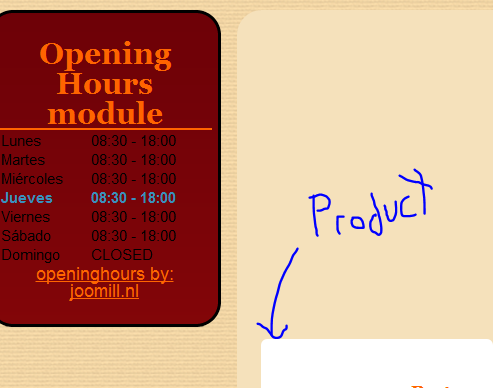
I don't know why this happens but I need to eliminate that space.
Please help
I don't know why this happens but I need to eliminate that space.
Please help
Please Log in or Create an account to join the conversation.

Less
More
- Posts: 12953
- Thank you received: 1778
14 years 5 months ago #52001
by Mohamed Thelji
Replied by Mohamed Thelji on topic Re: Issue with product position
Hello,
Can you give us a link to your website ?
Can you give us a link to your website ?
Please Log in or Create an account to join the conversation.
- linkthewise
-
Topic Author
- Offline
Less
More
- Posts: 13
- Thank you received: 0
14 years 5 months ago #52103
by linkthewise
Replied by linkthewise on topic Re: Issue with product position
www.chefencasa.tk
please let me know if you find the answer
Please Log in or Create an account to join the conversation.

14 years 5 months ago #52187
by nicolas
Replied by nicolas on topic Re: Issue with product position
That's a CSS issue coming from the way your template is done.
You will have to edit either the CSS of your template via the joomla template manager, or the front end CSS file of HikaShop via the Display tab of the configuration and add that CSS:
.hikashop_subcategories, .hikashop_products {
clear: none !important;
}
Don't forget to refresh your browser's cache after that.
You will have to edit either the CSS of your template via the joomla template manager, or the front end CSS file of HikaShop via the Display tab of the configuration and add that CSS:
.hikashop_subcategories, .hikashop_products {
clear: none !important;
}
Don't forget to refresh your browser's cache after that.
Please Log in or Create an account to join the conversation.
- linkthewise
-
Topic Author
- Offline
Less
More
- Posts: 13
- Thank you received: 0
14 years 5 months ago #52257
by linkthewise
Replied by linkthewise on topic Re: Issue with product position
Hi nicolas
That almost work but still have some issues take a look
chefencasa.comoj.com/index.php/se/product/cid-1
hope you can help me
That almost work but still have some issues take a look
chefencasa.comoj.com/index.php/se/product/cid-1
hope you can help me
Please Log in or Create an account to join the conversation.
14 years 5 months ago #52300
by nicolas
Replied by nicolas on topic Re: Issue with product position
For that page, you can use that CSS:
.hikashop_product_page .clear_both{
clear: none !important;
}
.hikashop_product_page .clear_both{
clear: none !important;
}
Please Log in or Create an account to join the conversation.
- linkthewise
-
Topic Author
- Offline
Less
More
- Posts: 13
- Thank you received: 0
14 years 5 months ago #52347
by linkthewise
Replied by linkthewise on topic Re: Issue with product position
No change in the page, have any ideas why?
Please Log in or Create an account to join the conversation.
14 years 5 months ago #52350
by nicolas
Replied by nicolas on topic Re: Issue with product position
Refresh your browser's cache.
Please Log in or Create an account to join the conversation.
- linkthewise
-
Topic Author
- Offline
Less
More
- Posts: 13
- Thank you received: 0
14 years 5 months ago #52355
by linkthewise
Replied by linkthewise on topic Re: Issue with product position
Clear the cache and reload and nothing happen.
Please Log in or Create an account to join the conversation.
14 years 5 months ago #52413
by nicolas
Replied by nicolas on topic Re: Issue with product position
I can see that page correctly now on my end.
It has to come from your browser's cache.
It has to come from your browser's cache.
Please Log in or Create an account to join the conversation.
- linkthewise
-
Topic Author
- Offline
Less
More
- Posts: 13
- Thank you received: 0
14 years 5 months ago #52442
by linkthewise
Replied by linkthewise on topic Re: Issue with product position
No luck refresh cache used another pc still see the same.
Please Log in or Create an account to join the conversation.
14 years 4 months ago #52498
by nicolas
Replied by nicolas on topic Re: Issue with product position
Now I see the problem again...
It seems that you changed something again.
I can see that you are now using the default front end CSS file instead of the custom front end CSS file. Please change the selection in the Display tab of the configuration and save the configuration.
It seems that you changed something again.
I can see that you are now using the default front end CSS file instead of the custom front end CSS file. Please change the selection in the Display tab of the configuration and save the configuration.
Please Log in or Create an account to join the conversation.
Time to create page: 0.080 seconds