

- Posts: 19
- Thank you received: 0
Standardizing the product box length
14 years 4 months ago #52744
by ryand500
Standardizing the product box length was created by ryand500
Where can I change the settings to standardize the length of the product boxes. Some of my product names are too long and extend to the next line which maakes the box longer. How can i make the smaller boxes bigger so that all the product boxes are the sane size?

Please Log in or Create an account to join the conversation.

Less
More
- Posts: 12953
- Thank you received: 1778
14 years 4 months ago #52762
by Mohamed Thelji
Replied by Mohamed Thelji on topic Re: Standardizing the product box length
Hello,
I think that you can maybe :
- Go to " Hikashop -> Display -> Content menu -> 'YOUR MENU' "
- set the "Item box margin" to 1
And if it's not enough I think that you'll have to change the CSS to reduce the product's name size.
I think that you can maybe :
- Go to " Hikashop -> Display -> Content menu -> 'YOUR MENU' "
- set the "Item box margin" to 1
And if it's not enough I think that you'll have to change the CSS to reduce the product's name size.
The following user(s) said Thank You: ryand500
Please Log in or Create an account to join the conversation.
14 years 4 months ago #52770
by ryand500
Replied by ryand500 on topic Re: Standardizing the product box length
Reducing the font size helped a bit. But i don't realy want to go to small is there any way I could just extend the boxes?
Please Log in or Create an account to join the conversation.

14 years 4 months ago #52865
by nicolas
Replied by nicolas on topic Re: Standardizing the product box length
You can do like that:
www.hikashop.com/en/forum/4-how-to/42377...listingimgtitle.html
www.hikashop.com/en/forum/4-how-to/42377...listingimgtitle.html
The following user(s) said Thank You: ryand500
Please Log in or Create an account to join the conversation.
14 years 4 months ago #52895
by ryand500
Replied by ryand500 on topic Re: Standardizing the product box length
Thanks a ton nicolas, it works perfectly
your a genius...
your a genius...
Please Log in or Create an account to join the conversation.
Less
More
- Posts: 9
- Thank you received: 1
13 years 3 months ago #116182
by rahulmalik17
Replied by rahulmalik17 on topic Re: Standardizing the product box length
That works like a charm but still the add to cart buttons and rating are not in sync
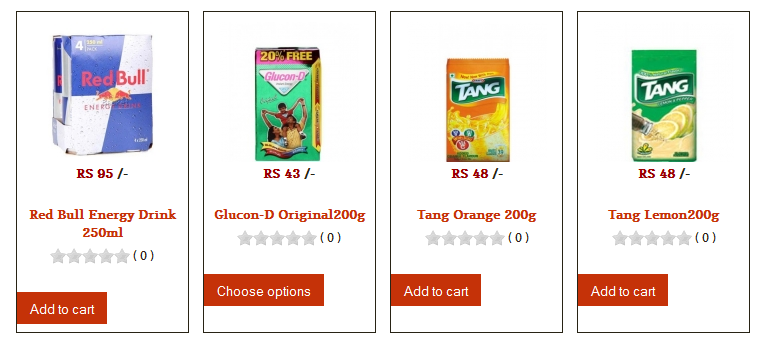
Any way to do that?
can we just set the default space taken by name = 2 lines?
Any way to do that?
can we just set the default space taken by name = 2 lines?
Please Log in or Create an account to join the conversation.
Less
More
- Posts: 12953
- Thank you received: 1778
13 years 3 months ago #116185
by Mohamed Thelji
Replied by Mohamed Thelji on topic Standardizing the product box length
Hi,
Can I have a link to your website for testing purpose then I'll probably be able to give you better indication about the CSS code to use ?
Thanks.
Can I have a link to your website for testing purpose then I'll probably be able to give you better indication about the CSS code to use ?
Thanks
. Please Log in or Create an account to join the conversation.
Less
More
- Posts: 9
- Thank you received: 1
13 years 3 months ago - 13 years 3 months ago #116197
by rahulmalik17
Replied by rahulmalik17 on topic Standardizing the product box length
I'm making it on wamp server
I'm using leo restro template does that help?
I'm using leo restro template does that help?
Last edit: 13 years 3 months ago by rahulmalik17.
Please Log in or Create an account to join the conversation.

13 years 3 months ago #116217
by Eliot
Replied by Eliot on topic Standardizing the product box length
Hi there,
Actually the only solution in your case is to look at the html and css of the page (you can for example do a right click on the button and use the "inspect element" function of your browser) in order to see which css property could solve the problem.
In you case, I think it wont be easy because the button is simply aligned on the vote and product name. So if you look, the space between the stars and the button is always the same.
A solution is to set an absolution position for your buttons but it's not very convenient.
I hope it helped.
Actually the only solution in your case is to look at the html and css of the page (you can for example do a right click on the button and use the "inspect element" function of your browser) in order to see which css property could solve the problem.
In you case, I think it wont be easy because the button is simply aligned on the vote and product name. So if you look, the space between the stars and the button is always the same.
A solution is to set an absolution position for your buttons but it's not very convenient.
I hope it helped.
The following user(s) said Thank You: rahulmalik17
Please Log in or Create an account to join the conversation.

12 years 11 months ago #132822
by in2computing
Thanks and regards
Yogi
www.barnetpcservices.com
www.in2computing.com
Replied by in2computing on topic Standardizing the product box length
I know its an old post but I thought I will post the solution I use.
Just add below lines to the custom.css
span.hikashop_product_name {
min-height: 40px;
}
I hope this helps.
Thanks and regards
Yogi
www.barnetpcservices.com
Just add below lines to the custom.css
span.hikashop_product_name {
min-height: 40px;
}
I hope this helps.
Thanks and regards
Yogi
www.barnetpcservices.com
Thanks and regards
Yogi
www.barnetpcservices.com
www.in2computing.com
Please Log in or Create an account to join the conversation.
Time to create page: 0.199 seconds