

- Posts: 11
- Thank you received: 0
J! 2.5 ACL permissions in Hikashop starter?
14 years 5 months ago #53010
by fastweb
J! 2.5 ACL permissions in Hikashop starter? was created by fastweb
Hello,
I am using Hikashop free version and i cannot see Permissions tab in it to allow/restrict specific users? Because i am simplifying J! 2.5 backend for my client and Hikashop is the only reason i need to give access to my client to log in backend?
But if i assign client to manager/administrator group then other stuff will also be visible to him which i strictly do not want?
Thanks
I am using Hikashop free version and i cannot see Permissions tab in it to allow/restrict specific users? Because i am simplifying J! 2.5 backend for my client and Hikashop is the only reason i need to give access to my client to log in backend?
But if i assign client to manager/administrator group then other stuff will also be visible to him which i strictly do not want?
Thanks
Please Log in or Create an account to join the conversation.

14 years 5 months ago #53072
by Xavier
Replied by Xavier on topic Re: J! 2.5 ACL permissions in Hikashop starter?
Hi fastweb,
Permissions to allow/restrict specific users are available in the Business version of HikaShop.
Permissions to allow/restrict specific users are available in the Business version of HikaShop.
Please Log in or Create an account to join the conversation.

14 years 5 months ago #53074
by nicolas
Replied by nicolas on topic Re: J! 2.5 ACL permissions in Hikashop starter?
Also, you can restrict the access of a user group to only HikaShop with this extension:
extensions.joomla.org/extensions/access-...access-control/17951
extensions.joomla.org/extensions/access-...access-control/17951
Please Log in or Create an account to join the conversation.
14 years 5 months ago #53191
by fastweb
Replied by fastweb on topic Re: J! 2.5 ACL permissions in Hikashop starter?
Oh alright...Thanks guys.
Please Log in or Create an account to join the conversation.
14 years 4 weeks ago #71645
by IamJim
Replied by IamJim on topic Re: J! 2.5 ACL permissions in Hikashop starter?
Hello Xavier,
re: Permissions to allow/restrict specific users are available in the Business version of HikaShop.
How please? I have the Business version I want some people to have access to enter products and such...and I sure do not want to pay for an extension as Nicolas suggests.
Thanks in advance,
Jim
re: Permissions to allow/restrict specific users are available in the Business version of HikaShop.
How please? I have the Business version I want some people to have access to enter products and such...and I sure do not want to pay for an extension as Nicolas suggests.
Thanks in advance,
Jim
Please Log in or Create an account to join the conversation.
14 years 4 weeks ago #71768
by Xavier
Replied by Xavier on topic Re: J! 2.5 ACL permissions in Hikashop starter?
Hi,
In HikaShop > Configuration > Access Level, you can choose which group can access which functionality.
You can try on out demo website: demo.hikashop.com/administrator/index.ph...hikashop&ctrl=config
In HikaShop > Configuration > Access Level, you can choose which group can access which functionality.
You can try on out demo website: demo.hikashop.com/administrator/index.ph...hikashop&ctrl=config
Please Log in or Create an account to join the conversation.
14 years 4 weeks ago #71882
by IamJim
Replied by IamJim on topic Re: J! 2.5 ACL permissions in Hikashop starter?
Sorry, I went to the link...and tried Access Level > Inherit parent group access = YES for Manager and did not work.
Please Log in or Create an account to join the conversation.
14 years 4 weeks ago #71936
by IamJim
Replied by IamJim on topic Re: J! 2.5 ACL permissions in Hikashop starter?
Here is my question? Is,
a) When I switch a Joomla DEFAULT registered user, and nothing has been changed..to a "Manager" it then allows /administrator PRESET function.
b) Does anyone have ACYMailing? As? Acymailing is able to be "used" for components, and not allowing all the others super admin items.
Jim
a) When I switch a Joomla DEFAULT registered user, and nothing has been changed..to a "Manager" it then allows /administrator PRESET function.
b) Does anyone have ACYMailing? As? Acymailing is able to be "used" for components, and not allowing all the others super admin items.
Jim
Please Log in or Create an account to join the conversation.
14 years 3 weeks ago #72090
by Xavier
Replied by Xavier on topic Re: J! 2.5 ACL permissions in Hikashop starter?
Hi,
You can change the rights like on this screenshot:
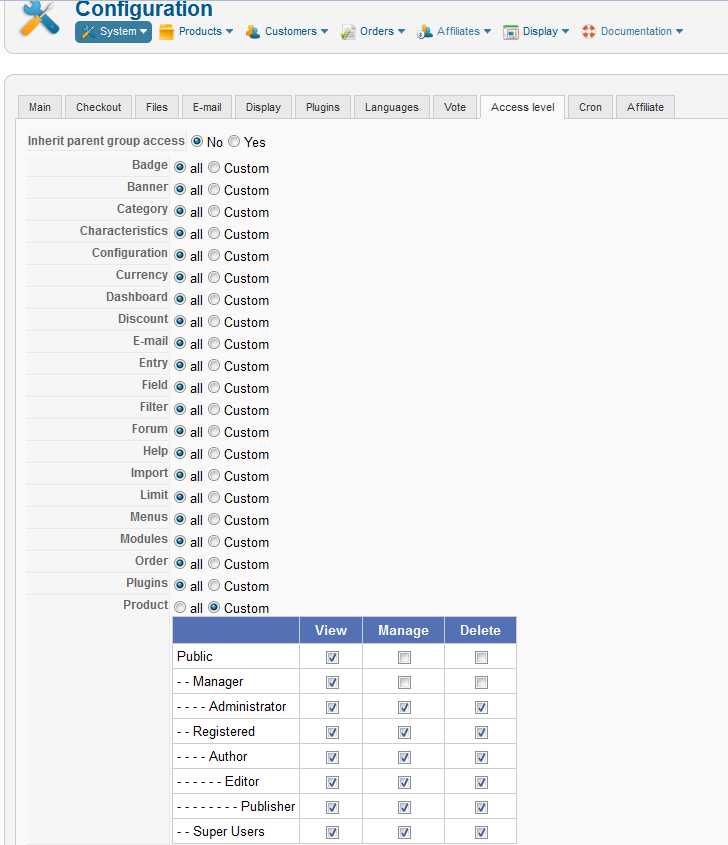
You can change the rights like on this screenshot:
Please Log in or Create an account to join the conversation.
14 years 3 weeks ago #72098
by IamJim
Replied by IamJim on topic Re: J! 2.5 ACL permissions in Hikashop starter?
Sorry, I am confused? Here is what mine DEFAULT looks like now <attached>
Please Log in or Create an account to join the conversation.
14 years 3 weeks ago #72229
by Xavier
Replied by Xavier on topic Re: J! 2.5 ACL permissions in Hikashop starter?
You just have to uncheck the checkboxes to remove the rights of a user group.
If you don't want that the manager access to the product management, you uncheck the box "Manager" for the "Manager".
If you don't want that the manager access to the product management, you uncheck the box "Manager" for the "Manager".
Please Log in or Create an account to join the conversation.
14 years 3 weeks ago #72336
by IamJim
Replied by IamJim on topic Re: J! 2.5 ACL permissions in Hikashop starter?
Xavier, do you have AcyMailing installed? Reason I ask is that "out of the box" with no modifications... When I simply change a Joomla USer from "Registered" to "Manager".. AcyMailing is allowed.
Please see attached image file.
Please move back up to my other attached image, and you'll see how Hika is set up please.
Jim
Please see attached image file.
Please move back up to my other attached image, and you'll see how Hika is set up please.
Jim
Please Log in or Create an account to join the conversation.
14 years 3 weeks ago #72498
by nicolas
Replied by nicolas on topic Re: J! 2.5 ACL permissions in Hikashop starter?
There is no magic here.
The access levels in HikaShop allo you to allow/disallow access to user groups to functionalities of HikaShop.
HikaShop has no control over joomla or other extensions.
So if you want to allow/disallow access to features of Joomla and extensions for different user groups, I don't see a solution besides using ACL manager.
The access levels in HikaShop allo you to allow/disallow access to user groups to functionalities of HikaShop.
HikaShop has no control over joomla or other extensions.
So if you want to allow/disallow access to features of Joomla and extensions for different user groups, I don't see a solution besides using ACL manager.
Please Log in or Create an account to join the conversation.
Time to create page: 0.085 seconds