

- Posts: 1
- Thank you received: 0
Add a column to Sales View in Backend
14 years 4 months ago #53045
by RageHats
Add a column to Sales View in Backend was created by RageHats
I am looking for a way to add a users last name to the sales view in the backend. I do not use user registration, so I am trying to pull the users shipping last name in the backend. Customers call up all the time, and they usually don't have their invoice number.
I tried editing the sales view file in the views menu
Even when I fully deleted that file, the sales view was unchanged. How can I add a column to the sales view in the backend?
Thanks!
Jesse
RageHats.com
I tried editing the sales view file in the views menu
Even when I fully deleted that file, the sales view was unchanged. How can I add a column to the sales view in the backend?
Thanks!
Jesse
RageHats.com
Please Log in or Create an account to join the conversation.

14 years 4 months ago #53132
by Xavier
Replied by Xavier on topic Re: Add a column to Sales View in Backend
Hi RageHats,
You can d oit by editing the view order / listing.php in HikaShop > Display > Views.
Then add:
After:
And add a column with the value:
You can d oit by editing the view order / listing.php in HikaShop > Display > Views.
Then add:
Code:
$address_id = $row->order_shipping_address_id;
$fieldClass = hikashop_get('class.field');
$addressClass = hikashop_get('class.address');
$order->fields = $fieldClass->getData('backend','address');
if(!empty($address_id)){
$order->name=$addressClass->get($address_id);
}
After:
Code:
$target = '';
if($this->popup)
$target = '" target="_top';
$k = 0;
for($i = 0,$a = count($this->rows);$i<$a;$i++){
$row =& $this->rows[$i];
And add a column with the value:
Code:
<?php echo $order->name->address_lastname; ?>
Please Log in or Create an account to join the conversation.
14 years 1 month ago #66533
by dvddvd
Replied by dvddvd on topic Re: Add a column to Sales View in Backend
how I can replace the column "method of payment" for "product code" and that at the top:
echo $ this-> payment-> display ("filter_payment", $ this-> PageInfo-> filter-> filter_payment, false);
To output the filter by "Product Code" instead of "payment method".
thanks
echo $ this-> payment-> display ("filter_payment", $ this-> PageInfo-> filter-> filter_payment, false);
To output the filter by "Product Code" instead of "payment method".
thanks
Please Log in or Create an account to join the conversation.
14 years 1 month ago #66566
by Xavier
Replied by Xavier on topic Re: Add a column to Sales View in Backend
Hi dvddvd,
Can you explain in more details what you need ?
A sale have many products, so we can't add a filter on the product code in the listing of the sales.
Can you explain in more details what you need ?
A sale have many products, so we can't add a filter on the product code in the listing of the sales.
Please Log in or Create an account to join the conversation.
14 years 1 month ago #66603
by dvddvd
Replied by dvddvd on topic Re: Add a column to Sales View in Backend
Sorry, in my case only allows one product per order
Please Log in or Create an account to join the conversation.
14 years 1 month ago #66609
by Xavier
Replied by Xavier on topic Re: Add a column to Sales View in Backend
Ok so in your case, you can edit the file: "yourSite/administrator/components/com_hikashop/views/order/show.html.php
And add the line:
Just before:
Then in HikaShop > Display > Views, edit the view "order / listing"
And replace the title "Payment method" by "Product code", and replace:
By:
And add the line:
Code:
$tables = ' INNER JOIN '.hikashop_table('order_product').' AS d ON b.order_id = d.order_id';
Code:
$query = ' FROM '.hikashop_table('order').' AS b LEFT JOIN '.hikashop_table('user').' AS a ON b.order_user_id=a.user_id LEFT JOIN '.hikashop_table('users',false).' AS c ON a.user_cms_id=c.id '.$tables.$filters.$order;
Then in HikaShop > Display > Views, edit the view "order / listing"
And replace the title "Payment method" by "Product code", and replace:
Code:
<?php if(!empty($row->order_payment_method)){
if(!empty($this->payments[$row->order_payment_method])){
echo $this->payments[$row->order_payment_method]->payment_name;
}else{
echo $row->order_payment_method;
}
} ?>
Code:
<?php echo $row->order_product_code; ?>
Please Log in or Create an account to join the conversation.
14 years 1 month ago - 14 years 1 month ago #66633
by dvddvd
Replied by dvddvd on topic Re: Add a column to Sales View in Backend
Hello Xavier thank you very much for your help
I made the following changes
1) add the following code:
Just before of:
Being the "/ administrator / components / com_hikashop / views / order / view.html.php" so:
and also by changing the title and replacing the code that you show me, being so "listing.php"
But I only get the code column empty and the upper flange as before.
Thanks
I made the following changes
1) add the following code:
Code:
$tables = ' INNER JOIN '.hikashop_table('order_product').' AS d ON b.order_id = d.order_id';
Just before of:
Code:
$query = ' FROM '.hikashop_table('order').' AS b LEFT JOIN '.hikashop_table('user').' AS a ON b.order_user_id=a.user_id LEFT JOIN '.hikashop_table('users',false).' AS c ON a.user_cms_id=c.id '.$tables.$filters.$order;
Being the "/ administrator / components / com_hikashop / views / order / view.html.php" so:
Code:
code removed by the administrator.
Please do not paste entire files here
and also by changing the title and replacing the code that you show me, being so "listing.php"
Code:
code removed by the administrator.
Please do not paste entire files here
But I only get the code column empty and the upper flange as before.
Thanks
Last edit: 14 years 1 month ago by dvddvd.
Please Log in or Create an account to join the conversation.
14 years 1 month ago #66643
by dvddvd
Replied by dvddvd on topic Re: Add a column to Sales View in Backend
Sorry for paste entire files.
Please Log in or Create an account to join the conversation.
14 years 1 month ago - 14 years 1 month ago #66644
by Xavier
Replied by Xavier on topic Re: Add a column to Sales View in Backend
Oh I forgot one thing, , you need to add ",d.*" like this:
in the file: "yourSite/administrator/components/com_hikashop/views/order/view.html.php and in the function listing().
Add "d.order_product_code" in the searchmap:
And then you can filter by product code in the filter field on the left.
Code:
$database->setQuery('SELECT a.*,b.*,c.*,d.*'.$query,(int)$pageInfo->limit->start,(int)$pageInfo->limit->value);
Add "d.order_product_code" in the searchmap:
Code:
$searchMap = array('c.id','c.username','c.name','a.user_email','b.order_user_id','b.order_number','b.order_id','b.order_full_price','d.order_product_code');
And then you can filter by product code in the filter field on the left.
Last edit: 14 years 1 month ago by Xavier.
Please Log in or Create an account to join the conversation.
14 years 1 month ago #66658
by dvddvd
Replied by dvddvd on topic Re: Add a column to Sales View in Backend
thank you very much now all right !!!!
Please Log in or Create an account to join the conversation.
14 years 1 month ago #67111
by dvddvd
Replied by dvddvd on topic Re: Add a column to Sales View in Backend
Hello again,
I'm trying to replace the 'id column' by 'telephone', following the steps you've RageHats indicated earlier in this post, but I just get the blank column.
thnaks
I'm trying to replace the 'id column' by 'telephone', following the steps you've RageHats indicated earlier in this post, but I just get the blank column.
thnaks
Please Log in or Create an account to join the conversation.
14 years 1 month ago #67137
by Xavier
Replied by Xavier on topic Re: Add a column to Sales View in Backend
Hi dvddvd,
You need to display "echo $order->name->address_telephone;" instead of "echo $order->name->address_lastname" like I said to RageHats.
You need to display "echo $order->name->address_telephone;" instead of "echo $order->name->address_lastname" like I said to RageHats.
The following user(s) said Thank You: dvddvd
Please Log in or Create an account to join the conversation.
14 years 1 month ago #67143
by dvddvd
Replied by dvddvd on topic Re: Add a column to Sales View in Backend
ok operates correctly. Thank you very much
Please Log in or Create an account to join the conversation.
13 years 2 months ago #120712
by dvddvd
Replied by dvddvd on topic Re: Add a column to Sales View in Backend
Hello Xavier,
We use HikaShop for university courses. We deleted all the orders last year and since then, the field added to order / listing is blank.
I was using "echo $ order-> name-> address_telephone;?".
What is the new command I use to take that data table address and field address_telephone ?
We use HikaShop for university courses. We deleted all the orders last year and since then, the field added to order / listing is blank.
I was using "echo $ order-> name-> address_telephone;?".
What is the new command I use to take that data table address and field address_telephone ?
Please Log in or Create an account to join the conversation.

13 years 2 months ago #120716
by nicolas
Replied by nicolas on topic Re: Add a column to Sales View in Backend
It's still the same.
Are you sure that it's not because the address_telephone has been unpublished or something like that ?
Are you sure that it's not because the address_telephone has been unpublished or something like that ?
The following user(s) said Thank You: dvddvd
Please Log in or Create an account to join the conversation.
13 years 2 months ago #120731
by dvddvd
Replied by dvddvd on topic Re: Add a column to Sales View in Backend
Thanks Xavier. I see that to enlist new orders from the administration and assign a customer, goes blank the form to the right which is where the data takes. Because if I put the phone there, if it appears
Please Log in or Create an account to join the conversation.
13 years 2 months ago #120736
by nicolas
Replied by nicolas on topic Re: Add a column to Sales View in Backend
I'm not following you. Could you maybe give more information on the problem ? Maybe screenshots ?
Please Log in or Create an account to join the conversation.
13 years 2 months ago - 13 years 2 months ago #120743
by dvddvd
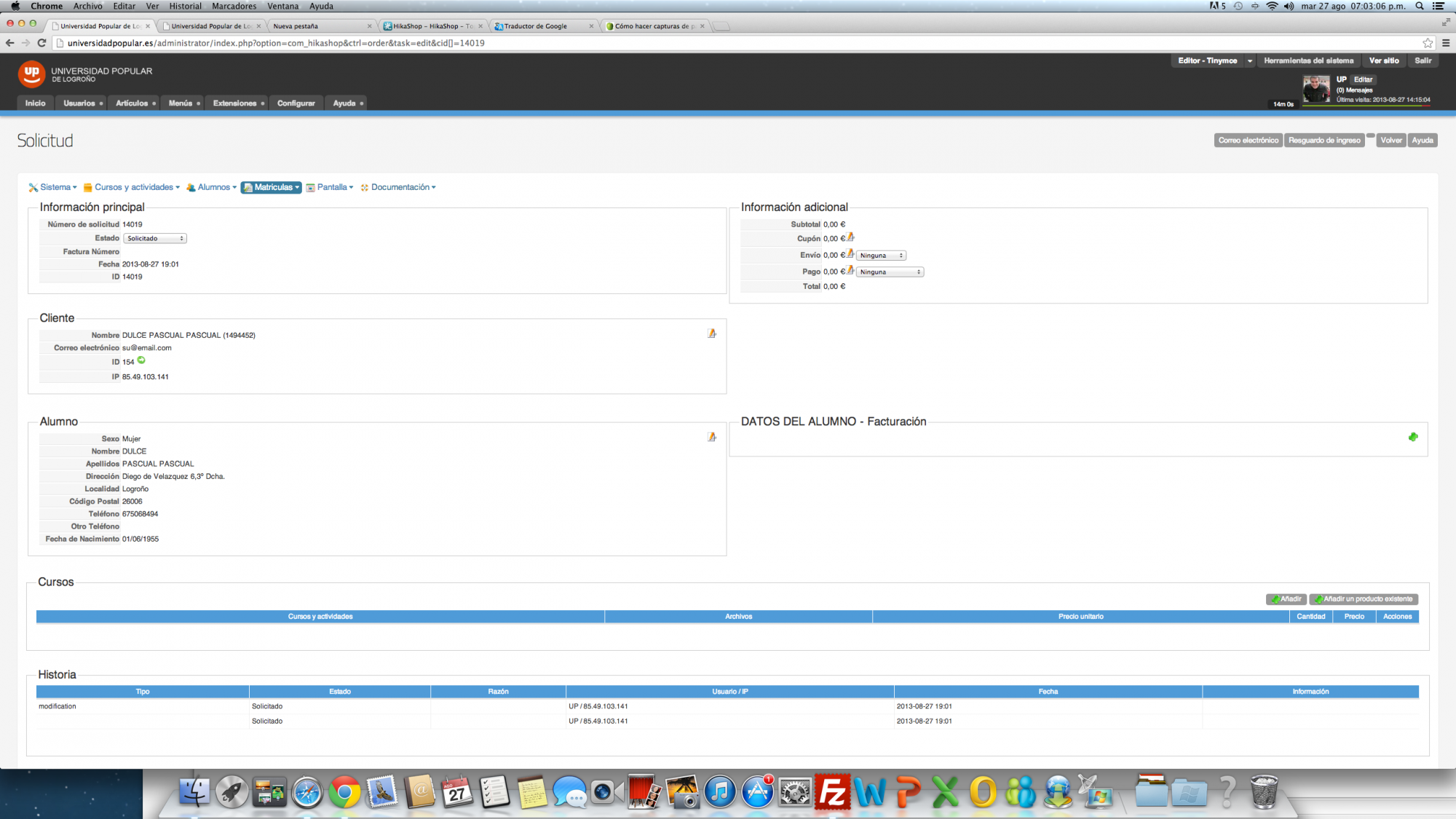
In the screenshot I show you what I mean:
1. - I have assigned the customer Dulce Pascual.
2. - Load data into Student form
3. - Form STUDENT DATA - Billing, left blank
I think in this last form, in the field where it takes the data phone address_telephone.
So I do not go out, to call it from <td class="hikashop_order_id_value">
<? php echo $ order-> name-> address_telephone;?>
</ td>
Replied by dvddvd on topic Re: Add a column to Sales View in Backend
In the screenshot I show you what I mean:
1. - I have assigned the customer Dulce Pascual.
2. - Load data into Student form
3. - Form STUDENT DATA - Billing, left blank
I think in this last form, in the field where it takes the data phone address_telephone.
So I do not go out, to call it from <td class="hikashop_order_id_value">
<? php echo $ order-> name-> address_telephone;?>
</ td>
Last edit: 13 years 2 months ago by dvddvd.
Please Log in or Create an account to join the conversation.
13 years 2 months ago #120753
by dvddvd
Replied by dvddvd on topic Re: Add a column to Sales View in Backend
I only needed to change $ address_id = $ row-> order_shipping_address_id, for $ address_id = $ row-> order_billing_address_id, in <? php
$ target ='';
if ($ this-> popup)
$ target = "" target = "_top";
$ k = 0;
for ($ i = 0, $ a = count ($ this-> rows); $ i <$ a, $ i + +) {
$ row = & $ this-> rows [$ i];
$ address_id = $ row-> order_billing_address_id;
$ fieldClass = hikashop_get ('class.field');
$ AddressClass = hikashop_get ('class.address');
$ order-> fields = $ fieldClass-> getData ('backend', 'address');
if (! empty ($ address_id)) {
$ order-> name = $ AddressClass-> get ($ address_id);
}
?>
Thank very much Xavier
$ target ='';
if ($ this-> popup)
$ target = "" target = "_top";
$ k = 0;
for ($ i = 0, $ a = count ($ this-> rows); $ i <$ a, $ i + +) {
$ row = & $ this-> rows [$ i];
$ address_id = $ row-> order_billing_address_id;
$ fieldClass = hikashop_get ('class.field');
$ AddressClass = hikashop_get ('class.address');
$ order-> fields = $ fieldClass-> getData ('backend', 'address');
if (! empty ($ address_id)) {
$ order-> name = $ AddressClass-> get ($ address_id);
}
?>
Thank very much Xavier
Please Log in or Create an account to join the conversation.
11 years 8 months ago #188640
by dvddvd
Replied by dvddvd on topic Re: Add a column to Sales View in Backend
Hi Xavier,
I just upgrade to HikaShop bussiness. This modification we do not work anymore.
In the country where the product code was to appear, is now blank.
It could appear again in the updated version of the product code in this field.
Thank You
I just upgrade to HikaShop bussiness. This modification we do not work anymore.
In the country where the product code was to appear, is now blank.
It could appear again in the updated version of the product code in this field.
Thank You
Please Log in or Create an account to join the conversation.
Time to create page: 0.680 seconds