

- Posts: 19
- Thank you received: 0
Difference from invoice and cart value with coupon
14 years 4 months ago #53502
by Ciovo
Difference from invoice and cart value with coupon was created by Ciovo
Hello, I'm using version 1.5.8 with Apply discounts before tax and price_with_tax set to no tax. I configured a 50% coupon.
In checkout I correctly get:
- product 100€
- coupon 50€
- vat (20%) 10€ - correctly (100-50) * 20/100
- total 60€
But order/invoice shows:
- product 100€
- coupon 60€ (!)
- vat (20%) 20€ (!)
- total 60€
Why is there this difference? If I choose Apply discounts after tax, the order/invoice doesn't change and the checkout works as expected.
I need order/invoice and administration to be like in the checkout, how can I do that?
Thanks!
In checkout I correctly get:
- product 100€
- coupon 50€
- vat (20%) 10€ - correctly (100-50) * 20/100
- total 60€
But order/invoice shows:
- product 100€
- coupon 60€ (!)
- vat (20%) 20€ (!)
- total 60€
Why is there this difference? If I choose Apply discounts after tax, the order/invoice doesn't change and the checkout works as expected.
I need order/invoice and administration to be like in the checkout, how can I do that?
Thanks!
Please Log in or Create an account to join the conversation.

14 years 4 months ago #53579
by nicolas
Replied by nicolas on topic Re: Difference from invoice and cart value with coupon
Hi,
We changed the taxed prices display system in the latest version so that it is easier to handle.
You must have edited the file "invoice" of the view "order" before updating HikaShop to the latest version right ?
In that case, you could remove your customization and that should then fix the problem automatically.
We changed the taxed prices display system in the latest version so that it is easier to handle.
You must have edited the file "invoice" of the view "order" before updating HikaShop to the latest version right ?
In that case, you could remove your customization and that should then fix the problem automatically.
Please Log in or Create an account to join the conversation.
14 years 4 months ago #53586
by Ciovo
Replied by Ciovo on topic Re: Difference from invoice and cart value with coupon
I installed version 1.5.7, then upgraded to 1.5.8.
After that, I made a small customization in templates/mytheme/html/com_hikashop/order/show.php starting from 1.5.8 file version.
I didn't create administrator/templates/bluestork/html/com_hikashop/order/invoice.php and didn't changed the original file.
I made some test checkout, but the problem is still there.
Should the problem be fixed also for old orders or just the new ones?
Thank you!!
After that, I made a small customization in templates/mytheme/html/com_hikashop/order/show.php starting from 1.5.8 file version.
I didn't create administrator/templates/bluestork/html/com_hikashop/order/invoice.php and didn't changed the original file.
I made some test checkout, but the problem is still there.
Should the problem be fixed also for old orders or just the new ones?
Thank you!!
Please Log in or Create an account to join the conversation.
14 years 4 months ago #53679
by nicolas
Replied by nicolas on topic Re: Difference from invoice and cart value with coupon
That's really strange... The VAT line is displayed before the coupon line in the invoice and the taxes display works fine on our end in the invoice. I don't see how you can get such results.
Can you do a screenshot ? Maybe we're not talking about the same thing here.
Can you do a screenshot ? Maybe we're not talking about the same thing here.
Please Log in or Create an account to join the conversation.
14 years 4 months ago #53755
by Ciovo
Replied by Ciovo on topic Re: Difference from invoice and cart value with coupon
I made some more investigation, also using your online demo. I chose Apply discounts before tax, configured a tax for Black shoes and wheel, but I got a strange behaviour: in the cart/checkout, if Show taxed prices is set to both under System-Configuration-Display the coupon is calculated on price VAT included, if it's set to No tax the coupon is calculated on price VAT excluded. It should always be VAT excluded because of Apply discounts before tax. I couldn't finish the checkout, I don't know why (click on next simply refreshed the page), so I don't know about the order/invoice.
Anyway I attached some screenshot of my environment, I made small graphical changes but it shouldn't be a problem.
Anyway I attached some screenshot of my environment, I made small graphical changes but it shouldn't be a problem.
This attachment is hidden for guests.
Please log in or register to see it.
Please log in or register to see it.
Please Log in or Create an account to join the conversation.
14 years 4 months ago - 14 years 4 months ago #53812
by Ciovo
Replied by Ciovo on topic Re: Difference from invoice and cart value with coupon
It looks like it has something related to line 1150 in components/com_hikashop/controllers/checkout.php
The discount calculation saved in order_discount_price field in db should depend on "Apply discounts: after/before tax", but now it looks like it's always after tax.
Could this be the problem?!
Code:
$discount_price=@$cart->coupon->total->prices[0]->price_value_without_discount_with_tax-@$cart->coupon->total->prices[0]->price_value_with_tax;
Could this be the problem?!
Last edit: 14 years 4 months ago by Ciovo.
Please Log in or Create an account to join the conversation.

14 years 4 months ago - 14 years 4 months ago #53817
by wildfire
Ecommerce expert for hire. DaveKarlsven.com
I love helping businesses make lots of money online.
Replied by wildfire on topic Re: Difference from invoice and cart value with coupon
We have the coupon discount value showing the coupon amount plus the amount that accounts for shipping and tax savings.
The end total is correct when we use a coupon, but it is confusing to our customers to see a coupon value that is higher than they are expecting to see. Also makes accounting reports difficult to figure out.
For example:
If we have a product that normally sells for $100 and a coupon for 50% off, then we want to see the coupon value displayed as $50.
Instead it shows a higher value for the coupon in to account for tax and shipping savings.
The total is correct at $50, but it is really weird to see more than $50 for the coupon total value.
Is there a way to make it so the coupon value is just $50 on a 50% discount off a product that costs $100?
We don't want shipping and tax to be figured into the coupon value that is displayed, just the 50% off the order subtotal.
Thanks.
The end total is correct when we use a coupon, but it is confusing to our customers to see a coupon value that is higher than they are expecting to see. Also makes accounting reports difficult to figure out.
For example:
If we have a product that normally sells for $100 and a coupon for 50% off, then we want to see the coupon value displayed as $50.
Instead it shows a higher value for the coupon in to account for tax and shipping savings.
The total is correct at $50, but it is really weird to see more than $50 for the coupon total value.
Is there a way to make it so the coupon value is just $50 on a 50% discount off a product that costs $100?
We don't want shipping and tax to be figured into the coupon value that is displayed, just the 50% off the order subtotal.
Thanks.
Ecommerce expert for hire. DaveKarlsven.com
I love helping businesses make lots of money online.
Last edit: 14 years 4 months ago by wildfire.
Please Log in or Create an account to join the conversation.
14 years 4 months ago #53937
by nicolas
Replied by nicolas on topic Re: Difference from invoice and cart value with coupon
@Ciovo :
If you can't finish an order during the checkout, you should have an error message. If you don't it's probably because of your template:
www.hikashop.com/en/support/documentatio...issues.html#messages
Also, it means that you either have a problem with your shipping methods or with your payment methods setup:
www.hikashop.com/en/support/documentatio...ins-listing.html#faq
Regarding the storing of discounts in the orders, it's possible that in some cases, we might need to store the calculation without taxes.
Could you try with that line instead:
$discount_price=@$cart->coupon->total->prices[0]->price_value_without_discount-@$cart->coupon->total->prices[0]->price_value;
@wildfire :
The coupon never takes into account shipping as the shipping is added after the coupon.
Regarding taxes for coupons, there are two options that manage that: The "Apply discounts: after/before tax" option of the configuration AND the tax category of the coupon itself.
Both results should be possible by changing these two options. I think that when the discounts are applied after taxes, you should not select a tax category, but when the discounts are applied before taxes, you should select a tax category.
If you can't finish an order during the checkout, you should have an error message. If you don't it's probably because of your template:
www.hikashop.com/en/support/documentatio...issues.html#messages
Also, it means that you either have a problem with your shipping methods or with your payment methods setup:
www.hikashop.com/en/support/documentatio...ins-listing.html#faq
Regarding the storing of discounts in the orders, it's possible that in some cases, we might need to store the calculation without taxes.
Could you try with that line instead:
$discount_price=@$cart->coupon->total->prices[0]->price_value_without_discount-@$cart->coupon->total->prices[0]->price_value;
@wildfire :
The coupon never takes into account shipping as the shipping is added after the coupon.
Regarding taxes for coupons, there are two options that manage that: The "Apply discounts: after/before tax" option of the configuration AND the tax category of the coupon itself.
Both results should be possible by changing these two options. I think that when the discounts are applied after taxes, you should not select a tax category, but when the discounts are applied before taxes, you should select a tax category.
Please Log in or Create an account to join the conversation.
14 years 4 months ago #53939
by Ciovo
In my environment I don't have shipping because I sell services, and payments seems to work without problems.
Thanks again!
Replied by Ciovo on topic Re: Difference from invoice and cart value with coupon
When I made this test, I was working on your online demo site, so if there's a problem it's not related to my template (maybe some reset of the db at fixed time?!).nicolas wrote: @Ciovo :
If you can't finish an order during the checkout, you should have an error message. If you don't it's probably because of your template:
www.hikashop.com/en/support/documentatio...issues.html#messages
Also, it means that you either have a problem with your shipping methods or with your payment methods setup:
www.hikashop.com/en/support/documentatio...ins-listing.html#faq
In my environment I don't have shipping because I sell services, and payments seems to work without problems.
I'll try and I'll let your know if it works as expected.nicolas wrote: Regarding the storing of discounts in the orders, it's possible that in some cases, we might need to store the calculation without taxes.
Could you try with that line instead:
$discount_price=@$cart->coupon->total->prices[0]->price_value_without_discount-@$cart->coupon->total->prices[0]->price_value;
Thanks again!
Please Log in or Create an account to join the conversation.
14 years 4 months ago #54005
by nicolas
Replied by nicolas on topic Re: Difference from invoice and cart value with coupon
There is no errors on that end on our demo website.
However, the demo website is reset once every hour. At that point, the pages won't display while the website is reset and such errors could occur. Nothing to worry about. Just try again a few minutes later.
However, the demo website is reset once every hour. At that point, the pages won't display while the website is reset and such errors could occur. Nothing to worry about. Just try again a few minutes later.
Please Log in or Create an account to join the conversation.
14 years 4 months ago #54113
by Ciovo
Calculations and order/invoice is now as expected and reflects what appear in the checkout, so this problem is solved with this change.
Anyway, after this I had to override the subtotal calculation in administrator/templates/bluestork/html/com_hikashop/order/form.php in order to take into account the different behaviour. From
to
It's working now, but I strongly suggest to parametrize this option because the boss I'm working with in this project said to me it was a must for the Italian law.
Thank you for you important support!!
Replied by Ciovo on topic Re: Difference from invoice and cart value with coupon
Ciovo wrote:
I'll try and I'll let your know if it works as expected.nicolas wrote: Regarding the storing of discounts in the orders, it's possible that in some cases, we might need to store the calculation without taxes.
Could you try with that line instead:
$discount_price=@$cart->coupon->total->prices[0]->price_value_without_discount-@$cart->coupon->total->prices[0]->price_value;
Thanks again!
Calculations and order/invoice is now as expected and reflects what appear in the checkout, so this problem is solved with this change.
Anyway, after this I had to override the subtotal calculation in administrator/templates/bluestork/html/com_hikashop/order/form.php in order to take into account the different behaviour. From
Code:
<?php echo $this->currencyHelper->format($this->order->order_subtotal,$this->order->order_currency_id); ?>
Code:
<?php $taxes = 0;
if (/*$this->config->get('detailed_tax_display') &&*/ !empty($this->order->order_tax_info)) {
foreach ($this->order->order_tax_info as $tax) {
$taxes += (double)str_replace(',', '.', $this->currencyHelper->format($tax->tax_amount,$this->order->order_currency_id));
}
}
echo $this->currencyHelper->format($this->order->order_subtotal - $taxes,$this->order->order_currency_id); ?>
Thank you for you important support!!
Please Log in or Create an account to join the conversation.
14 years 3 months ago #56420
by Ciovo
Replied by Ciovo on topic Re: Difference from invoice and cart value with coupon
I still have some problem after this change.
If I order two items:
- 100 euro, full price
- 10 euro with a 50% discount coupon (Coupon percentage applies to product only to yes)
I get:
total: 110 euro
discount: 5 euro
vat (21%): 23.1 euro (=110*0.21 instead of 22.05=105*0.21)
final: 128.1 (=105+23.1 instead of 127.05=105+22.05)
It looks like
is making a wrong calculation, especially the value of price_value_with_tax which is calculated after taxes, even if I set the Apply discounts before tax.
How can I change the code to make price_value_with_tax and discount_tax work as expected?
Thank you!
If I order two items:
- 100 euro, full price
- 10 euro with a 50% discount coupon (Coupon percentage applies to product only to yes)
I get:
total: 110 euro
discount: 5 euro
vat (21%): 23.1 euro (=110*0.21 instead of 22.05=105*0.21)
final: 128.1 (=105+23.1 instead of 127.05=105+22.05)
It looks like
Code:
$discount_tax = $cart->coupon->total->prices[0]->price_value_with_tax-$cart->coupon->total->prices[0]->price_value;
How can I change the code to make price_value_with_tax and discount_tax work as expected?
Thank you!
Please Log in or Create an account to join the conversation.
14 years 3 months ago #56474
by nicolas
Replied by nicolas on topic Re: Difference from invoice and cart value with coupon
I tried on my end and I get the correct result without any code change:
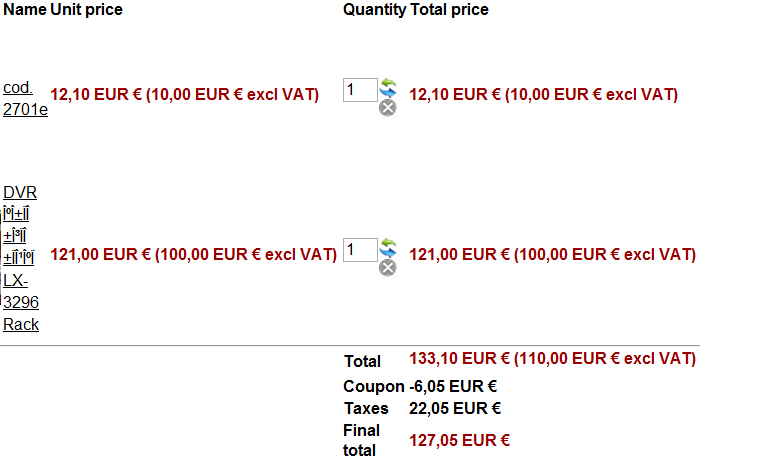
I set the discounts to be before taxes in the configuration, the coupon to be in the tax category and the products with the exact same settings than you did.
I set the discounts to be before taxes in the configuration, the coupon to be in the tax category and the products with the exact same settings than you did.
Please Log in or Create an account to join the conversation.
14 years 3 months ago #56507
by Ciovo
Thank you again for your great support!
Replied by Ciovo on topic Re: Difference from invoice and cart value with coupon
That's what I missed!!nicolas wrote: I set [..] the coupon to be in the tax category
Thank you again for your great support!
Please Log in or Create an account to join the conversation.
14 years 3 months ago #56666
by Ciovo
Replied by Ciovo on topic Re: Difference from invoice and cart value with coupon
I still have some problem with variants using a 50% coupon.
If I choose a category in the coupon configuration, it looks like the discount for variants are calculated with this formula: price_variant * 50% + price_product.
Product: 20, you buy variant a at 20, you get 20 discount (and not 10)
Product: 20, you buy variant b at 40, you get 30 discount (and not 20)
Product: 30, you but a variant c at 170, you get 150 discount (and not 135)
If I choose a product in the coupon configuration, it looks like the discount for variants are calculated only on the price of the product.
Product: 20, you buy a variant b at 20, you get 10 discount (it's correct but the two prices are the same)
Product: 20, you buy a variant b at 40, you get 10 discount (and not 20)
Product: 30, you buy a variant c at 170, you get 15 discount (and not 135)
In both cases, I'm checking "Coupon percentage applies to product only" to yes because the discount should be applied only to the product into the selected category or variant.
Am I missing something? Thanks!!
If I choose a category in the coupon configuration, it looks like the discount for variants are calculated with this formula: price_variant * 50% + price_product.
Product: 20, you buy variant a at 20, you get 20 discount (and not 10)
Product: 20, you buy variant b at 40, you get 30 discount (and not 20)
Product: 30, you but a variant c at 170, you get 150 discount (and not 135)
If I choose a product in the coupon configuration, it looks like the discount for variants are calculated only on the price of the product.
Product: 20, you buy a variant b at 20, you get 10 discount (it's correct but the two prices are the same)
Product: 20, you buy a variant b at 40, you get 10 discount (and not 20)
Product: 30, you buy a variant c at 170, you get 15 discount (and not 135)
In both cases, I'm checking "Coupon percentage applies to product only" to yes because the discount should be applied only to the product into the selected category or variant.
Am I missing something? Thanks!!
Please Log in or Create an account to join the conversation.
14 years 3 months ago #56957
by nicolas
Replied by nicolas on topic Re: Difference from invoice and cart value with coupon
That's because you're setting the price in the main product.
If you only set it in the variants, it should work fine.
Edit the file administrator/components/com_hikashop/classes/discount.php and change the lines:
foreach ($products as $product) {
to:
$variantsFirst = array_reverse($products);
foreach ($variantsFirst as $product) {
in the function recalculateDiscountValue(&$coupon,&$products,&$id) and that should fix the problem for products with variants and the prices defined both in the main product and in the variants.
If you only set it in the variants, it should work fine.
Edit the file administrator/components/com_hikashop/classes/discount.php and change the lines:
foreach ($products as $product) {
to:
$variantsFirst = array_reverse($products);
foreach ($variantsFirst as $product) {
in the function recalculateDiscountValue(&$coupon,&$products,&$id) and that should fix the problem for products with variants and the prices defined both in the main product and in the variants.
Please Log in or Create an account to join the conversation.
14 years 3 months ago #56982
by Ciovo
Replied by Ciovo on topic Re: Difference from invoice and cart value with coupon
Thank you, now coupon works properly but only if a product or category is specified.
If a coupon is for all product, the discount value is correct but VAT and total are wrong.
Example: price 100, discount 50% = -50, vat is not displayed (it's a negative value, should be 10.5) and total is 47,79 (should be 50*1.21=60,5)
The same coupon works correctly if the same product is specified in the coupon.
Would it be possible in the future to assign a coupon to a variant? And what about multiple products/variants? It would be very useful!!
Thanks again.
If a coupon is for all product, the discount value is correct but VAT and total are wrong.
Example: price 100, discount 50% = -50, vat is not displayed (it's a negative value, should be 10.5) and total is 47,79 (should be 50*1.21=60,5)
The same coupon works correctly if the same product is specified in the coupon.
Would it be possible in the future to assign a coupon to a variant? And what about multiple products/variants? It would be very useful!!
Thanks again.
Please Log in or Create an account to join the conversation.
14 years 3 months ago #57027
by nicolas
Replied by nicolas on topic Re: Difference from invoice and cart value with coupon
Can you do a screenshot of the options of your coupon ?
So that we can try to reproduce the problem.
We could potentially add the possibility to assign coupon to variants yes.
You can already assign a coupon to several products. Just use an unpublished category for that and add it as second category to the products.
So that we can try to reproduce the problem.
We could potentially add the possibility to assign coupon to variants yes.
You can already assign a coupon to several products. Just use an unpublished category for that and add it as second category to the products.
Please Log in or Create an account to join the conversation.
14 years 3 months ago #57751
by Ciovo
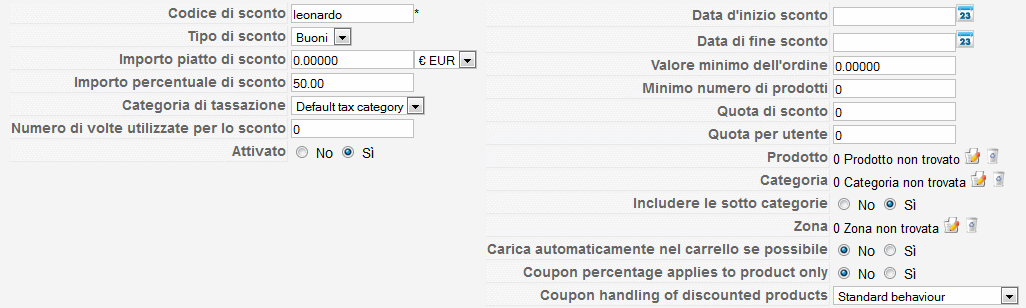
This is the coupon when no product/category is specified.
The other coupon is the same except product or category and "Coupon percentage applies to product only" set to yes.
Replied by Ciovo on topic Re: Difference from invoice and cart value with coupon
nicolas wrote: Can you do a screenshot of the options of your coupon ?
So that we can try to reproduce the problem.
This is the coupon when no product/category is specified.
The other coupon is the same except product or category and "Coupon percentage applies to product only" set to yes.
Please Log in or Create an account to join the conversation.
14 years 3 months ago #58187
by Ciovo
Replied by Ciovo on topic Re: Difference from invoice and cart value with coupon
Did you find something strange? Should I provide you more details?
Thanks!
Thanks!
Please Log in or Create an account to join the conversation.
Time to create page: 0.266 seconds