

- Posts: 42
- Thank you received: 1
Registration Form and Member Accounts Page
14 years 4 months ago #54251
by Darken
Registration Form and Member Accounts Page was created by Darken
The member registration page on my website has this default "admin" and password already inputted into the fields. How do I make it dissapear its annoying. Please see screenshot.
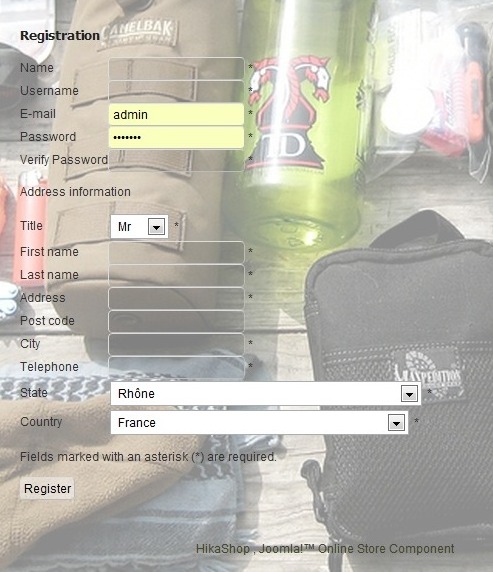
After logging in, the member goes to his accounts page and the options there are a little ugly as well. Because the text on the options are sticking together. How should I solve this? Please see screenshot. Thanks.

After logging in, the member goes to his accounts page and the options there are a little ugly as well. Because the text on the options are sticking together. How should I solve this? Please see screenshot. Thanks.
Please Log in or Create an account to join the conversation.
14 years 4 months ago #54342
by Darken
Replied by Darken on topic Re: Registration Form and Member Accounts Page
nicolas could you help me? thanks
Please Log in or Create an account to join the conversation.

14 years 4 months ago #54352
by nicolas
Replied by nicolas on topic Re: Registration Form and Member Accounts Page
The fact that the form has the username and password is normal. It's your browser which fills that automatically.
You won't have it if you try with another browser/computer and there is nothing we can do to avoid that.
For the customer account page, that's either because your browser's cache is not flushed (so try to flush it) or because you had edited the CSS before updating HikaShop. In that case, you will have to get the control panel related CSS from the default front end CSS file and add it to your custom CSS via the Display tab of the configuration.
You won't have it if you try with another browser/computer and there is nothing we can do to avoid that.
For the customer account page, that's either because your browser's cache is not flushed (so try to flush it) or because you had edited the CSS before updating HikaShop. In that case, you will have to get the control panel related CSS from the default front end CSS file and add it to your custom CSS via the Display tab of the configuration.
Please Log in or Create an account to join the conversation.
14 years 4 months ago #54366
by Darken
Replied by Darken on topic Re: Registration Form and Member Accounts Page
I have flushed my cache but the problem is still there. It must be the css affair which you mentioned.
However, I don't remember editing any css which might have caused this problem. Are you referring to one of the files in HikaShop -> Display -> Views -> Frontend? Could you point out the specific one?
Thanks.
However, I don't remember editing any css which might have caused this problem. Are you referring to one of the files in HikaShop -> Display -> Views -> Frontend? Could you point out the specific one?
Thanks.
Please Log in or Create an account to join the conversation.
14 years 4 months ago #54400
by nicolas
Replied by nicolas on topic Re: Registration Form and Member Accounts Page
No, it's in the Display tab of the configuration:
www.hikashop.com/en/support/documentatio...-config.html#display
www.hikashop.com/en/support/documentatio...-config.html#display
Please Log in or Create an account to join the conversation.
14 years 4 months ago - 14 years 4 months ago #54422
by Darken
Replied by Darken on topic Re: Registration Form and Member Accounts Page
Nicolas, I have another problem regarding visitor registration.
After someone registers for an account, he will receive a confirmation email to activate the account. I created a dummy account to test it. However, after clicking on the activation link in the email, the website says:
"Message
There is no such account in our database or the account has already been activated."
Do you know why is this happening? And, even after seeing that message, I just try to log in but failed, the website says:
"Error
Login denied! Your account has either been blocked or you have not activated it yet."
Please help. Thanks.
After someone registers for an account, he will receive a confirmation email to activate the account. I created a dummy account to test it. However, after clicking on the activation link in the email, the website says:
"Message
There is no such account in our database or the account has already been activated."
Do you know why is this happening? And, even after seeing that message, I just try to log in but failed, the website says:
"Error
Login denied! Your account has either been blocked or you have not activated it yet."
Please help. Thanks.
Last edit: 14 years 4 months ago by Darken.
Please Log in or Create an account to join the conversation.
14 years 4 months ago #54448
by nicolas
Replied by nicolas on topic Re: Registration Form and Member Accounts Page
Try to download hikashop from our website again and install it over your current version. I recall such problem with the first builds of the 1.5.8 version and we fixed that in later builds.
Please Log in or Create an account to join the conversation.
14 years 4 months ago - 14 years 4 months ago #54467
by Darken
Replied by Darken on topic Re: Registration Form and Member Accounts Page
If I reinstall Hikashop, will everything be gone? All the current inventory and customer details etc etc etc?? It will be crazy if all data is lost.
Last edit: 14 years 4 months ago by Darken.
Please Log in or Create an account to join the conversation.
14 years 4 months ago #54520
by nicolas
Replied by nicolas on topic Re: Registration Form and Member Accounts Page
No you won't loose anything. I still recommend you that you do a backup before with akeeba backup, just in case something goes wrong.
Please Log in or Create an account to join the conversation.
Less
More
- Posts: 5
- Thank you received: 0
14 years 3 months ago #58533
by Schilderij
Replied by Schilderij on topic Re: Registration Form and Member Accounts Page
I have the same problem: after registration I see the same error messages. The update section of Hikashop says I have the latest stabel version: 1.5.8
Also, how do I get rid of the opt-in? I would like people to be able to buy something without checking their e-mail address.
Also, how do I get rid of the opt-in? I would like people to be able to buy something without checking their e-mail address.
Please Log in or Create an account to join the conversation.
14 years 3 months ago #58595
by nicolas
Replied by nicolas on topic Re: Registration Form and Member Accounts Page
Please download again HikaShop on our website and install it over your current HikaShop. We made a fix for that after the release. You must have downloaded HikaShop before that.
If you don't want users to have a user account created during the checkout, you can change the option "registration" to "no registration" in the Checkout tab of the configuration.
If you don't want users to have a user account created during the checkout, you can change the option "registration" to "no registration" in the Checkout tab of the configuration.
Please Log in or Create an account to join the conversation.
Less
More
- Posts: 5
- Thank you received: 0
14 years 3 months ago #58610
by Schilderij
Replied by Schilderij on topic Re: Registration Form and Member Accounts Page
Thanks for your quick reply. I'm a little scared to re-install it. I've made quite a few alterations. Will they be saved?
I was actually thinking of buying the business edition (have the starter now - that's why I can't change the registration opt-in) later on. So, if I have to reinstall, might as well get it all done in once.
If I buy the business edition and install it, will it save all of my current work? Work I've done included:
- changing language file
- changing PHP codes via the backend
- configuration of checkout workflow
- putting in articles etc
If yes, how do I go about? Buy and then install using the extension manager as if it were a new component?
I was actually thinking of buying the business edition (have the starter now - that's why I can't change the registration opt-in) later on. So, if I have to reinstall, might as well get it all done in once.
If I buy the business edition and install it, will it save all of my current work? Work I've done included:
- changing language file
- changing PHP codes via the backend
- configuration of checkout workflow
- putting in articles etc
If yes, how do I go about? Buy and then install using the extension manager as if it were a new component?
Please Log in or Create an account to join the conversation.
14 years 3 months ago #58684
by nicolas
Replied by nicolas on topic Re: Registration Form and Member Accounts Page
If you change things as we explain you should not loose anything.
You don't say whether you change the translations via the override area or directly in the translation file. If it's directly, make sure that you save your translation file before reinstalling.
The reinstall/upgrade/update is the same as the install process. Download the package, install using the extension manager and it's done.
You don't say whether you change the translations via the override area or directly in the translation file. If it's directly, make sure that you save your translation file before reinstalling.
The reinstall/upgrade/update is the same as the install process. Download the package, install using the extension manager and it's done.
The following user(s) said Thank You: Schilderij
Please Log in or Create an account to join the conversation.
Less
More
- Posts: 5
- Thank you received: 0
14 years 3 months ago #58769
by Schilderij
Replied by Schilderij on topic Re: Registration Form and Member Accounts Page
Thanks, installation went perfect.
Please Log in or Create an account to join the conversation.
Time to create page: 0.215 seconds