

- Posts: 7
- Thank you received: 0
Categories Menu Links Problems
14 years 4 months ago #55982
by nubelr
Categories Menu Links Problems was created by nubelr
Hello,
I thought I had things figured out, but...
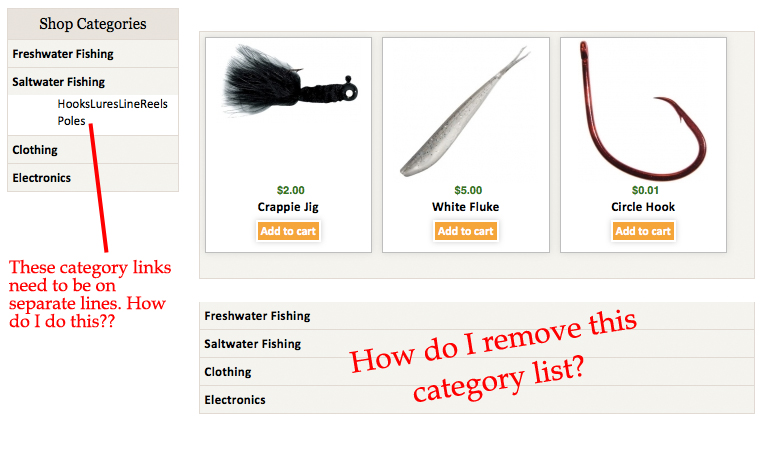
I've got a menu that lists my shop categories (using hikashop's accordian style menu)... however, there is no line break between each sub category link (the ones that are short words)... they show up on one line... see attached image. I'd like each category link listed out on it's own line.
Also, why is there a category list under the products? How do I remove this?
Thanks!
I thought I had things figured out, but...
I've got a menu that lists my shop categories (using hikashop's accordian style menu)... however, there is no line break between each sub category link (the ones that are short words)... they show up on one line... see attached image. I'd like each category link listed out on it's own line.
Also, why is there a category list under the products? How do I remove this?
Thanks!
Please Log in or Create an account to join the conversation.

Less
More
- Posts: 12953
- Thank you received: 1778
14 years 4 months ago - 14 years 4 months ago #56000
by Mohamed Thelji
Replied by Mohamed Thelji on topic Re: Categories Menu Links Problems
Hello,
I think that you'll have to go to your menu and set your "Show sub categories" to no child.
Hope this will help you.
I think that you'll have to go to your menu and set your "Show sub categories" to no child.
Hope this will help you.
Last edit: 14 years 4 months ago by Mohamed Thelji.
Please Log in or Create an account to join the conversation.

14 years 4 months ago #56006
by nicolas
Replied by nicolas on topic Re: Categories Menu Links Problems
Hi,
1. You can do like that:
www.hikashop.com/en/forum/4-how-to/41721...ry-list-display.html
2. Edit your menu via the menu Display->Content menus and disable the category listing attached to your menu in the "associated modules" option.
1. You can do like that:
www.hikashop.com/en/forum/4-how-to/41721...ry-list-display.html
2. Edit your menu via the menu Display->Content menus and disable the category listing attached to your menu in the "associated modules" option.
The following user(s) said Thank You: Mohamed Thelji
Please Log in or Create an account to join the conversation.
14 years 3 months ago #56018
by nubelr
Yes, that did the trick! Thanks!
Replied by nubelr on topic Re: Categories Menu Links Problems
nicolas wrote: Hi,
1. You can do like that:
www.hikashop.com/en/forum/4-how-to/41721...ry-list-display.html
2. Edit your menu via the menu Display->Content menus and disable the category listing attached to your menu in the "associated modules" option.
Yes, that did the trick! Thanks!
Please Log in or Create an account to join the conversation.
Time to create page: 0.169 seconds