
- Posts: 74
- Thank you received: 1
Hiding Country in Cart Registration form
- Southcoaster
-
 Topic Author
- Offline
Less
More
14 years 4 months ago #56301
by Southcoaster
Hiding Country in Cart Registration form was created by Southcoaster
I have set up my site just to have the UK as a country, as I will only be dealing with UK based customers.
By default the country shows up when registering a customer with a drop down box of 1, so I would like to get rid of the Country box from the registration.
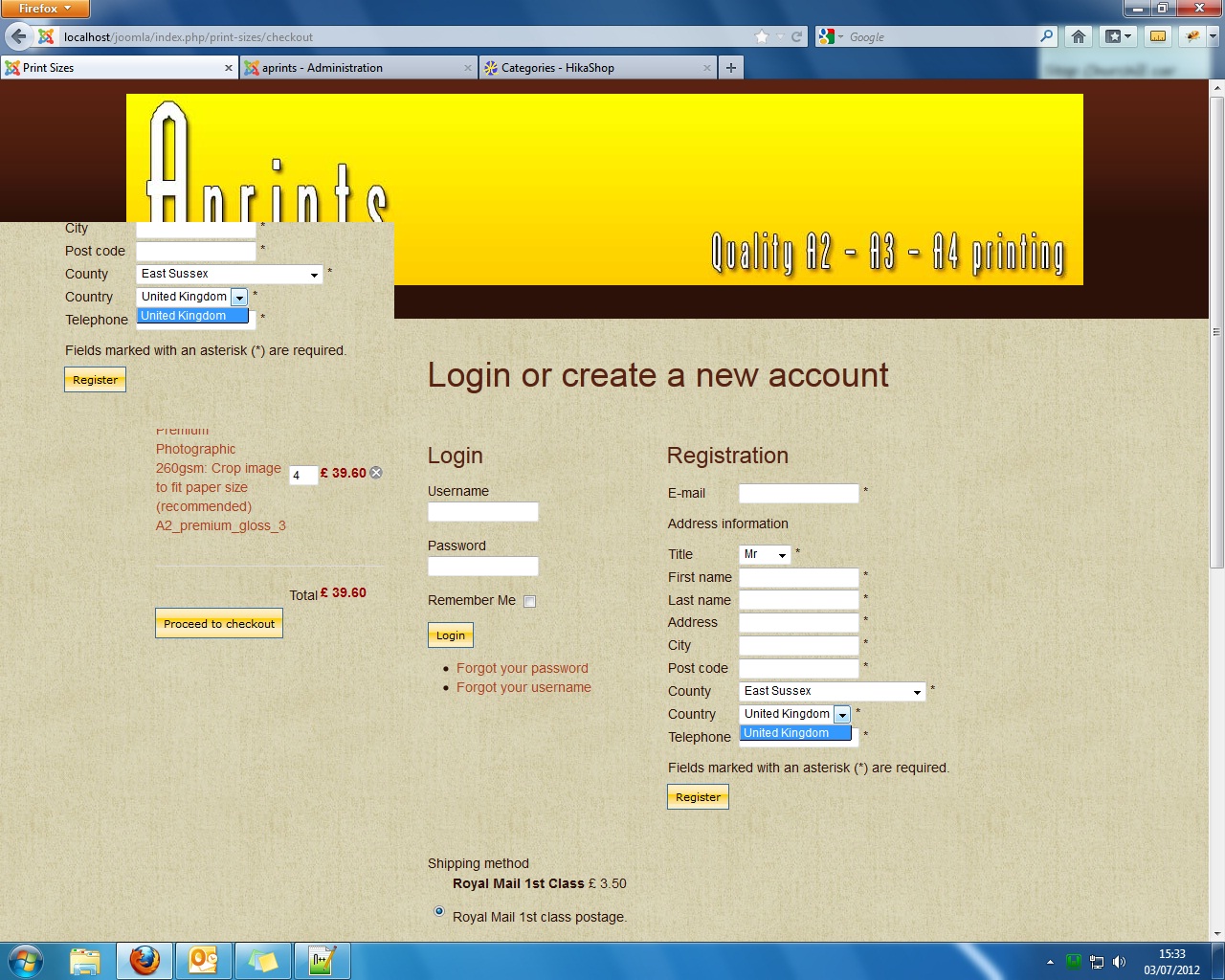
If I go into Menus/Display/Custom Fields and edit 'address_country' by selecting Published to 'No' & Required to 'No', the Country field is no longer displayed, but now my County drop down box field is now missing.
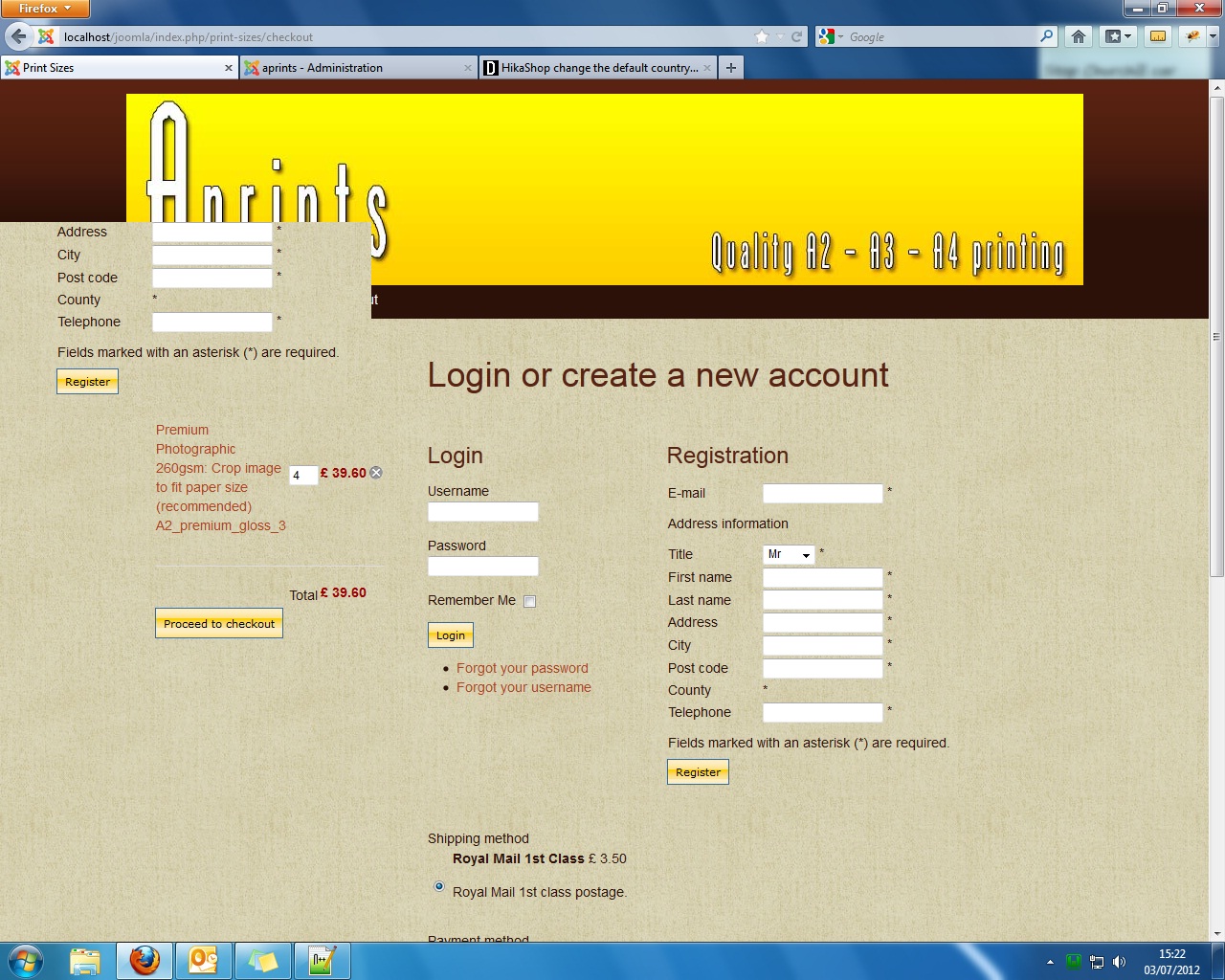
Many thanks.
By default the country shows up when registering a customer with a drop down box of 1, so I would like to get rid of the Country box from the registration.
If I go into Menus/Display/Custom Fields and edit 'address_country' by selecting Published to 'No' & Required to 'No', the Country field is no longer displayed, but now my County drop down box field is now missing.
Many thanks.
Please Log in or Create an account to join the conversation.
- Southcoaster
-
Topic Author
- Offline
Less
More
- Posts: 74
- Thank you received: 1
14 years 4 months ago #56302
by Southcoaster
Replied by Southcoaster on topic Re: Hiding Country in Cart Registration form
Apologies my screen shots should have been better above, so here goes again...
I have set up my site just to have the UK as a country, as I will only be dealing with UK based customers.
By default the country shows up when registering a customer with a drop down box of 1, so I would like to get rid of the Country box from the registration.
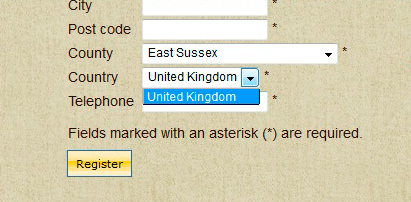
If I go into Menus/Display/Custom Fields and edit 'address_country' by selecting Published to 'No' & Required to 'No', the Country field is no longer displayed, but now my County drop down box field is now missing.
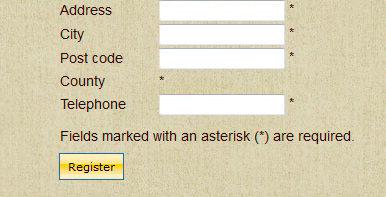
Many thanks.
I have set up my site just to have the UK as a country, as I will only be dealing with UK based customers.
By default the country shows up when registering a customer with a drop down box of 1, so I would like to get rid of the Country box from the registration.
If I go into Menus/Display/Custom Fields and edit 'address_country' by selecting Published to 'No' & Required to 'No', the Country field is no longer displayed, but now my County drop down box field is now missing.
Many thanks.
Please Log in or Create an account to join the conversation.

14 years 3 months ago #56379
by nicolas
Replied by nicolas on topic Re: Hiding Country in Cart Registration form
Hi,
You should keep the country field published. Instead, just add that CSS in the front end CSS file of HikaShop via the Display tab of the configuration in order to hide it:
#address_country{display:none;}
You should keep the country field published. Instead, just add that CSS in the front end CSS file of HikaShop via the Display tab of the configuration in order to hide it:
#address_country{display:none;}
Please Log in or Create an account to join the conversation.
- Southcoaster
-
Topic Author
- Offline
Less
More
- Posts: 74
- Thank you received: 1
14 years 3 months ago #56436
by Southcoaster
Replied by Southcoaster on topic Re: Hiding Country in Cart Registration form
Hi Nicolas,
Many thanks, we are almost there.
Is there a way of hiding the whole 'Country' line, as at the moment I get the Label plus the '*' remining.
Thanks.
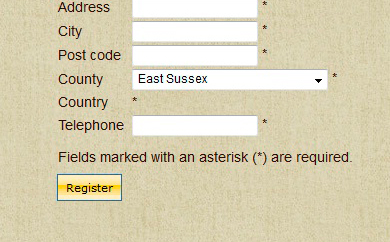
Many thanks, we are almost there.
Is there a way of hiding the whole 'Country' line, as at the moment I get the Label plus the '*' remining.
Thanks.
Please Log in or Create an account to join the conversation.
- Southcoaster
-
Topic Author
- Offline
Less
More
- Posts: 74
- Thank you received: 1
14 years 3 months ago #56437
by Southcoaster
Replied by Southcoaster on topic Re: Hiding Country in Cart Registration form
Hi Nicolas,
Actually I have just solved it, by setting the 'address_country' field, Required flag to 'No', and clearing out the Label Name.
Thanks again.
Actually I have just solved it, by setting the 'address_country' field, Required flag to 'No', and clearing out the Label Name.
Thanks again.
Please Log in or Create an account to join the conversation.
14 years 3 months ago #56442
by nicolas
Replied by nicolas on topic Re: Hiding Country in Cart Registration form
Then you should use that CSS instead :
.hikashop_registration_address_country_line{display:none;}
.hikashop_registration_address_country_line{display:none;}
Please Log in or Create an account to join the conversation.
- Southcoaster
-
Topic Author
- Offline
Less
More
- Posts: 74
- Thank you received: 1
14 years 3 months ago #56520
by Southcoaster
Replied by Southcoaster on topic Re: Hiding Country in Cart Registration form
Many thanks Nicolas,
I think I may be getting the hang of this now.
May I ask some related questions please:
Many thanks.
I think I may be getting the hang of this now.
May I ask some related questions please:
- When I first edit the 'frontend_default.css' file and save it, it creates a 'frontend_custom.css' file, and I understand the reasons for this.
- Can I make what changes I need to my 'frontend_custom.css' file anywhere in the file?
- The supplied editor in Configuration/Display is quite simple, for example it has no search facility, so is it OK to edit my 'frontend_custom.css' file directly with something like Notepad++?
- What happens during an HikaShop update, as I assume you may change the 'frontend_default.css' file, so there could be new/modified elements in the new 'frontend_default.css' file not present in my old custom file?
Many thanks.
Please Log in or Create an account to join the conversation.
14 years 3 months ago #56566
by nicolas
Replied by nicolas on topic Re: Hiding Country in Cart Registration form
2. Yes, you can change the CSS anywhere in the custom CSS file.
3. Yes, you can directly edit it with your preferred text editor.
4. That's indeed the case. You might need to copy new CSS from the new CSS file to your custom CSS file.
Otherwise, you can also add your CSS in your template's CSS file and keep the default CSS file of HikaShop. That way, you always get the new CSS of HikaShop.
But then you might loose your CSS when you update your template...
3. Yes, you can directly edit it with your preferred text editor.
4. That's indeed the case. You might need to copy new CSS from the new CSS file to your custom CSS file.
Otherwise, you can also add your CSS in your template's CSS file and keep the default CSS file of HikaShop. That way, you always get the new CSS of HikaShop.
But then you might loose your CSS when you update your template...
Please Log in or Create an account to join the conversation.
- Southcoaster
-
Topic Author
- Offline
Less
More
- Posts: 74
- Thank you received: 1
14 years 3 months ago #57279
by Southcoaster
Replied by Southcoaster on topic Re: Hiding Country in Cart Registration form
Many thanks for the information Nicolas.
Please Log in or Create an account to join the conversation.
14 years 1 month ago #66597
by simond
Replied by simond on topic Re: Hiding Country in Cart Registration form
Hi there,
i have a similar problem (need to remove the only UK dropdown menu) and County has no field/drop down.
i have been through the CSS mentioned but cannot track down the specific elements.
Any advice?
thanks
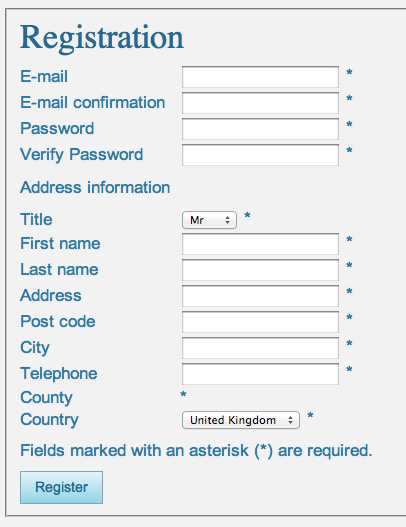
i have a similar problem (need to remove the only UK dropdown menu) and County has no field/drop down.
i have been through the CSS mentioned but cannot track down the specific elements.
Any advice?
thanks
Please Log in or Create an account to join the conversation.
14 years 1 month ago #66818
by nicolas
Replied by nicolas on topic Re: Hiding Country in Cart Registration form
You should use that CSS to remove the country:
.hikashop_registration_address_country_line{display:none;}
If the county (state) is not displayed there that two possible reasons.
One is that you unpublished/deleted all the counties (states) of UK. You should check that via the menu System->Zones.
The second one is that you have javascript errors on your page:
www.hikashop.com/en/support/documentatio...ty-issues.html#modal
.hikashop_registration_address_country_line{display:none;}
If the county (state) is not displayed there that two possible reasons.
One is that you unpublished/deleted all the counties (states) of UK. You should check that via the menu System->Zones.
The second one is that you have javascript errors on your page:
www.hikashop.com/en/support/documentatio...ty-issues.html#modal
Please Log in or Create an account to join the conversation.
13 years 2 months ago #121720
by fantomet
Replied by fantomet on topic Re: Hiding Country in Cart Registration form
Nicolas! I'm having trouble editing the width of the drop down menu for country selection, and also I'm thinking of removing it. Where can I find the CSS entry for that class: hikashop_registration_address_country_line?? I've been searching but can't find it!
Please Log in or Create an account to join the conversation.

Less
More
- Posts: 12953
- Thank you received: 1778
13 years 2 months ago #121725
by Mohamed Thelji
Replied by Mohamed Thelji on topic Hiding Country in Cart Registration form
Hi,
1. If you want to change the width of your country drop-down of your registration form, you'll have to use some CSS code like :
2. And if you want to hide your country drop-down of your registration form, some CSS code like this will probably do the job :
1. If you want to change the width of your country drop-down of your registration form, you'll have to use some CSS code like :
Code:
.hikashop_registration_address_country_line td select {
width: 100px;
}
Code:
.hikashop_registration_address_country_line {
display: none;
}
The following user(s) said Thank You: fantomet
Please Log in or Create an account to join the conversation.
Time to create page: 0.098 seconds