

- Posts: 2
- Thank you received: 0
Style css but no images and cart module no css
14 years 3 months ago - 14 years 3 months ago #57284
by aghi75
Style css but no images and cart module no css was created by aghi75
Hi!
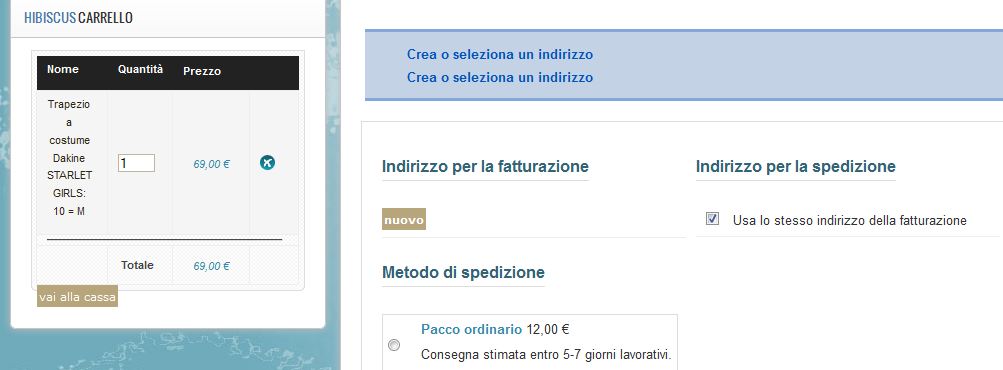
I have installed the style css correctly in the right folder but the images are not loaded..so you can see just some color change like some back grounds ...
and the strange things is that the cart module is with
the option of the joomla template and not about the css style ...you can see in attachment file images that theri not icons loaded...why?
And the cart module is with table and td ??
Please help me.
agostino
I have installed the style css correctly in the right folder but the images are not loaded..so you can see just some color change like some back grounds ...
and the strange things is that the cart module is with
the option of the joomla template and not about the css style ...you can see in attachment file images that theri not icons loaded...why?
And the cart module is with table and td ??
Please help me.
agostino
Last edit: 14 years 3 months ago by aghi75.
Please Log in or Create an account to join the conversation.

14 years 3 months ago #57362
by nicolas
Replied by nicolas on topic Re: Style css but no images and cart module no css
Hi,
Which style did you install ?
Could you give a link to that page ?
What kind of icons are you talking about ?
We need more information to help you.
And yes, the listing of products in the cart uses a table.
Which style did you install ?
Could you give a link to that page ?
What kind of icons are you talking about ?
We need more information to help you.
And yes, the listing of products in the cart uses a table.
Please Log in or Create an account to join the conversation.
14 years 3 months ago - 14 years 3 months ago #57418
by nicolas
Replied by nicolas on topic Re: Style css but no images and cart module no css
Hi,
I talked to our designer and he proposed that style file instead of the one you're using as it should help to be compatible with your template.
But since you didn't answer my questions yet, it might need a bit more tweaking for some of the points you raised.
You will need to extract the file and upload it to the media/com_hikashop/css folder over your current CSS file and then flush your browser cache.
I talked to our designer and he proposed that style file instead of the one you're using as it should help to be compatible with your template.
But since you didn't answer my questions yet, it might need a bit more tweaking for some of the points you raised.
You will need to extract the file and upload it to the media/com_hikashop/css folder over your current CSS file and then flush your browser cache.
Last edit: 14 years 3 months ago by nicolas.
Please Log in or Create an account to join the conversation.
Time to create page: 0.107 seconds